Your cart is empty.
Browse plugins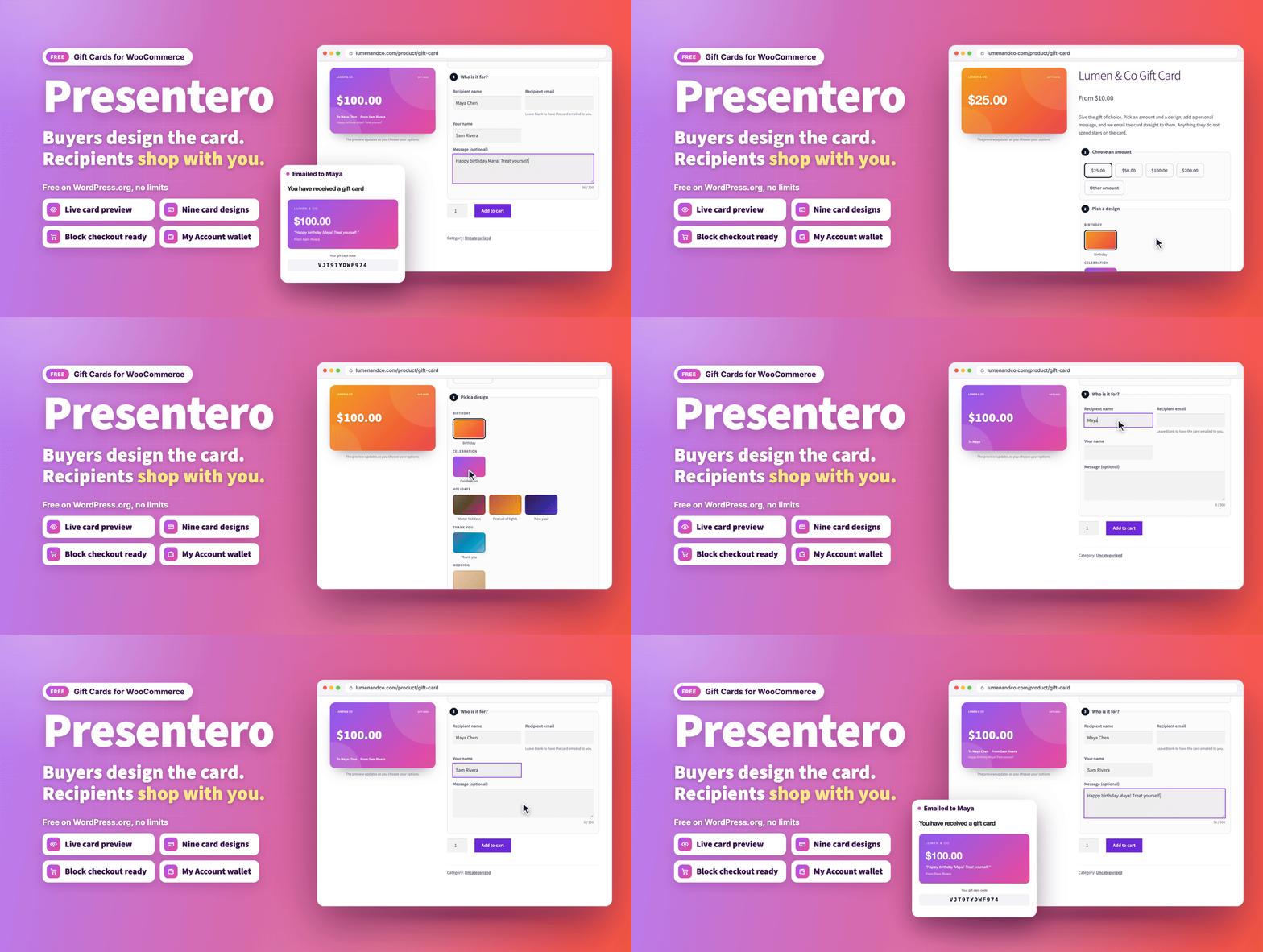
Overview
Presentero adds a Gift card product type to WooCommerce. Customers choose an amount and a design, add the recipient and a personal message, and watch the card update as they go. Once the order is paid, the card is created and emailed. The recipient enters the code at the cart or checkout and the balance is taken off the order total. Whatever is left stays on the card for next time.
What's new in 1.3.1 (October 21, 2026)
- Codes typed any way. GIFT7KQ2M9XA3HPD, gift 7kq2 m9xa 3hpd and GIFT-7KQ2-M9XA-3HPD all find the same card, through a fast indexed lookup.
- Made for edge caching. The gift card fields, balance checker, wallet buttons and gift card product form keep working on pages cached by your site or Cloudflare for any length of time.
- Real visitor addresses. "Visitor IP address" (Settings, Redeeming) counts wrong codes per real shopper behind Cloudflare and your own proxies, and visitors can't fake their address.
- Buy now, pay later stays off gift cards. On by default (Settings, Selling): Afterpay and Clearpay in Stripe and PayPal Pay Later are not offered while a gift card is being bought. Cards and the PayPal button stay.
- Wallet reminder follows your settings. On the classic cart and checkout it follows the Cart page and Checkout page switches, as in the blocks.
Earlier releases are listed in the changelog at the end of this page.
Selling gift cards
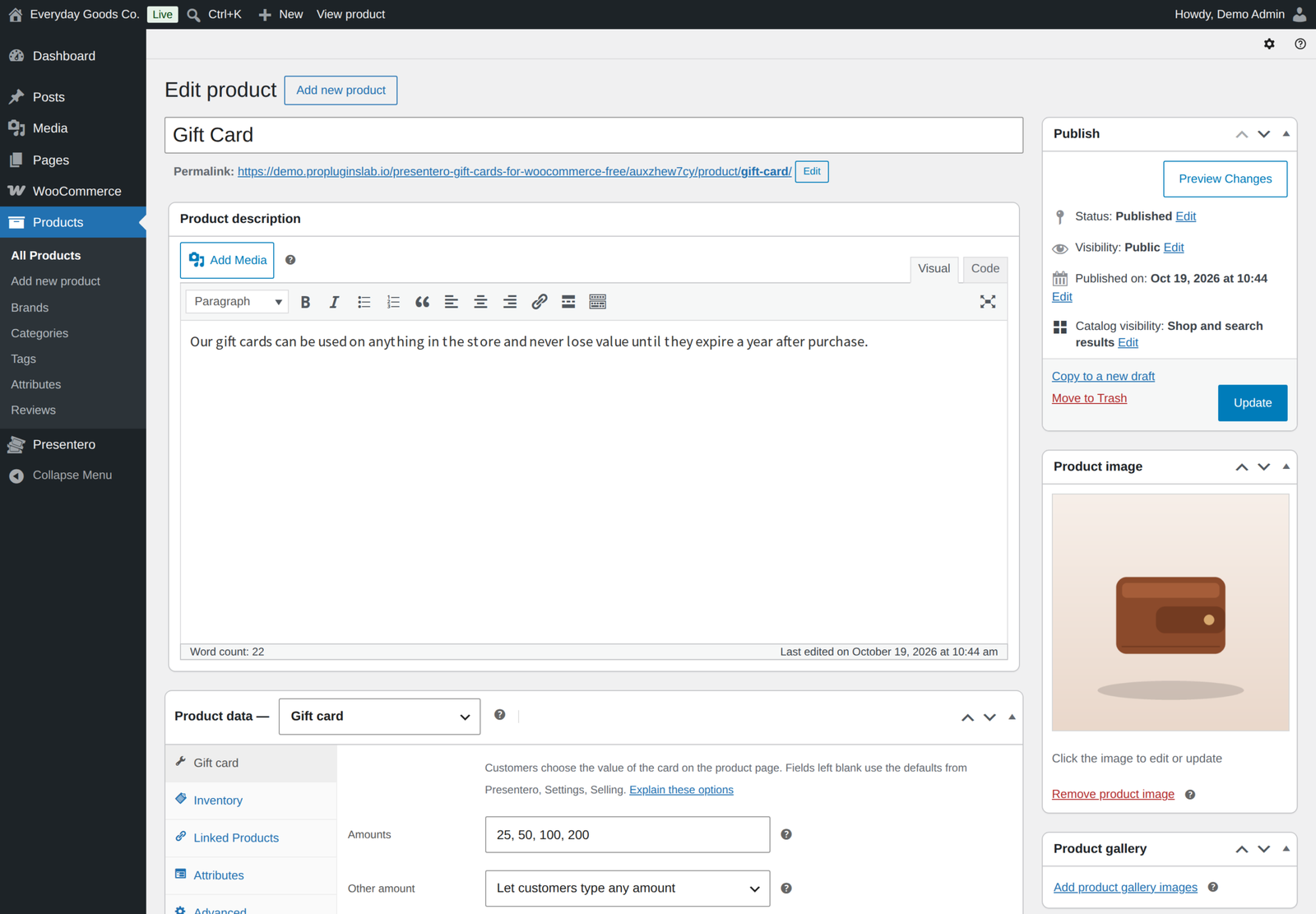
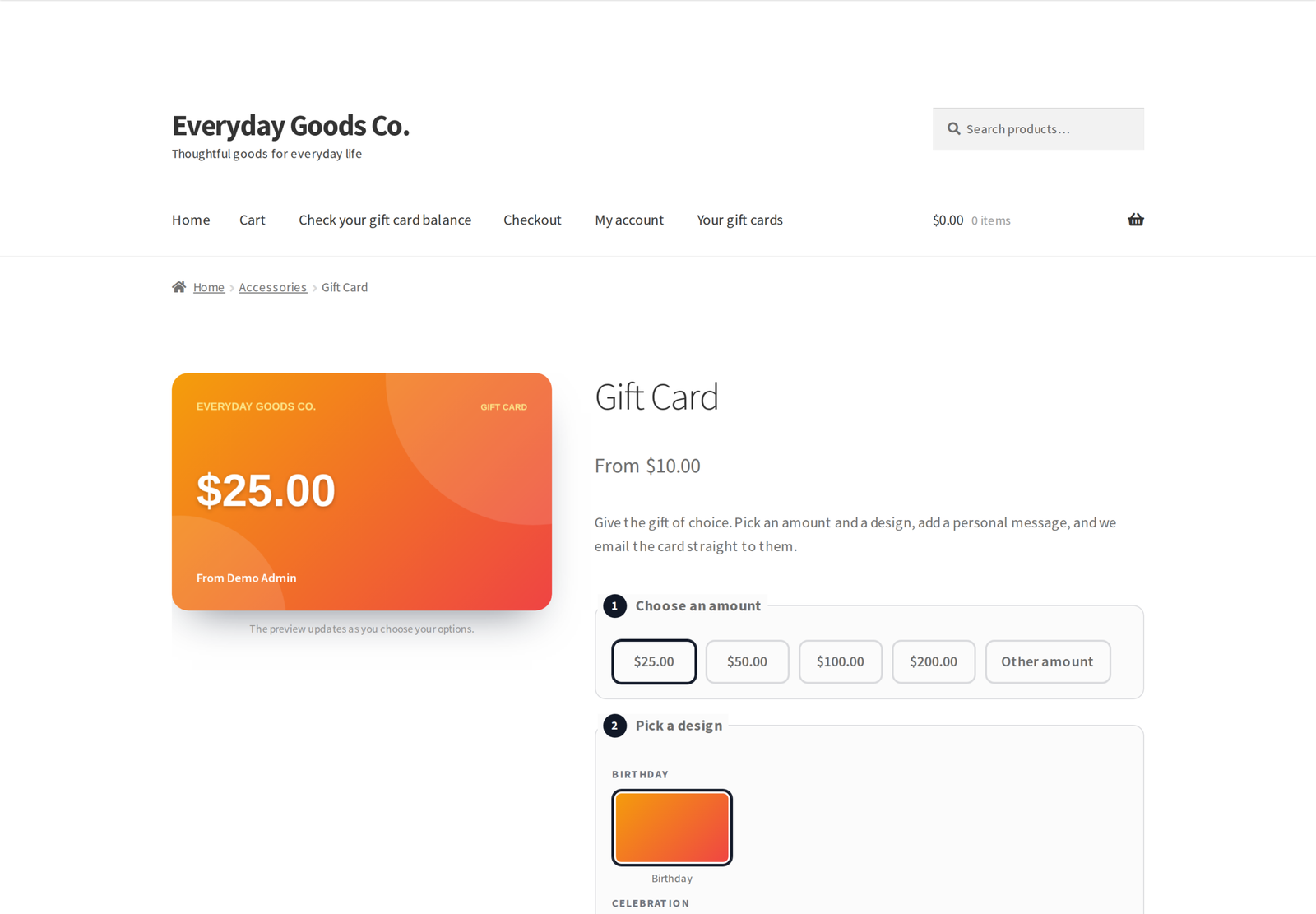
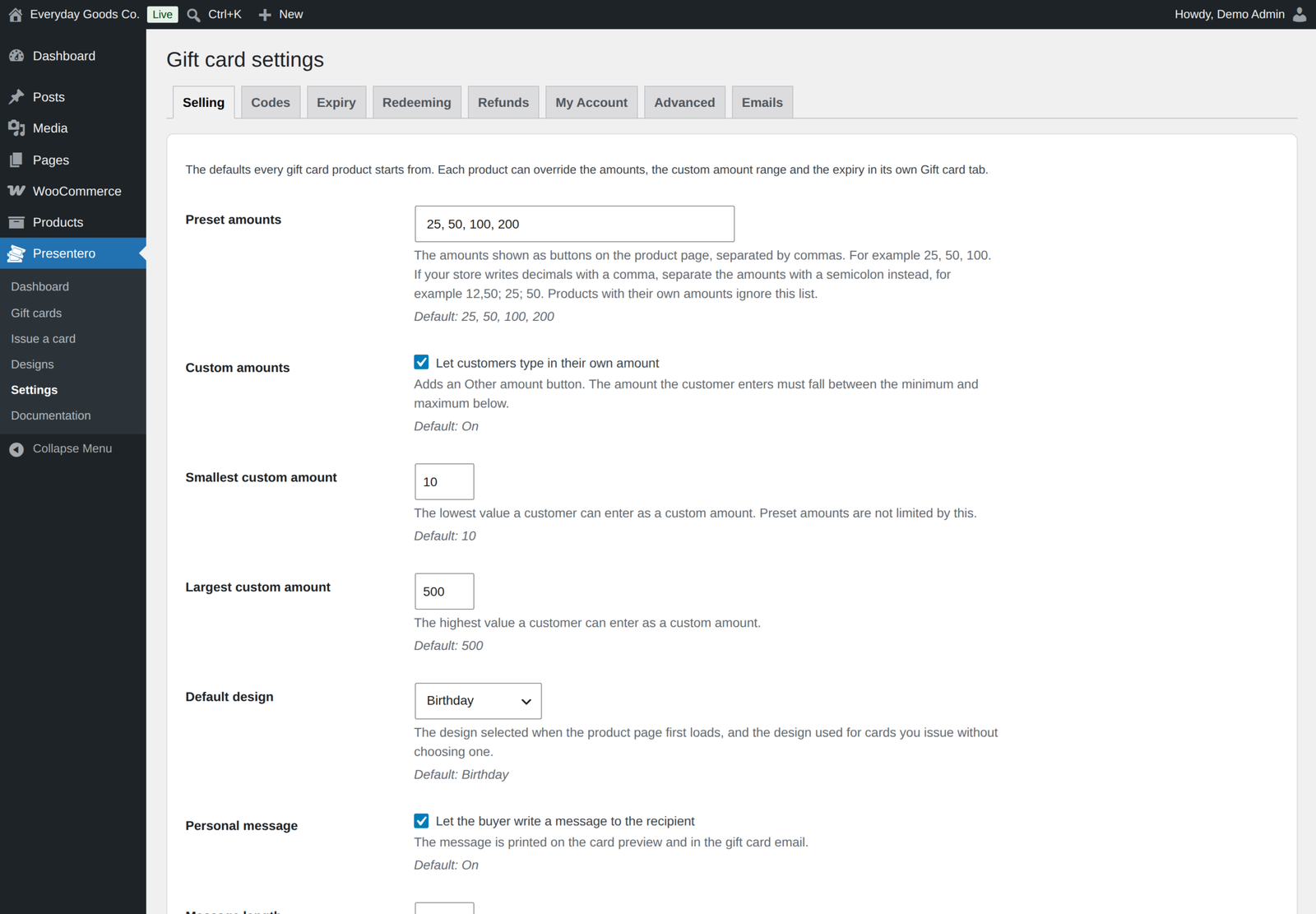
- A Gift card product type with preset amounts and an optional Other amount field with a minimum and maximum.
- A live preview that replaces the product images and redraws as the customer chooses the amount, design, names and message.
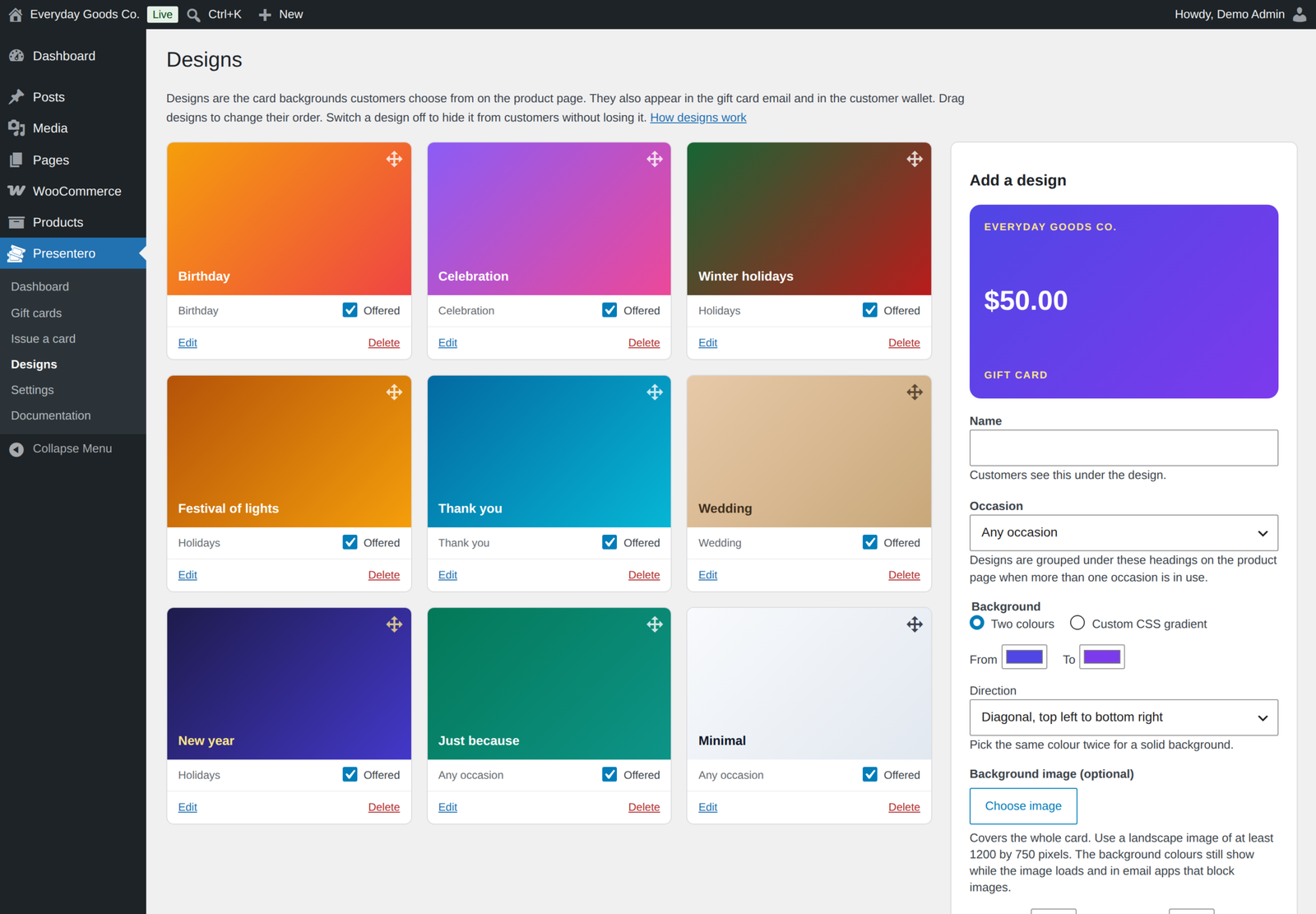
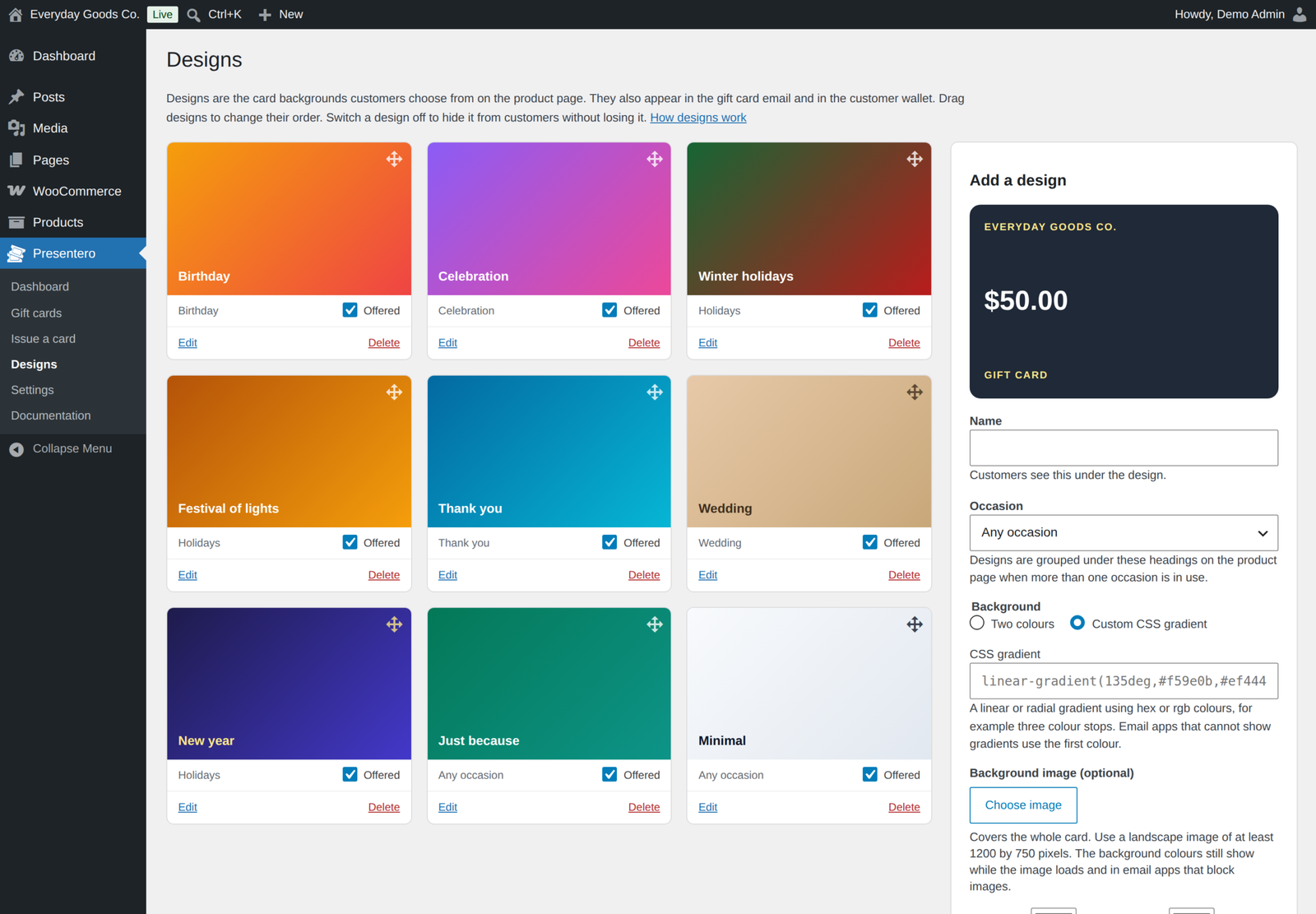
- Nine starter designs, and a designs screen to add your own with two colour gradients, custom CSS gradients or background images.
- Limit which designs each product offers.
- Recipient name and email, sender name and a personal message with a length limit.
- Leave the recipient email blank to have the card emailed to the buyer, ready to print or forward.
- Buy several cards at once, each with its own code.
- Per product amounts, custom amount range and validity.
Delivery
- Cards are created when the order is paid, or when it is completed if you prefer to review orders first.
- A WooCommerce email shows the card in its design with the code, value and expiry date. Change the subject, heading and text under WooCommerce, Settings, Emails.
- Optionally send the buyer a hidden copy of the gift card email.
- Send any card again at any time, to the same or a new address.
Redeeming
- Works on the classic cart and checkout and on the cart and checkout blocks.
- A gift card works like a payment: it is taken off the final total after tax, so your tax figures stay correct.
- With WooCommerce PayPal Payments, the PayPal buttons charge only what is left after the gift card.
- On stores that sell in more than one currency, each card pays only in the currency it was issued in.
- Use several cards on one order, or limit orders to one card.
- Choose whether cards can pay for shipping, and whether they can pay for other gift cards.
- Optionally require customers to log in before using a card.
- Protection against people guessing codes: wrong attempts are counted and the visitor has to wait after too many.
- The balance is taken in a single database step when the order is placed, so the same money can never be spent twice.
- Balances go back on the card automatically when an order is cancelled, fully refunded or its payment fails.
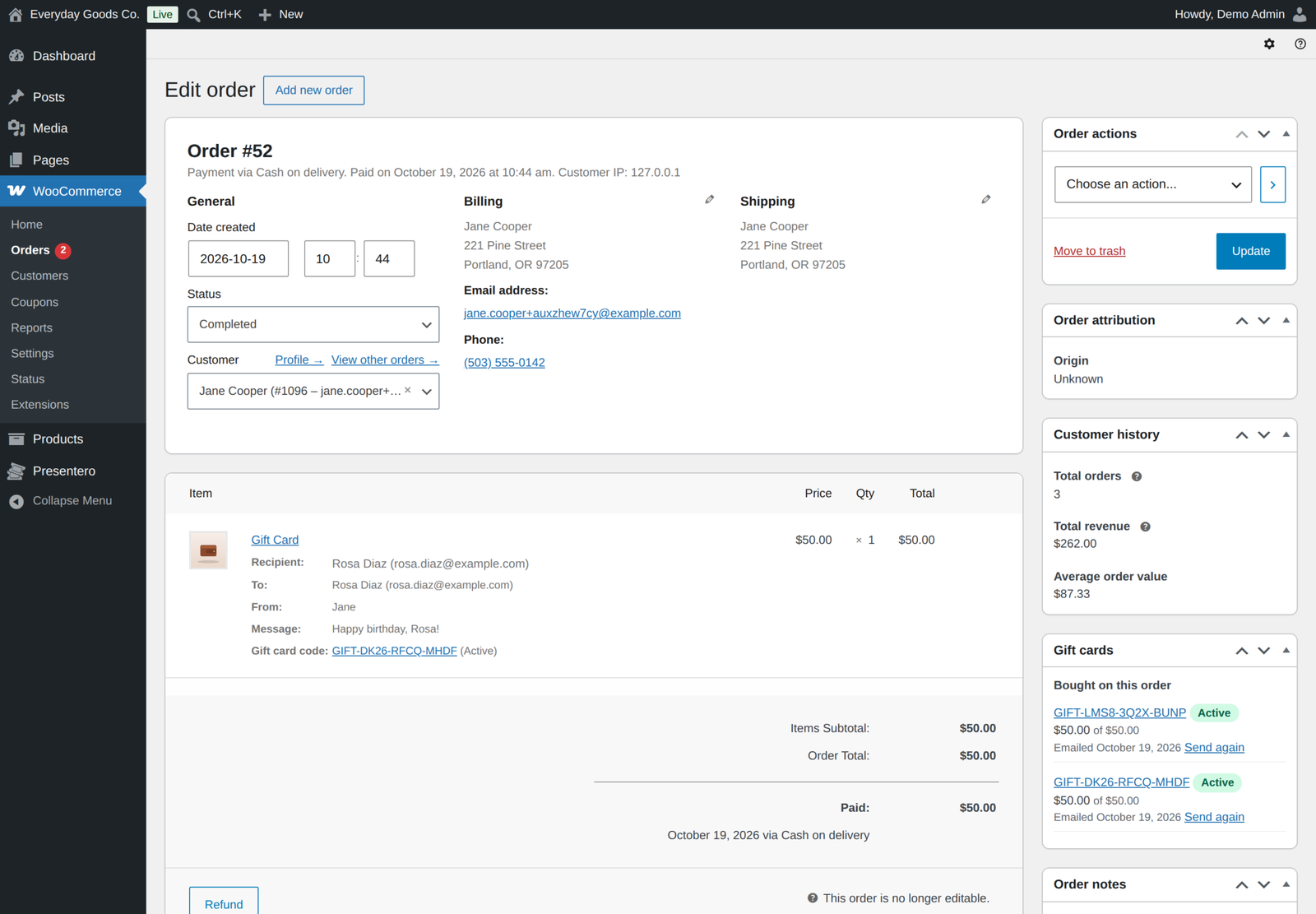
- Refund to card in the Gift cards box on the order screen gives back part or all of a gift card payment.
- Store coupons never discount gift card products unless you allow it, so balance is never sold for less than it is worth.
- Optionally show the balance left on each card next to its payment on the order received page, in My Account orders and in order emails.
- Cards bought on an order that is later refunded can be disabled automatically, including when only some gift card lines are refunded.
For customers
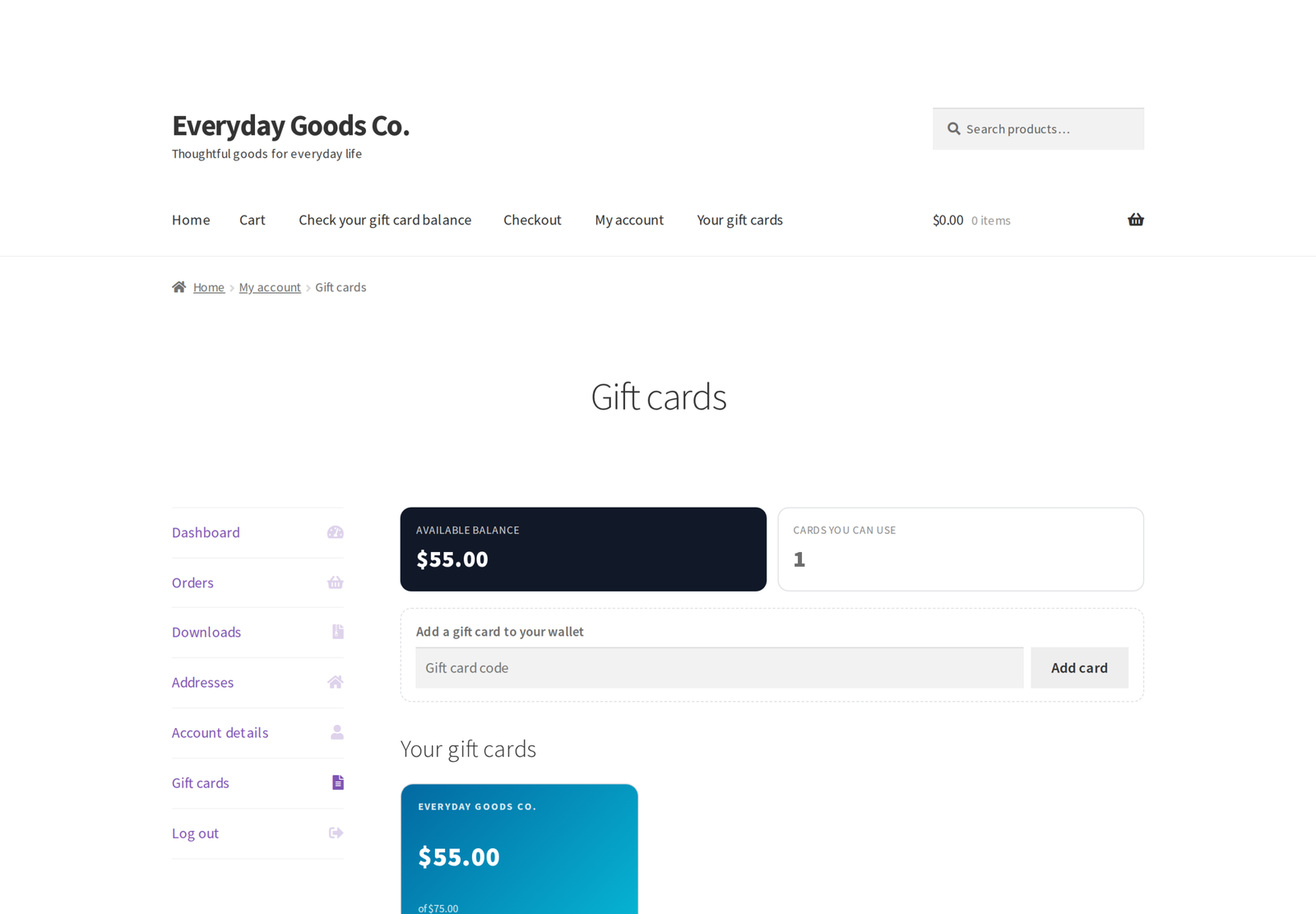
- A Gift cards page in My Account shows every card in the wallet with its balance, code, expiry date and history, plus the cards they sent to other people.
- Customers add a card to their wallet by entering its code. Email addresses alone never put a card in a wallet.
- Logged-in customers are reminded of their wallet balance at the cart and checkout, with a one-click Use button.
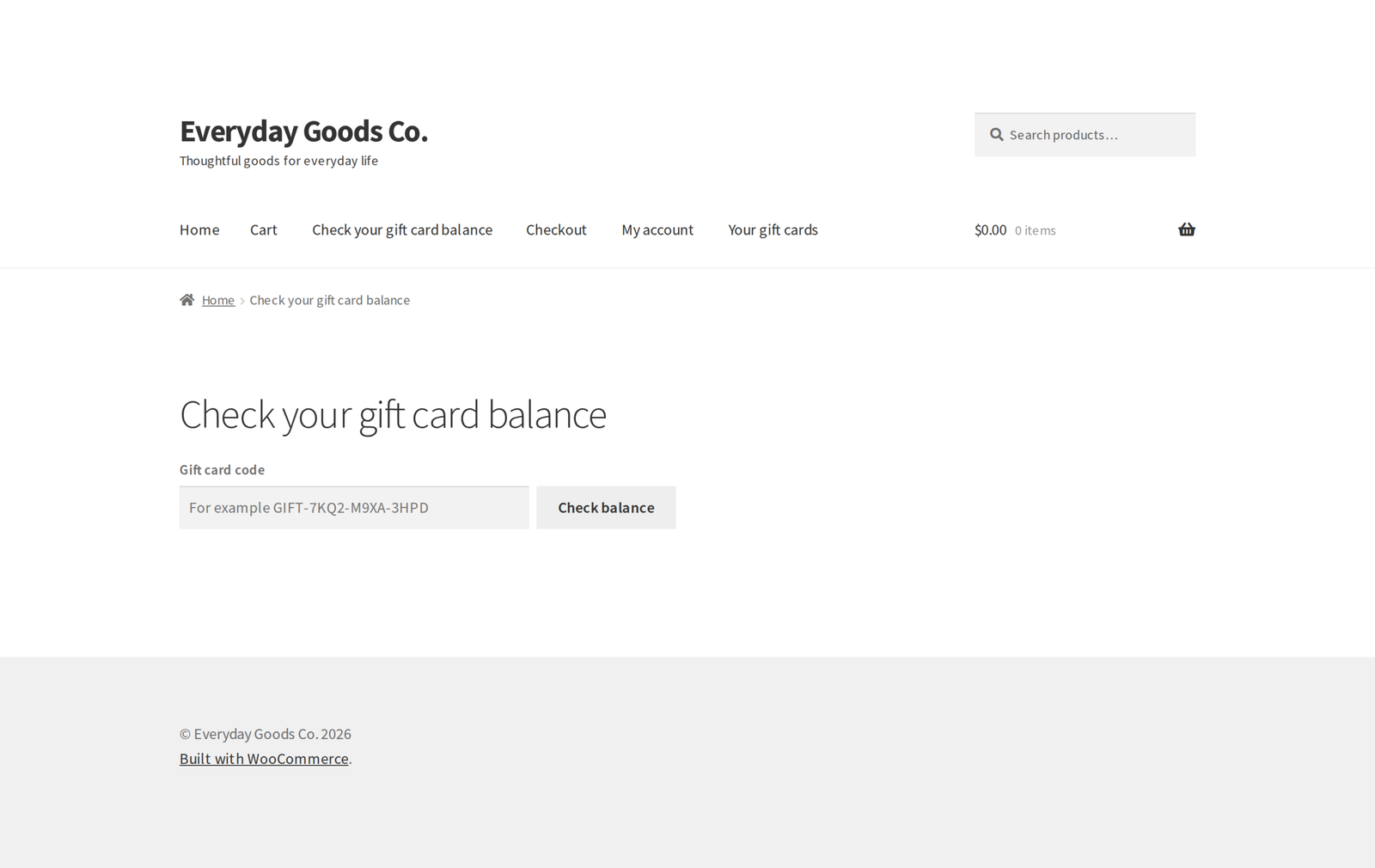
- A balance checker for any page, as the [[presentero_balance]] shortcode or the Gift card balance block.
- The wallet on any page, as the [[presentero_wallet]] shortcode or the Gift card wallet block.
- Every amount shows in the card's own currency, and wallet totals are kept apart per currency.
For you
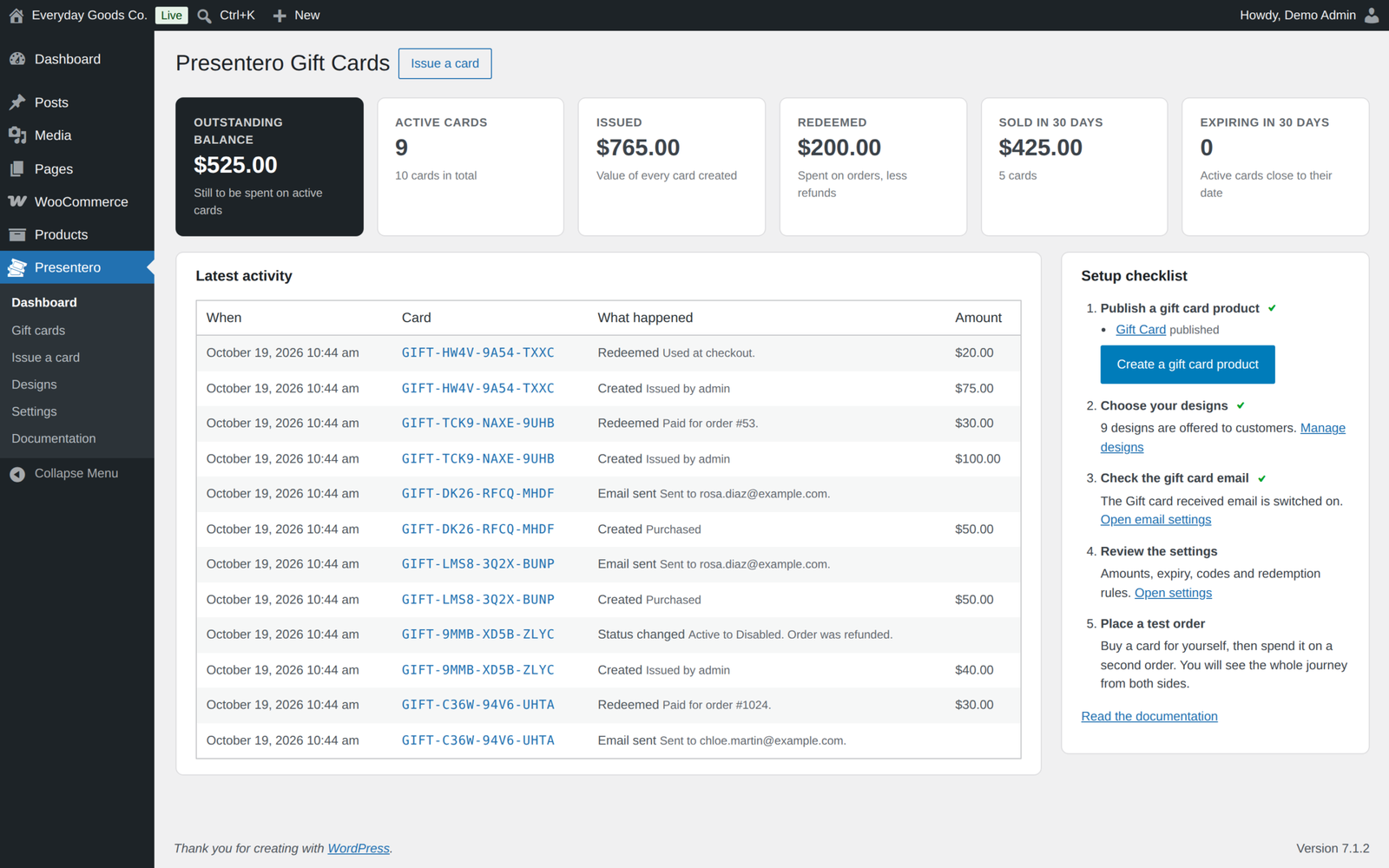
- A dashboard with the outstanding balance, cards issued, redeemed and sold, cards close to expiry, a setup checklist and the latest activity, with each currency shown on its own.
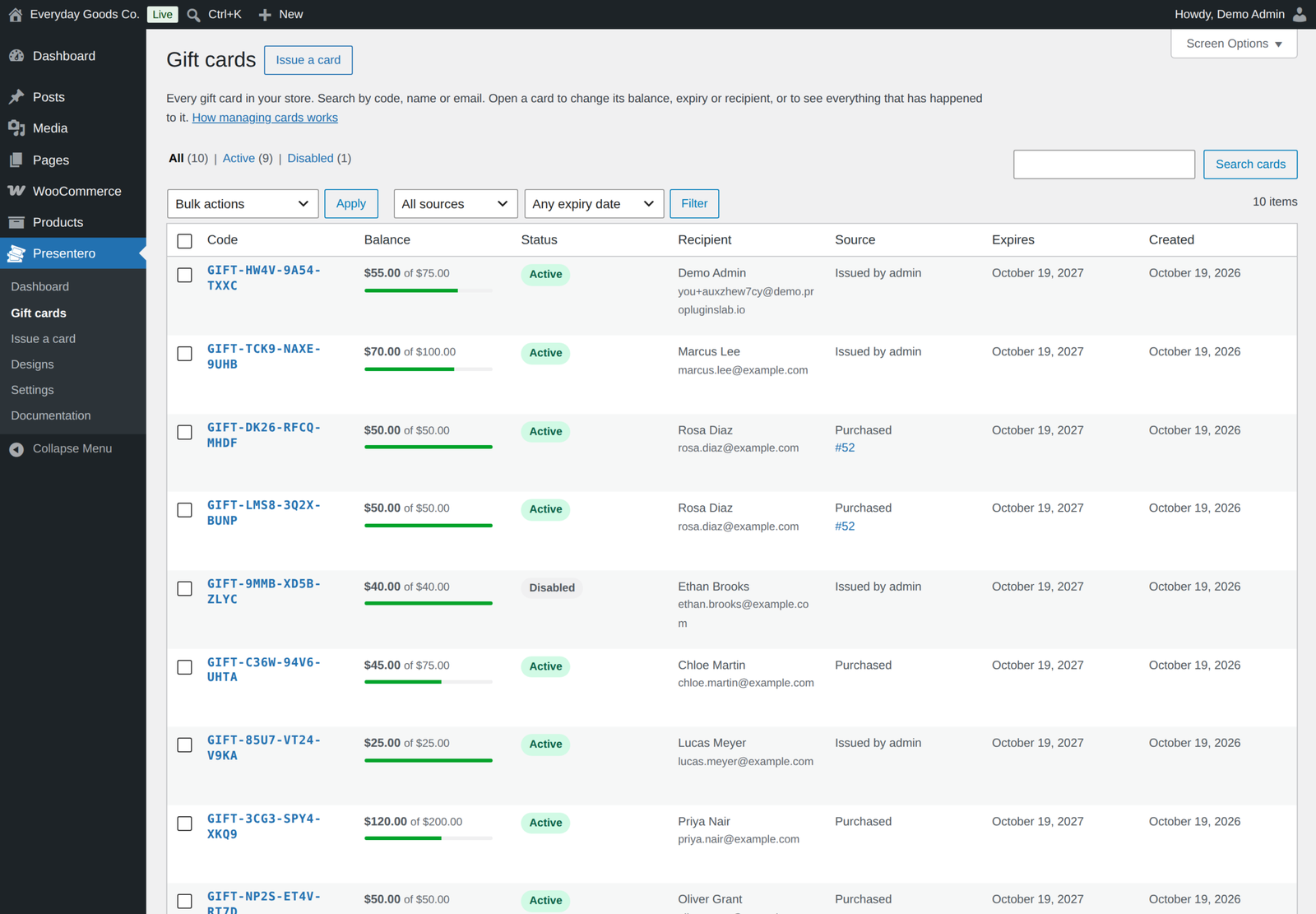
- A gift card list with search, status, source and expiry filters and bulk actions. See which active cards expire in the next 7, 30 or 90 days.
- A screen for each card to change its balance with a reason, its expiry date, recipient, message, design and status, with a full history of everything that happened to it.
- Issue cards by hand for prizes, goodwill or store credit.
- A Gift cards box on the order screen with Refund to card, and gift card payments shown in order totals, emails and My Account.
- Code settings for the prefix, length, characters and grouping.
- Personal data export and erase through the WordPress privacy tools.
- Built-in documentation that explains every screen and every option.
External services
This plugin does not connect to any external service. It makes no remote requests and sends no data anywhere. Gift card emails are sent through WooCommerce using your own mail setup.
Presentero Pro
This free plugin is complete on its own. A separate Pro edition includes everything here and adds physical gift cards, scheduled delivery, up to 10 recipients per purchase, customer photo designs, PDF gift cards with a QR code, a Redeem screen for in store payments, PIN protection, expiry reminders, WooCommerce Subscriptions renewals, automations, bulk generation with every batch kept, import and export, reports per currency and a REST API.
While Pro is active, the free edition stays idle and the Plugins screen asks you to deactivate it. Pro uses the same cards, designs and settings, so nothing needs to be moved.
Requirements
- WordPress 6.5 or newer, tested up to 7.1
- WooCommerce 8.0 or newer, tested up to 11.2.1
- PHP 7.4 or newer
- High Performance Order Storage and the Cart and Checkout blocks are supported
Changelog
Every release, newest first, with the date it came out.
Version 1.3.1 (October 21, 2026)
- New: Visitor IP address setting (Settings, Redeeming). Detect automatically, the default, counts wrong codes by the real visitor address behind Cloudflare and behind load balancers or proxies on your own network, and accepts a forwarded address only from Cloudflare's published addresses or your own network. Server address only and Cloudflare are offered for other setups.
- New: Buy now, pay later setting (Settings, Selling), on by default. While the cart holds a gift card product, on gift card product pages and on the pay page of an order with a gift card, Afterpay and Clearpay in WooCommerce Stripe and Pay Later in WooCommerce PayPal Payments, with its messages, are not offered. Cards, the PayPal button and every other payment method stay.
- Improved: codes can be typed in any letter case, with or without their dashes and with spaces between the groups. GIFT7KQ2M9XA3HPD and gift 7kq2 m9xa 3hpd find GIFT-7KQ2-M9XA-3HPD, through an indexed lookup. Existing and imported codes work in every form.
- Improved: the gift card fields, the balance checker, the wallet Use buttons and the gift card product form work on pages kept in a page cache or a Cloudflare edge cache for any length of time. A page older than its security token fetches a current one with a small request that is never cached, and the balance checker answers without one.
- Improved: the wallet reminder on the classic cart and checkout follows the Cart page and Checkout page settings, as it does in the blocks.
- Improved: the Characters help text says which characters each choice uses.
- Improved: settings are read safely while WordPress is still working out the current user.
- New for developers: Presentero_GC_Cart::apply_code() takes 'count_failures' => false for fields that accept promo codes and gift card codes together, and the presentero_gc_cloudflare_ranges, presentero_gc_hide_pay_later and presentero_gc_pay_later_gift_card_involved filters. presentero_gc_client_ip also receives REMOTE_ADDR.
Version 1.3.0 (October 17, 2026)
- New: Coupons setting (Settings, Selling). Store coupons no longer discount gift card products unless you switch it on, so a 20% coupon can no longer buy a 100 card for 80. The rest of the cart is still discounted, and a coupon on a cart of gift cards only is refused with a message.
- New: Refund to card in the Gift cards box of the order screen gives back part or all of what an order paid with a gift card, including orders paid fully by gift card.
- Fix: refunding some gift card lines of an order disables that many of its cards, unused ones first, when Disable refunded cards is on.
- Fix: card amounts in emails, the wallet, the balance checker and the admin show the card's own currency, and wallet totals and the dashboard never add different currencies together.
- Fix: preset amounts work on stores that write decimals with a comma. Separate amounts with a semicolon there, such as 12,50; 25.
- Improved: photo and image designs in the gift card email are shown as an image, which Outlook and other email programs display.
- Improved: the gift card field shows in the Cart and Checkout block editor preview.
Version 1.2.1 (October 17, 2026)
- Fix: WooCommerce PayPal Payments now charges the amount left after gift cards. The smart buttons on the cart, the express checkouts and shipping changes inside the PayPal window asked for the full amount before.
- Fix: a gift card pays only in the currency it was issued in. On a store that sells in more than one currency, a card in another currency is refused with a clear message, and is removed from a cart whose currency changes. Developers can change this with the presentero_gc_card_accepts_currency and presentero_gc_currency_mismatch_message filters.
- Fix: when a payment fails, the balance the order took is given back to the card, as for a cancelled order (Settings, Refunds, Return spent balance). Paying the order again, at checkout, on the pay page or by a late payment, takes the balance again, and a later cancellation or refund never gives it back twice.
Show earlier versions (1.0.0 to 1.2.0)
Version 1.2.0 (October 15, 2026)
- New: an expiry filter on the gift card list shows the active cards that expire within the next 7, 30 or 90 days. The Expiring in 30 days figure on the dashboard links straight to that list.
- Security hardening: wrong code attempts by logged in customers now also count against their IP address, adding a card to a wallet is a single database step so only one account can claim it, and generated codes always keep at least 40 bits of randomness whatever the code settings.
- When the Pro edition is active, the free edition now stays idle and the Plugins screen asks you to deactivate it, instead of switching itself off.
- The Pro banner shows only to users who can install plugins, and once dismissed it stays hidden. The privacy eraser stops cleanly when a page changes nothing.
- Uninstalling with Remove data on delete also removes the gift card email settings and the cards per page screen option.
- Tested with WordPress 7.1.3 and WooCommerce 11.2.1.
Version 1.1.0 (September 22, 2026)
- New: optionally show the balance left on each gift card next to its payment on the order received page, in My Account orders and in order emails. Switch it on under Settings, Redeeming, Balance on orders. Off by default.
- Links moved to propluginslab.io.
- Added Pro upgrade banner on plugin screens. It shows only on the Presentero screens and can be dismissed.
- Tested with WordPress 7.1.1 and WooCommerce 11.1.1.
Version 1.0.0 (September 17, 2026)
- First release.
Details
At a glance
- Last updated
- October 22, 2026
- Type
- Free plugin
Share
You might also like
 Pro
Affireo Affiliates for WooCommerce
Run a complete WooCommerce affiliate program from one plugin. Track referrals, pay per product and tiered commissions, stop fraud and schedule payouts.
From $49.00 One-time
Live demo-
Free
Storefold Multivendor Marketplace for WooCommerce Free
Turn WooCommerce into a multivendor marketplace with vendor stores, split orders, commissions and payouts. Sellers apply, you approve them, and customers pay once.
Free
Live demo -
Free
Anticipo Pre-Orders for WooCommerce Free
Sell products before they exist in WooCommerce. Take pre-orders, hold each order until launch day, then release it automatically.
Free
Live demo