Your cart is empty.
Browse plugins
Overview
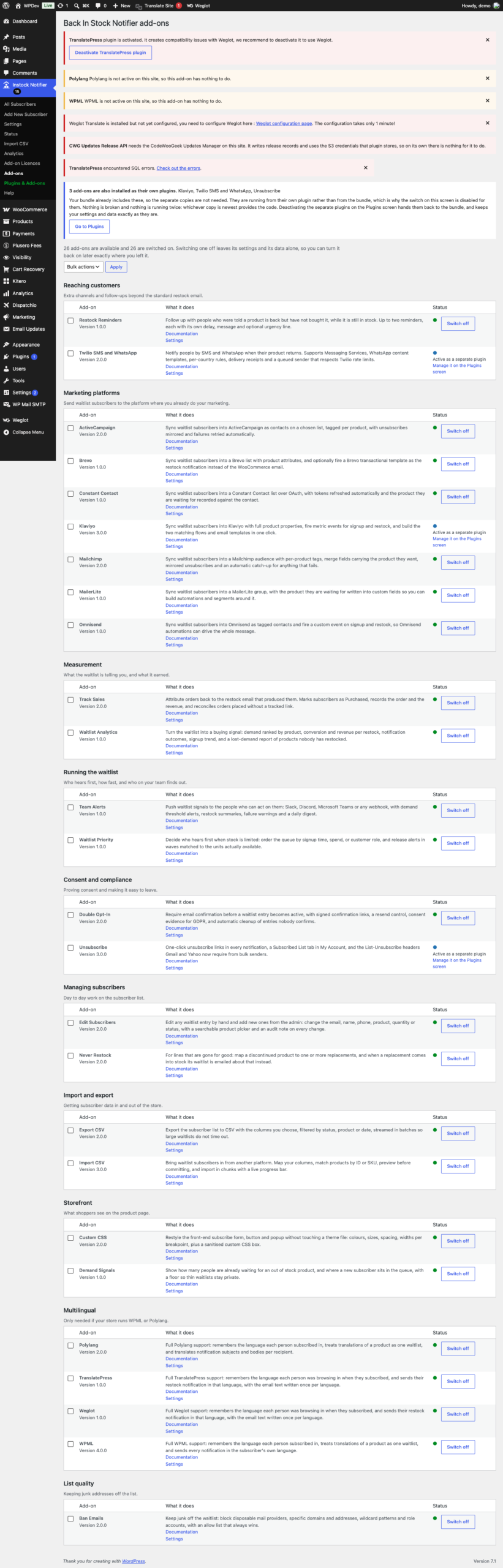
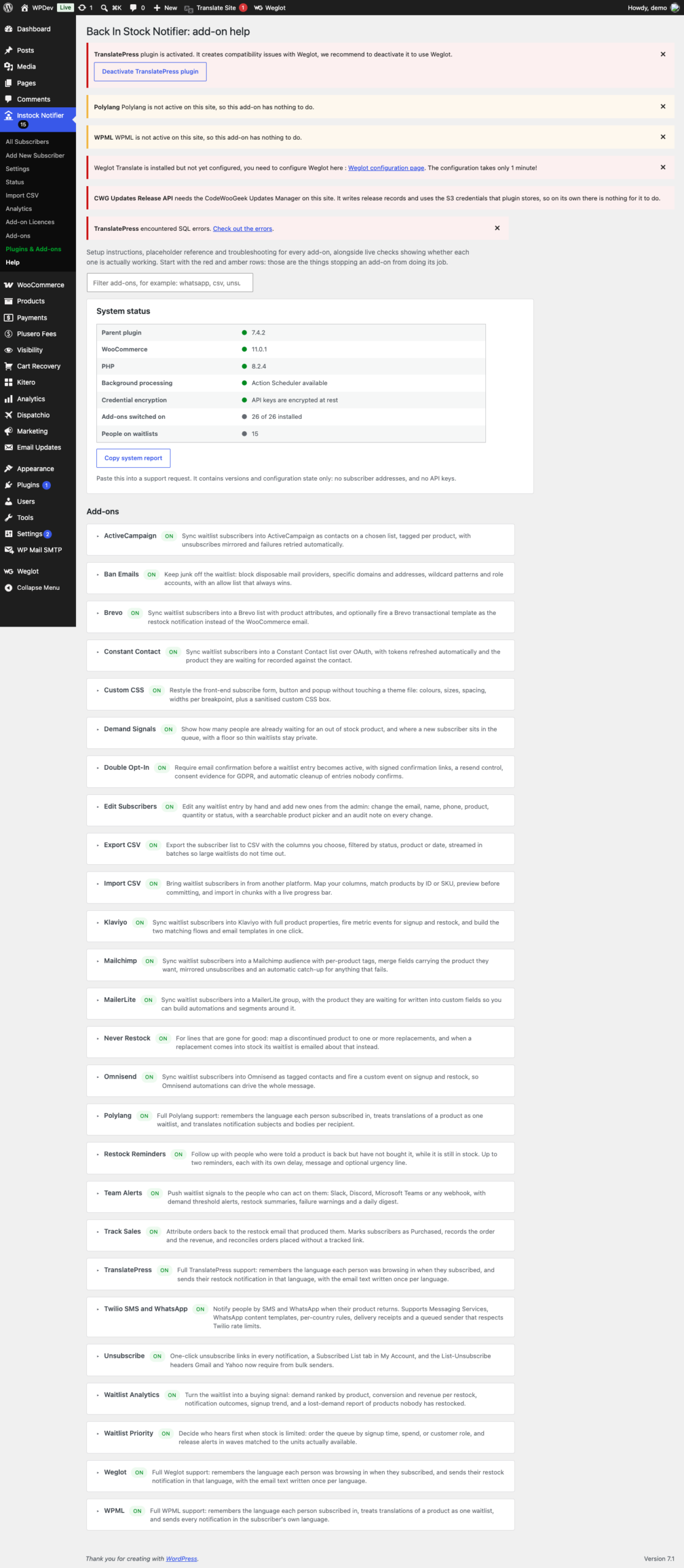
All 26 add-ons + future add-ons for Back In Stock Notifier, in one plugin, for one price and one licence key. Switch each add-on on or off from a single screen, and pay once rather than 26 times.
What is inside
Marketing platforms (7)
- ActiveCampaign Sync waitlist subscribers into ActiveCampaign as contacts on a chosen list, tagged per product, with unsubscribes mirrored and failures retried automatically.
- Brevo Sync waitlist subscribers into a Brevo list with product attributes, and optionally fire a Brevo transactional template as the restock notification instead of the WooCommerce email.
- Constant Contact Sync waitlist subscribers into a Constant Contact list over OAuth, with tokens refreshed automatically and the product they are waiting for recorded against the contact.
- Klaviyo Sync waitlist subscribers into Klaviyo with full product properties, fire metric events for signup and restock, and build the two matching flows and email templates in one click.
- Mailchimp Sync waitlist subscribers into a Mailchimp audience with per-product tags, merge fields carrying the product they want, mirrored unsubscribes and an automatic catch-up for anything that fails.
- MailerLite Sync waitlist subscribers into a MailerLite group, with the product they are waiting for written into custom fields so you can build automations and segments around it.
- Omnisend Sync waitlist subscribers into Omnisend as tagged contacts and fire a custom event on signup and restock, so Omnisend automations can drive the whole message.
Reaching customers another way (2)
- Restock Reminders Follow up with people who were told a product is back but have not bought it, while it is still in stock.
- Twilio SMS and WhatsApp Notify people by SMS and WhatsApp when their product returns.
Selling in more than one language (4)
- Polylang Full Polylang support: remembers the language each person subscribed in, treats translations of a product as one waitlist, and translates notification subjects and bodies per recipient.
- TranslatePress Full TranslatePress support: remembers the language each person was browsing in when they subscribed, and sends their restock notification in that language, with the email text written once per language.
- Weglot Full Weglot support: remembers the language each person was browsing in when they subscribed, and sends their restock notification in that language, with the email text written once per language.
- WPML Full WPML support: remembers the language each person subscribed in, treats translations of a product as one waitlist, and sends every notification in the subscriber’s own language.
Knowing what the waitlist is worth (2)
- Track Sales Attribute orders back to the restock email that produced them.
- Waitlist Analytics Turn the waitlist into a buying signal: demand ranked by product, conversion and revenue per restock, notification outcomes, signup trend, and a lost-demand report of products nobody has restocked.
How it looks to shoppers (2)
- Custom CSS Restyle the front-end subscribe form, button and popup without touching a theme file: colours, sizes, spacing, widths per breakpoint, plus a sanitised custom CSS box.
- Demand Signals Show how many people are already waiting for an out of stock product, and where a new subscriber sits in the queue, with a floor so thin waitlists stay private.
Consent and unsubscribes (2)
- Double Opt-In Require email confirmation before a waitlist entry becomes active, with signed confirmation links, a resend control, consent evidence for GDPR, and automatic cleanup of entries nobody confirms.
- Unsubscribe One-click unsubscribe links in every notification, a Subscribed List tab in My Account, and the List-Unsubscribe headers Gmail and Yahoo now require from bulk senders.
Getting data in and out (2)
- Export CSV Export the subscriber list to CSV with the columns you choose, filtered by status, product or date, streamed in batches so large waitlists do not time out.
- Import CSV Bring waitlist subscribers in from another platform.
Working with subscribers (2)
- Edit Subscribers Edit any waitlist entry by hand and add new ones from the admin: change the email, name, phone, product, quantity or status, with a searchable product picker and an audit note on every change.
- Never Restock For lines that are gone for good: map a discontinued product to one or more replacements, and when a replacement comes into stock its waitlist is emailed about that instead.
Running the shop (2)
- Team Alerts Push waitlist signals to the people who can act on them: Slack, Discord, Microsoft Teams or any webhook, with demand threshold alerts, restock summaries, failure warnings and a daily digest.
- Waitlist Priority Decide who hears first when stock is limited: order the queue by signup time, spend, or customer role, and release alerts in waves matched to the units actually available.
Keeping the list clean (1)
- Ban Emails Keep junk off the waitlist: block disposable mail providers, specific domains and addresses, wildcard patterns and role accounts, with an allow list that always wins.
How the bundle works
- The bundle is not a different edition of the software. Each of the 26 add-ons inside it is the same code as the add-on sold on its own, so nothing behaves differently because it arrived in the bundle, and moving between the two is not a migration.
- Switching an add-on off leaves its settings and its data alone. Turn it back on a month later and it is exactly where you left it, which makes it safe to try something on a live shop.
- One licence key covers everything, including add-ons released after you buy. There is no per add-on key to track and no second purchase when the catalogue grows.
- If you already own an add-on as a separate plugin, it keeps working. The bundle notices, tells you it is running from there, and stays out of its way rather than competing with it.
- Every add-on carries its own documentation beside its settings, along with a diagnostics panel that reports what it is actually doing. Most support questions are answered on the screen where they come up.
Common questions
Is an add-on in the bundle the same as buying it on its own? Yes, identical code. The only difference is how it is delivered and licensed.
What happens if I switch an add-on off? Nothing is deleted. Its settings and its data stay exactly as they are, and turning it back on picks up where you left off.
Do I get add-ons released later? Yes. One key covers everything in the bundle, including add-ons added after your purchase.
I already bought one add-on separately. Is it wasted? It keeps working. The bundle sees it is installed as its own plugin, says so on the Add-ons screen, and leaves it alone rather than running a second copy.
How many add-ons is it? 26 today, and the number grows without costing you anything further.
Details
At a glance
- Latest version
- 10.0.4
- Last updated
- November 5, 2026
- Type
- Add-on
Requirements
- PHP version
- 7.2
- WordPress (min)
- 5.8
- WordPress (tested)
- 6.8
Share
You might also like
 Add-on
MailerLite Add-on Back In Stock Notifier for WooCommerce
From $19.00 One-time
Live demo-
Add-on
Import CSV Add-on Back In Stock Notifier for WooCommerce
From $19.00 One-time
Live demo -
Add-on
Demand Signals Add-on Back In Stock Notifier for WooCommerce
From $19.00 One-time
Live demo