Your cart is empty.
Browse plugins
Overview
Restyle the front-end subscribe form, button and popup without touching a theme file: colours, sizes, spacing, widths per breakpoint, plus a sanitised custom CSS box. Everything here writes a small stylesheet that loads after your theme, so these values win without you editing a template. Leave a field empty to inherit whatever your theme already does.
How it works
- The stylesheet is compiled once from your settings and cached against them, then attached to the parent plugin front-end handle. Earlier versions issued fourteen separate inline style calls on every request, each re-reading the option.
- The mobile width is emitted as a media query rather than switched on wp_is_mobile. That function makes the output vary by user agent, so behind a full page cache the wrong width gets served to the wrong devices.
- Version 7.4 of the parent plugin added six form designs and six popup designs, each with its own stylesheet. Everything here is emitted after those and marked important, so your colours win over the design without you having to fight specificity. The cache is cleared automatically when you change design.
- The Custom CSS box is sanitised on save: tags, javascript URLs, CSS expressions, behaviours and remote imports are stripped, so a shop manager cannot leave a stored script behind for the next visitor.
Setting it up
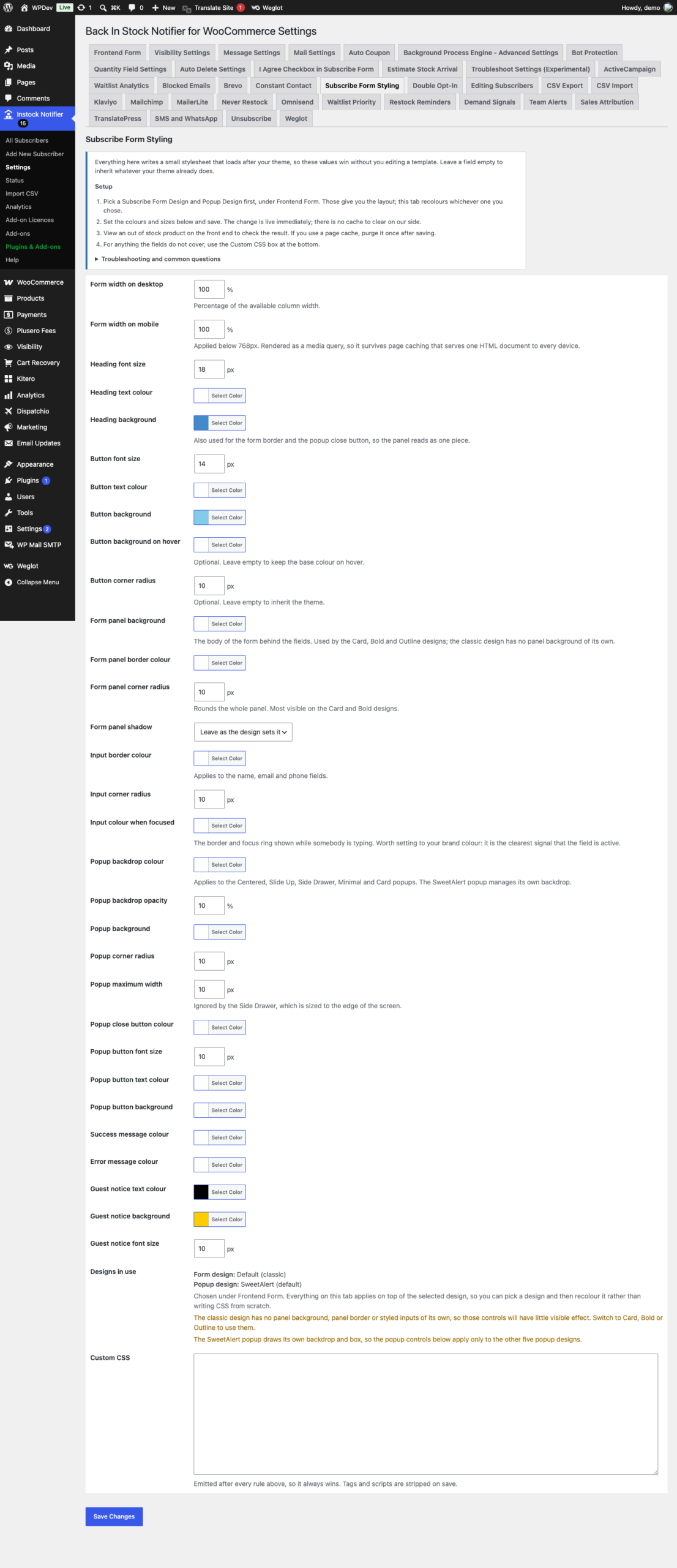
- Pick a Subscribe Form Design and Popup Design first, under Frontend Form. Those give you the layout; this tab recolours whichever one you chose.
- Set the colours and sizes below and save. The change is live immediately; there is no cache to clear on our side.
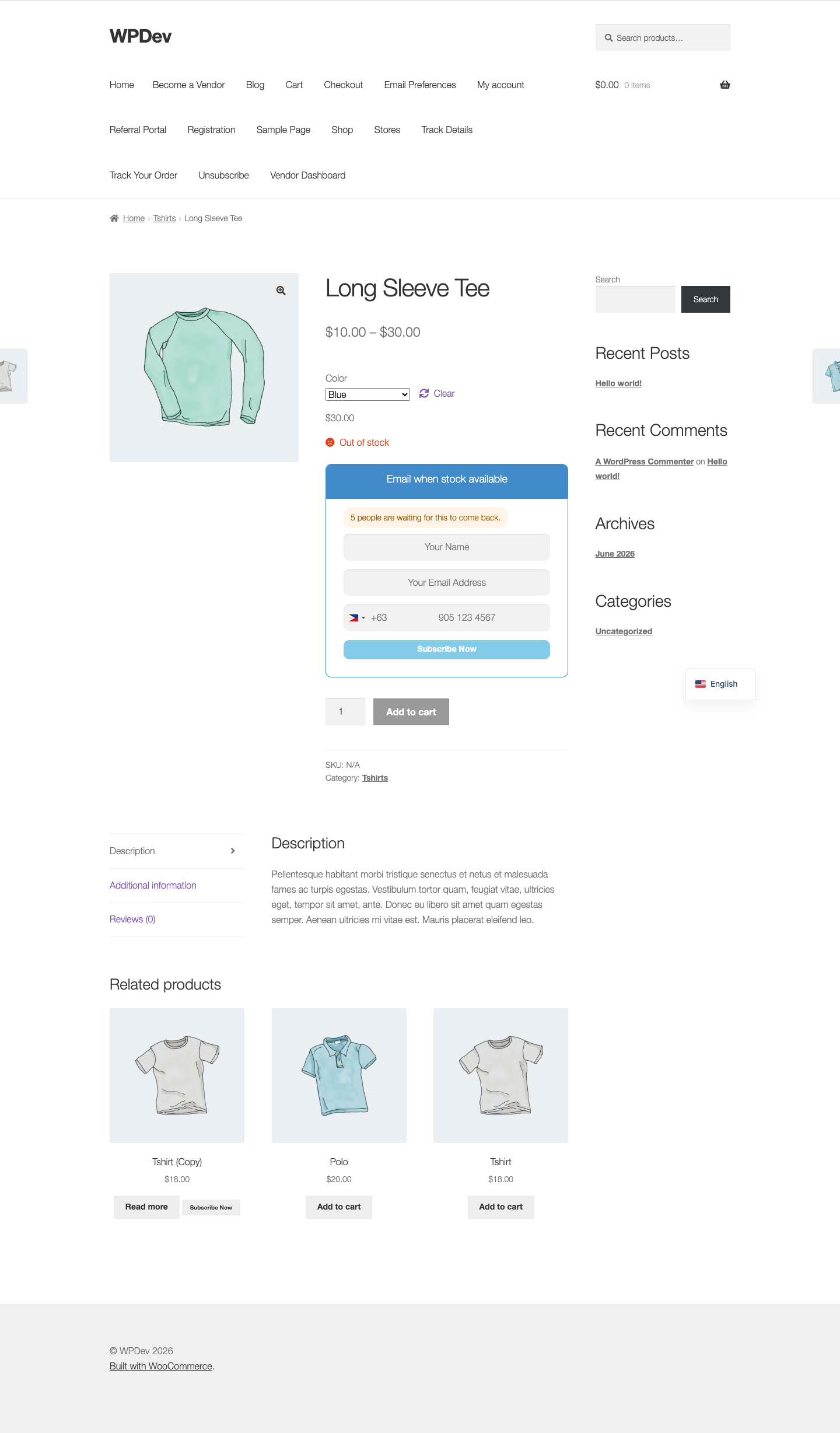
- View an out of stock product on the front end to check the result. If you use a page cache, purge it once after saving.
- For anything the fields do not cover, use the Custom CSS box at the bottom.
Common questions
My changes are not showing up. Almost always a page cache or a CDN. Purge both, then hard reload the product page. If it still looks unchanged, your theme may be loading its own stylesheet after ours; add the rule to the Custom CSS box, which is emitted last.
Which CSS classes can I target? The wrapper is .cwginstock-subscribe-form, the panel is .cwginstock-panel-primary, the heading is .cwginstock-panel-heading, the body is .cwginstock-panel-body, the submit button is .cwgstock_button, and the guest notice is .cwg-guest-message. A non-classic form design also adds .cwg-design and .cwg-design-card or similar to the wrapper, so you can style one design only. Popups use .cwg-modal-overlay, .cwg-modal-box and .cwg-modal-close.
I set a panel colour and nothing changed. The classic form design has no panel background or styled inputs of its own, so several controls have nothing to affect. Switch the Subscribe Form Design under Frontend Form to Card, Bold or Outline. The Designs in use box on this tab tells you which design is active.
The popup controls do nothing. The SweetAlert popup draws its own backdrop and box and ignores them. The other five popup designs, Centered, Slide Up, Side Drawer, Minimal and Card, all respond.
Can I paste JavaScript in the Custom CSS box? No. Tags, javascript: URLs, @import and CSS expressions are stripped when the setting is saved. That box produces a stylesheet, nothing else.
Data and privacy
- Nothing is stored per subscriber and nothing is sent anywhere.
- The compiled stylesheet is cached and cleared automatically when you save.
Details
At a glance
- Latest version
- 10.0.3
- Last updated
- November 5, 2026
- Type
- Add-on
Requirements
- PHP version
- 7.2
- WordPress (min)
- 5.8
- WordPress (tested)
- 6.8
Share
You might also like
 Add-on
Track Sales Back In Stock Notifier for WooCommerce
Track Sales is an add-on for Back In Stock Notifier. Using this Add-on you can track the subscribers who purchase product through our back…
From $19.00 One-time
Live demo-
Add-on
Never Restock Add-on Back In Stock Notifier for WooCommerce
Notify customers when an alternative product becomes available if the original item will never be restocked, helping you recover missed WooCommerce sales.
From $19.00 One-time
Live demo -
Add-on
Unsubscribe Add-on Back In Stock Notifier for WooCommerce
From $19.00 One-time
Live demo