Your cart is empty.
Browse plugins
Overview
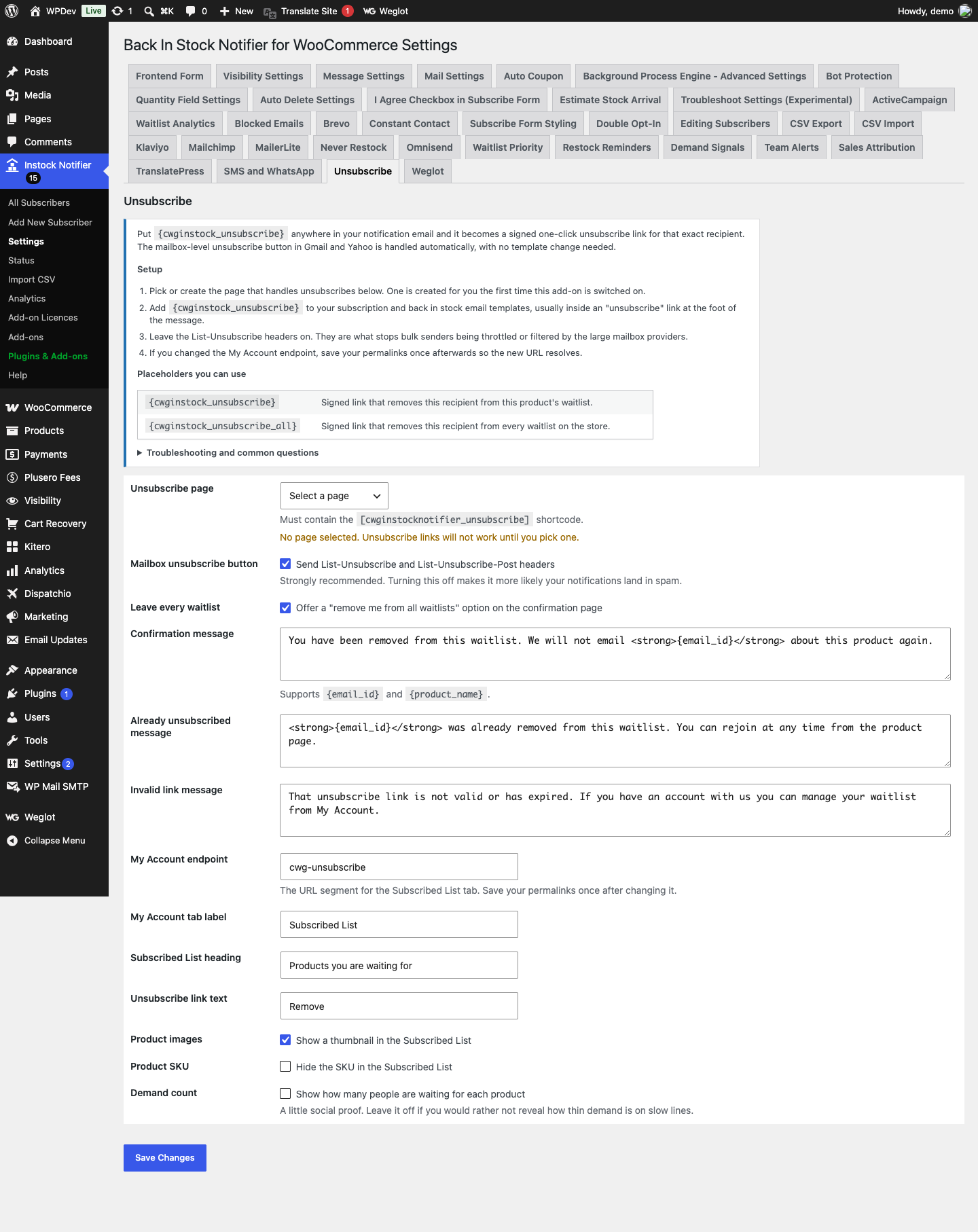
One-click unsubscribe links in every notification, a Subscribed List tab in My Account, and the List-Unsubscribe headers Gmail and Yahoo now require from bulk senders. Put {cwginstock_unsubscribe} anywhere in your notification email and it becomes a signed one-click unsubscribe link for that exact recipient. The mailbox-level unsubscribe button in Gmail and Yahoo is handled automatically, with no template change needed.
How it works
- Three routes all end in the same place. The link inside the email, the native Unsubscribe control Gmail and Yahoo render next to the sender name, and a Subscribed List tab in My Account.
- Links are signed with an HMAC keyed on your site salts and compared in constant time. Links generated by earlier versions used an unkeyed MD5 of the subscriber and address, which anybody who knew a customer email could reproduce; those old links are still accepted so mail already delivered keeps working, and every new link uses the HMAC.
- The mailbox level button works through two headers, List-Unsubscribe and List-Unsubscribe-Post. The customer never reaches your site: their provider posts to a URL that unsubscribes them directly. That POST carries no nonce and cannot, because the caller is Google or Yahoo rather than a browser with a session. The signed token in the URL is the authentication, which is what RFC 8058 intends.
- Removals from the My Account tab go through a POST with a nonce, and check the row belongs to the person asking. A plain link would be followed by prefetching browsers and mail scanners, unsubscribing people who never clicked.
Setting it up
- Pick or create the page that handles unsubscribes in the add-on settings. One is created for you the first time this add-on is switched on.
- Add {cwginstock_unsubscribe} to your subscription and back in stock email templates, usually inside an “unsubscribe” link at the foot of the message.
- Leave the List-Unsubscribe headers on. They are what stops bulk senders being throttled or filtered by the large mailbox providers.
- If you changed the My Account endpoint, save your permalinks once afterwards so the new URL resolves.
Shortcodes
{cwginstock_unsubscribe}Signed link that removes this recipient from this product’s waitlist.{cwginstock_unsubscribe_all}Signed link that removes this recipient from every waitlist on the store.
Common questions
What is one-click unsubscribe? Gmail, Yahoo and Apple Mail read two headers from your message and turn them into an Unsubscribe button in their own interface. The customer never lands on your site. Since February 2024 both Gmail and Yahoo require this from senders above roughly five thousand messages a day, and a store notifying a large waitlist crosses that easily.
Someone says their unsubscribe link is invalid. Links are signed with your site’s secret keys. If those keys were rotated, or the site was moved without them, older links stop verifying. Ask the customer to unsubscribe from My Account instead, or remove the row yourself from the subscribers list.
Why does the unsubscribe page look empty if I open it directly? Because there is no subscriber in the URL to act on. Rather than returning a bare 403 like the previous version, it now shows a short explanation and a link to My Account.
Does unsubscribing delete their data? No. The row is marked Unsubscribed and kept, so they are not notified again but you keep the demand history. Use the parent plugin’s privacy tools to erase data on request.
Data and privacy
- Nothing leaves your site. Unsubscribing marks the row as unsubscribed and keeps it, so you retain the demand history without contacting the person again.
- The signed token contains no personal data. It is a keyed hash of the subscriber ID and address, and cannot be reversed into either.
- Use the parent plugin privacy tools to erase a subscriber entirely on request.
Details
At a glance
- Last updated
- October 2, 2026
- Type
- Add-on
Share
You might also like
 Add-on
Export CSV Add-on Back In Stock Notifier for WooCommerce
From $19.00 One-time
Live demo-
Add-on
Never Restock Add-on Back In Stock Notifier for WooCommerce
Notify customers when an alternative product becomes available if the original item will never be restocked, helping you recover missed WooCommerce sales.
From $19.00 One-time
Live demo -
Add-on
Reminders Add-on Back In Stock Notifier for WooCommerce
From $19.00 One-time
Live demo