Your cart is empty.
Browse plugins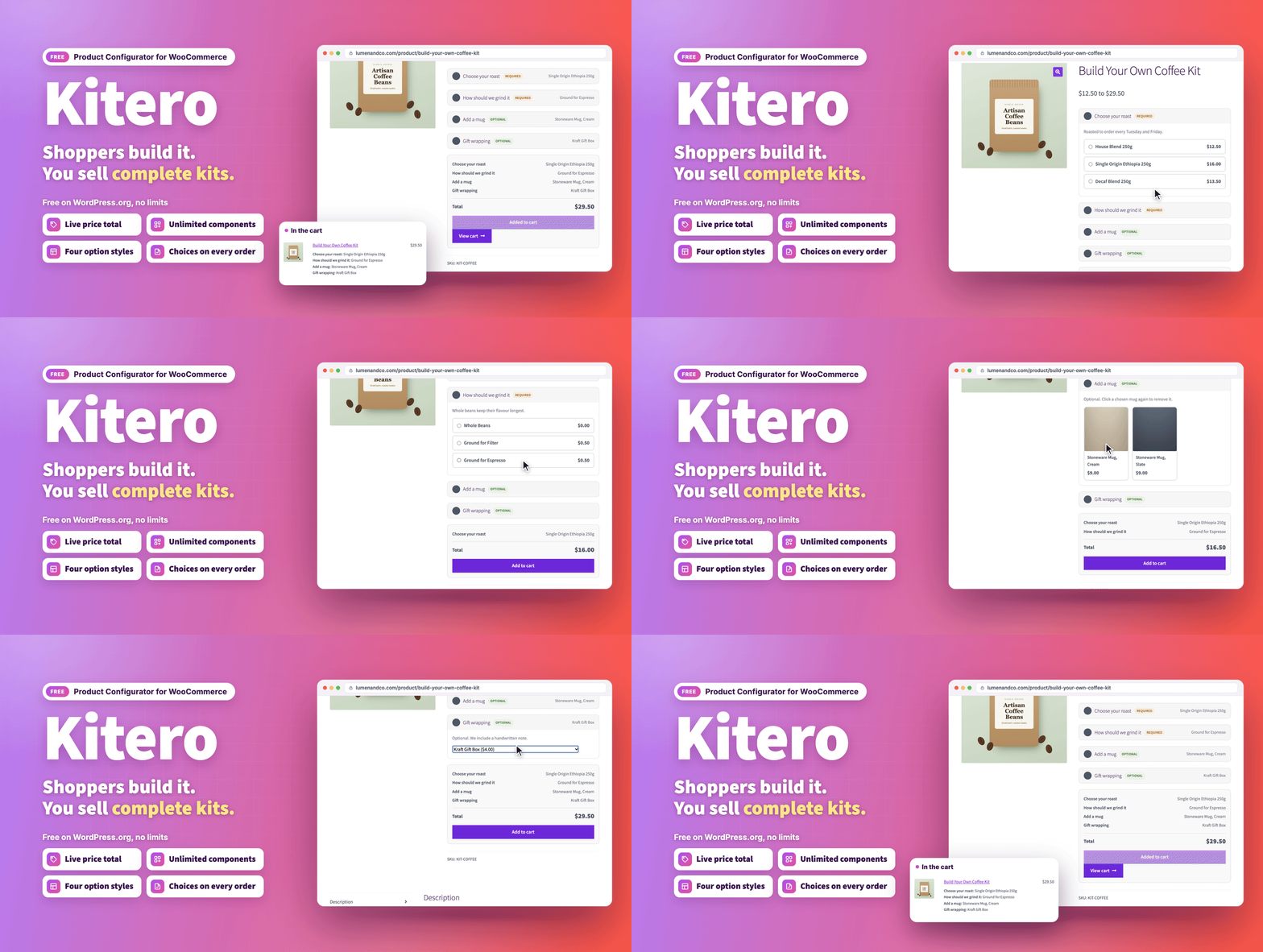
Overview
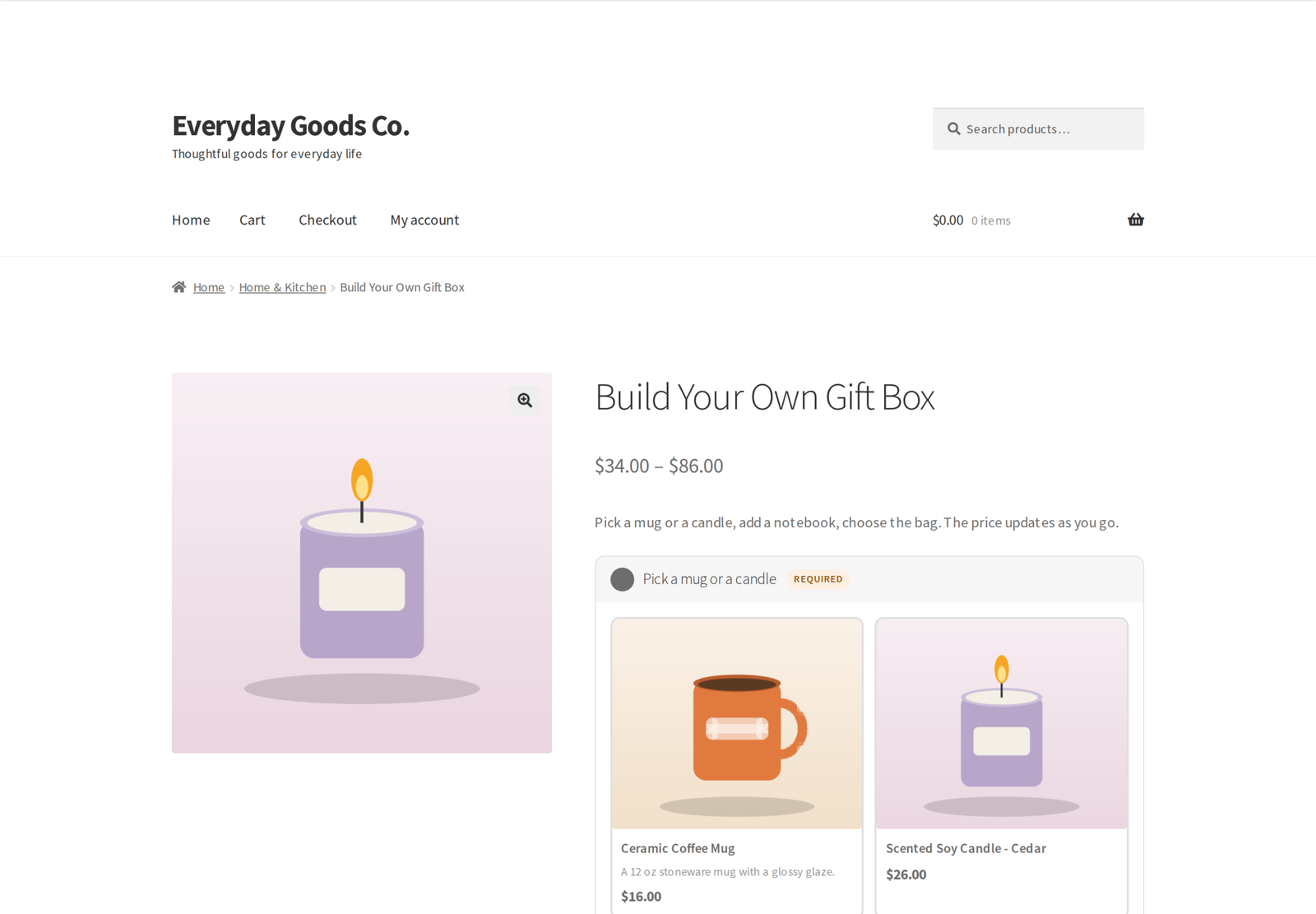
Let shoppers build their own product, priced live.
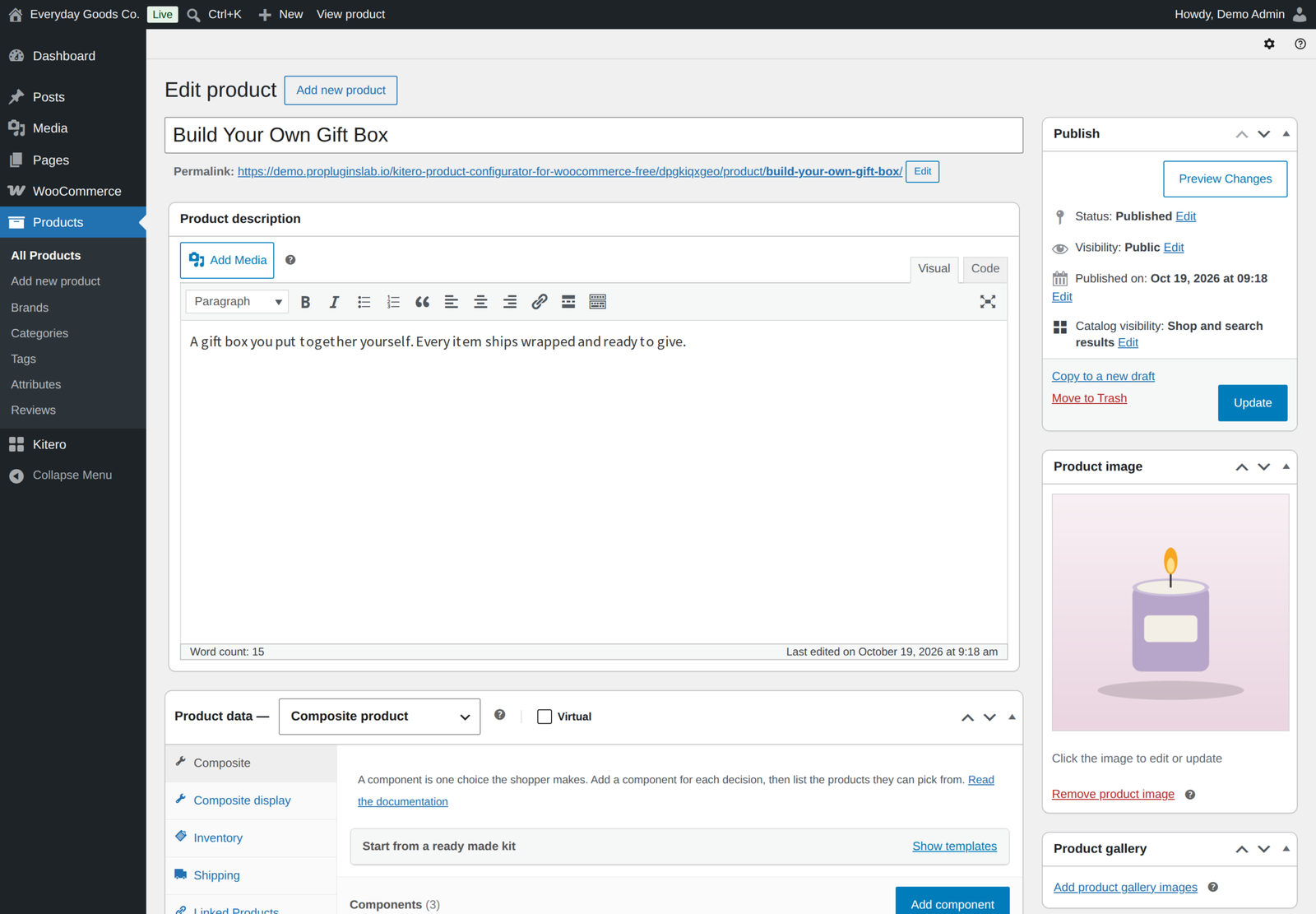
Kitero - Composite Products for WooCommerce adds a Composite product type to WooCommerce. You define the choices, called components, and list the products a shopper can pick for each one. The shopper builds their product on the product page and the total updates as they choose.
A gift hamper, a build your own skincare routine, a made to order desk setup and a spare parts kit are all the same idea: a parent product made of choices, priced from what the customer selected. The free edition is complete on its own, with no limits, locks or time restrictions.
What's new in 1.3.0 (October 17, 2026)
- Edit a kit from the cart. Each kit in the classic or block cart has an Edit link that opens the product page with the choices filled in, and Update cart replaces the line.
- Order again. A past order rebuilds each kit from the stored choices, checked against today's products, prices and stock.
- Inventory, tax and shipping fields. Composite products get the Inventory tab, the tax status and tax class fields and the Virtual box, and a kit without its own weight ships at the combined weight of the chosen items.
- Tax counted once. The kit line is taxed once with the composite product's tax class whichever way your shop enters and shows prices, and the product page shows the same amounts as the cart.
- Stock counted across the whole cart. Component stock is checked against the kit quantity and every other line in the cart, and Restock refunded items puts the components of a refunded kit back.
- Clear stock messages. A composite whose required component has nothing in stock shows as out of stock, and a published composite that cannot be bought says so.
- Works on more pages. The form works wherever WooCommerce prints the add to cart area, such as the [product_page] shortcode, and guests on cached pages no longer see a session expired message.
- Better catalog prices. The lowest price is stored with the product so price sorting and the price filter include composites, and discounted options show the original price struck through.
What you can do
- Add as many components as a product needs, with no limits of any kind.
- Assign any number of simple products or variations to each component.
- Search products by name or by SKU, including variation SKUs, with the SKU shown beside every result.
- Show options as a thumbnail grid, larger cards, a radio list or a dropdown. The style is set per component.
- Mark a component required or optional. Optional choices can be cleared by clicking the selected option again.
- Set a minimum and maximum quantity per component, and let the shopper adjust it with plus and minus buttons.
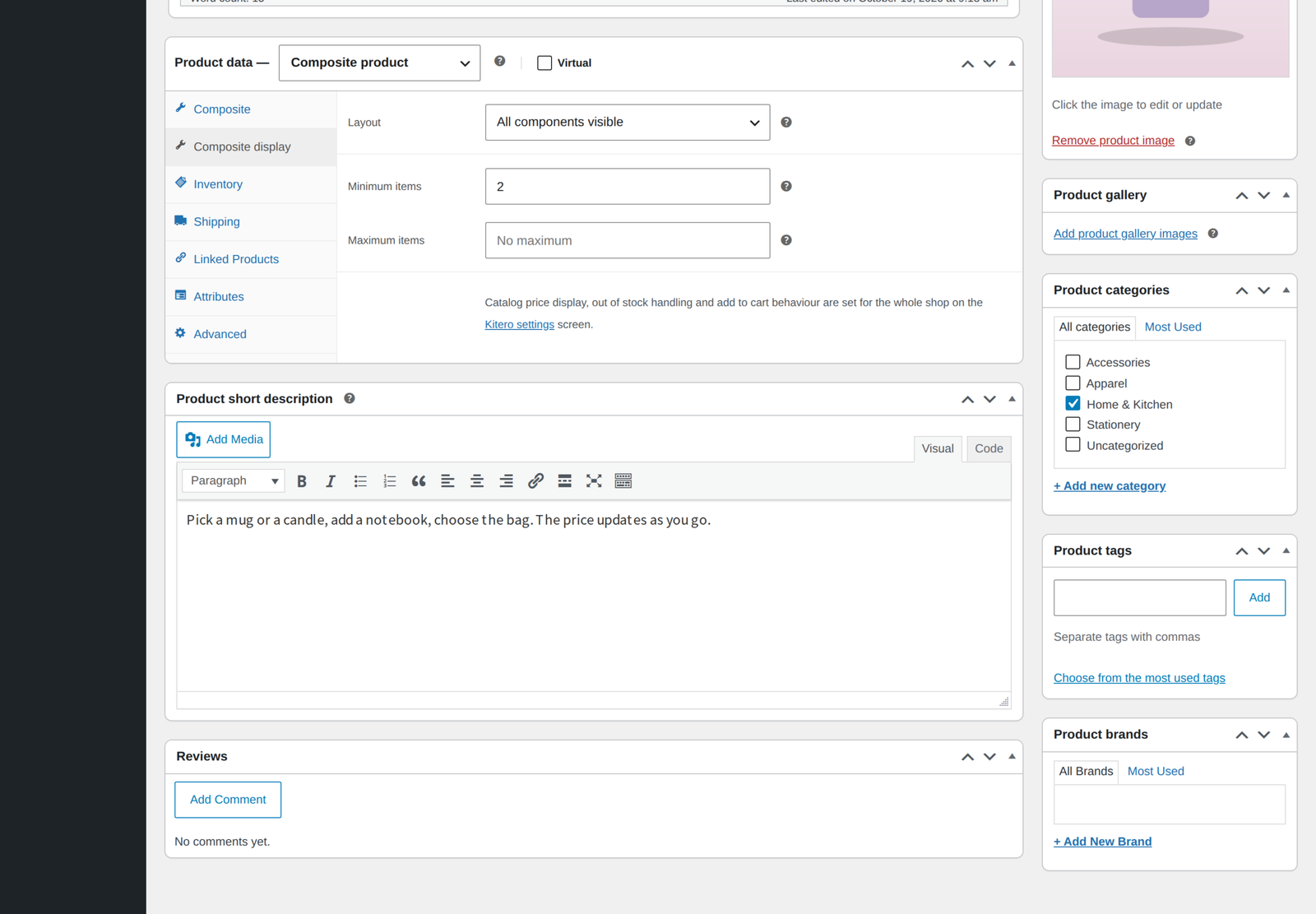
- Set a minimum and maximum number of items for the whole kit, for example a box of six, checked on the product page and again in the cart.
- Choose between an all visible layout and an accordion layout.
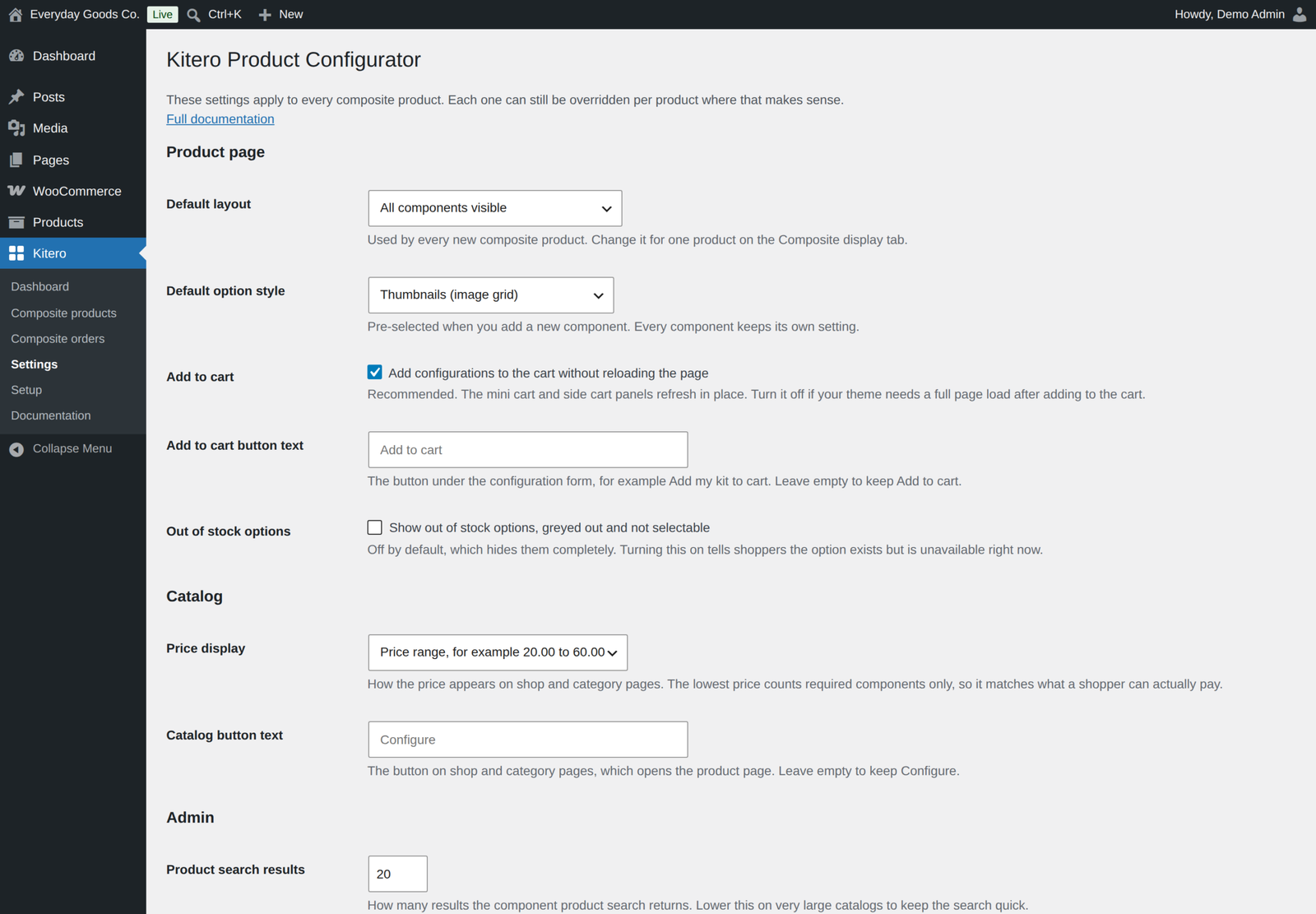
- Change the wording of the Add to cart button and the catalog Configure button.
- Give the kit its own SKU, stock and Sold individually setting, choose its tax status and tax class, or mark it Virtual.
- Duplicate a composite product and its components come along, ready to edit as a new draft.
Pricing
You do not give the composite a price. The total is the sum of the options the shopper chooses, worked out on the server from current product prices.
- Price control per component. Apply a percentage discount, a fixed discount, a percentage fee or a fixed fee to whatever is chosen in a component. A discount rewards a bigger build, a fee covers work such as engraving or assembly, and a discount never takes a line below zero. Discounted options show the original price struck through.
- Catalog price. Show a price range, a starting price, or no price at all on shop and category pages. The lowest price is stored with the product, so sorting by price and the price filter work for composites.
- Correct tax. Whichever way your shop enters and shows prices, the kit line is taxed once with the composite product's own tax class, and the product page shows the same amounts as the cart.
On the product page and in the order
- Live total. The price updates as the shopper makes each choice.
- Add to cart without a reload. Mini cart and side cart panels open straight away. You can switch this off if your theme needs a full page load.
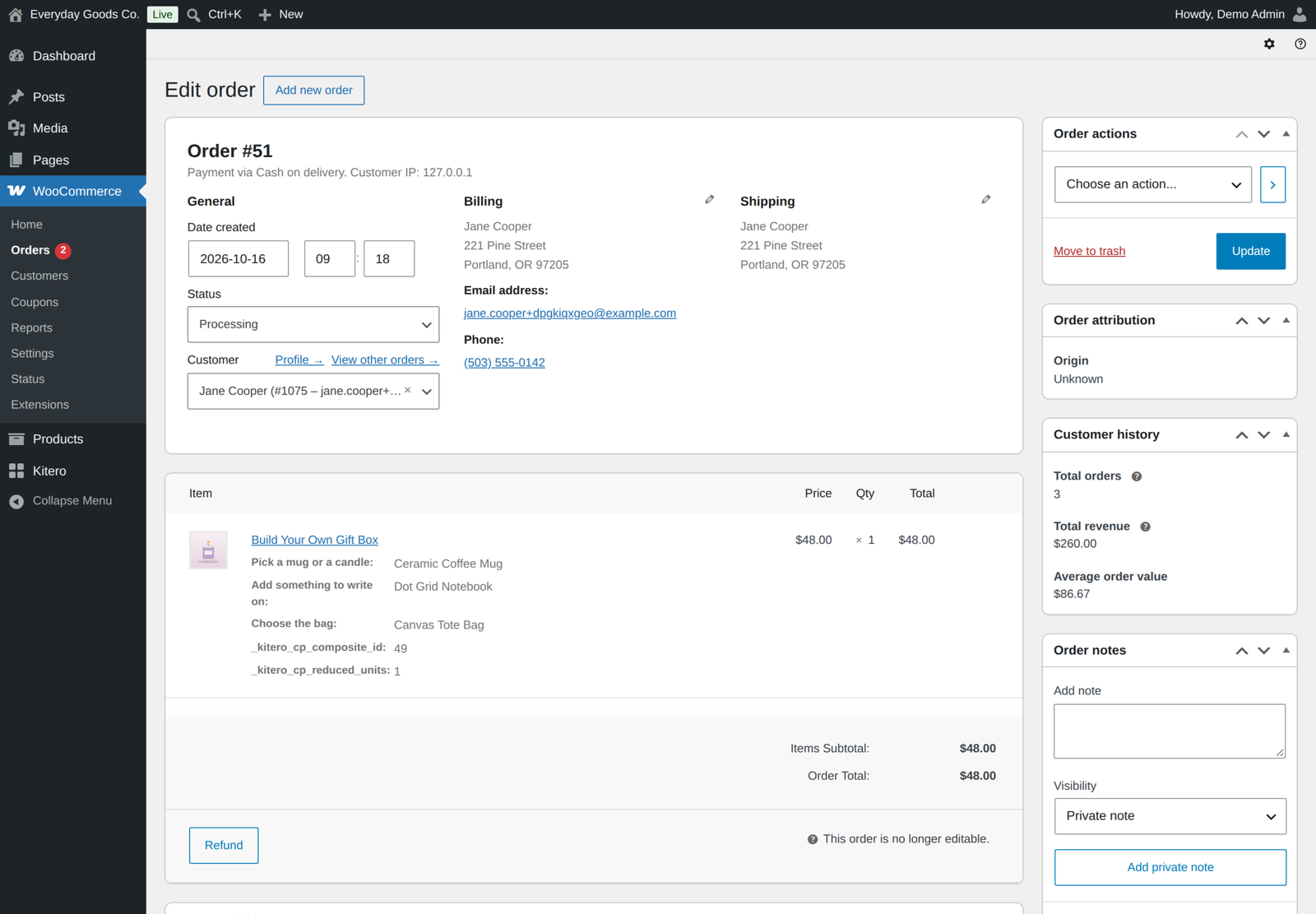
- Every choice recorded. Each selection is written to the cart, the checkout, the order and the confirmation email automatically.
- Edit from the cart. Each kit in the classic or block cart has an Edit link that opens the form with the choices filled in, and Update cart replaces the line.
- Order again. A past order with a kit can go back in the cart, and every stored choice is checked against today's products, prices and stock first.
- Shipping weight. A kit without a weight of its own ships at the combined weight of the chosen items.
Stock is handled properly
Stock lives on the products the shopper picks. When an order reduces stock, the stock of each chosen item is reduced by its quantity times the number of kits, and an order note records the change. Cancelling the order puts it back, and so does a refund with Restock refunded items ticked. Options that are out of stock cannot be selected.
The cart adds up every kit and every plain product, on the cart page and again before checkout, in the classic and the block cart, so two kits can never oversell the same item. A kit whose required component has nothing left in stock shows as out of stock.
Five kit templates
Ready made kit templates build the components in one click: custom PC builder, gift box or hamper, meal kit, skincare routine, and coffee or tea kit. You then swap in your own products.
The Kitero menu
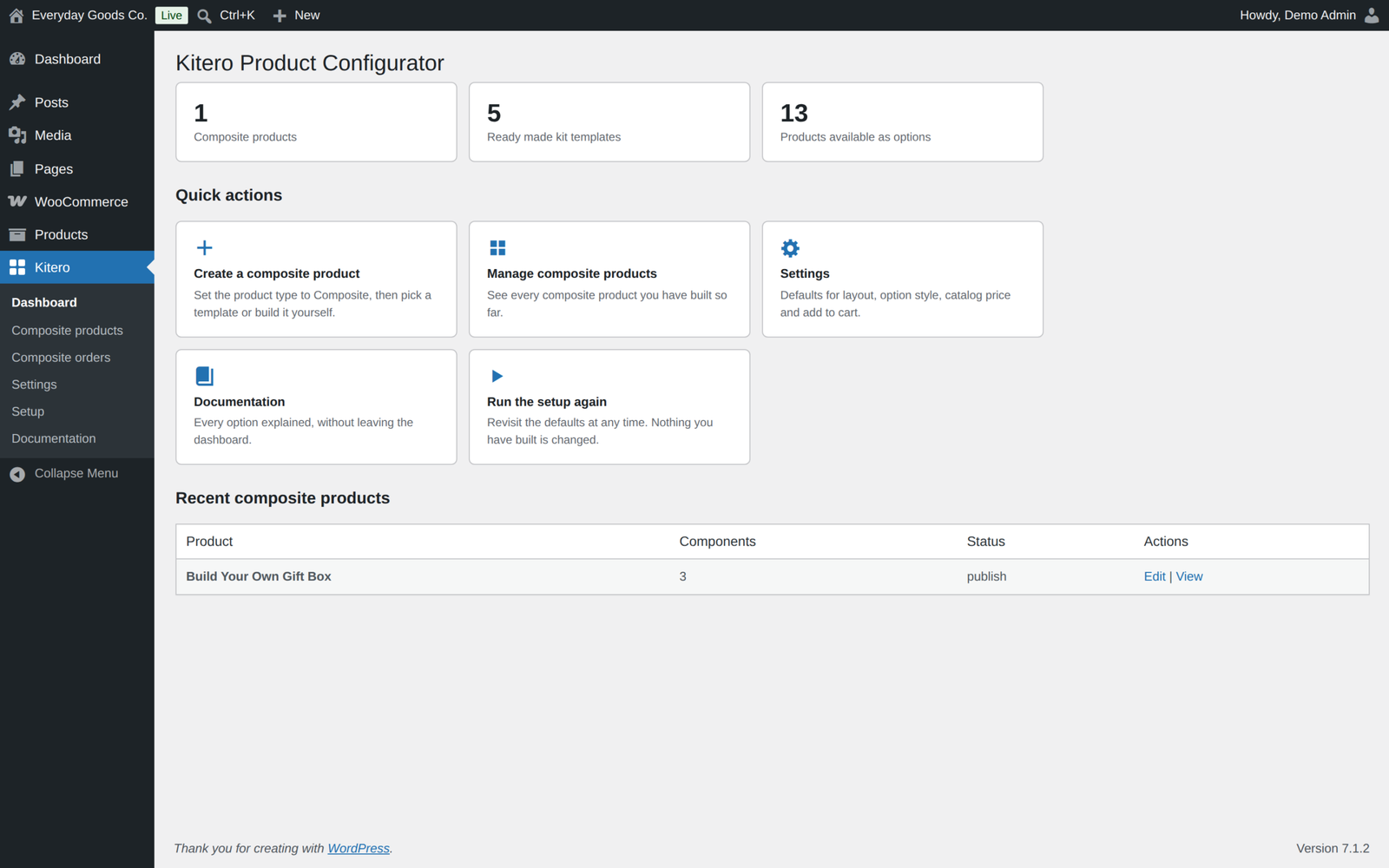
- Dashboard. A summary of your composite products and a link to every screen.
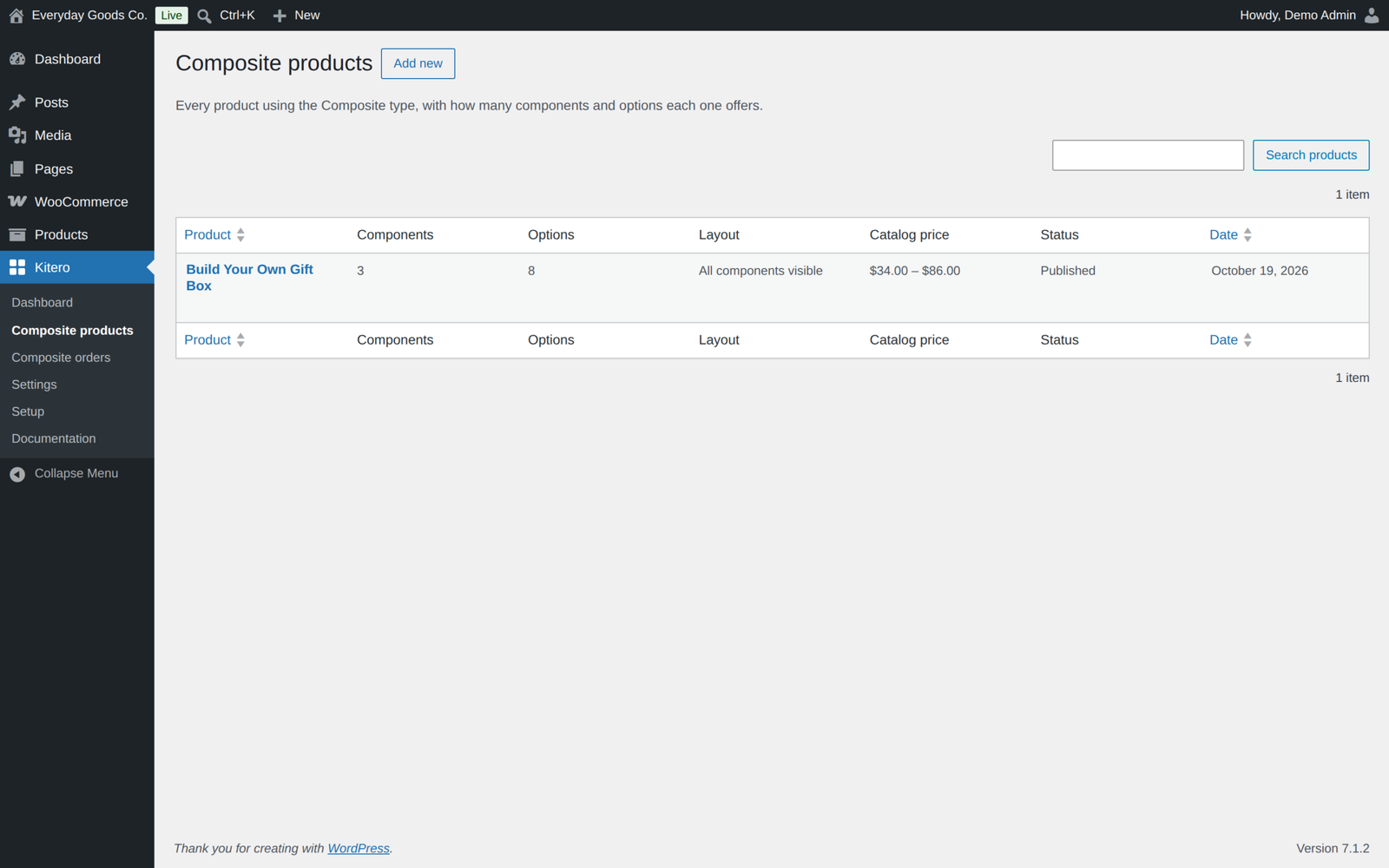
- Composite products. Every composite in one list, with its components, options, layout, catalog price and status.
- Composite orders. Orders that contain a composite product, with the choices the customer made.
- Settings. Shop wide defaults such as layout, option style, add to cart behaviour, button text, out of stock options, catalog price display, search result count and uninstall cleanup.
- Setup. A short wizard that sets the defaults for every composite product you build.
- Documentation. Every option explained inside the dashboard, so there is no need to leave your site to look up a setting.
Works with what you already run
- High Performance Order Storage, declared compatible, with order data stored through the WooCommerce CRUD layer
- Cart and Checkout Blocks, declared compatible, with Store API add to cart requests validated on the server
- Any theme. Copy
templates/single-product/composite-form.phpintokitero-product-configurator/single-product/in your theme to change the form, safe from plugin updates. The template changed in 1.3.0, so compare any copy you made earlier. - Shortcodes and page builders. The form works wherever WooCommerce prints the add to cart area, such as the
[product_page]shortcode or a page builder template. - Cached pages. Guests can add to the cart from a cached page. Signed in customers still need a valid nonce, and every choice is checked on the server.
- Fast pages. Component data is cached per request, so a page that needs the same product several times only builds it once.
For developers
Over thirty hooks let you extend components, options, pricing, stock, templates, settings and the cart, including kitero_cp_components, kitero_cp_component_options, kitero_cp_price_breakdown, kitero_cp_price_html, kitero_cp_catalog_price, kitero_cp_is_in_stock, kitero_cp_cart_item_data, kitero_cp_cart_item_editable, kitero_cp_added_to_cart and kitero_cp_product_duplicated. The main hooks are listed in the built in documentation.
Privacy
This plugin does not connect to any external service. It makes no remote requests and sends no data anywhere.
Kitero Pro
Kitero Pro is a separate plugin that includes everything in this free edition and adds:
- Bundle mode, with optional items the shopper can drop and the saving shown
- Fixed and hybrid pricing, and your own price per product inside a component
- Default choices, several choices in one component, and options from categories and tags
- A visual preview that swaps the product image or stacks a layer image per choice
- Logic rules between components, enforced in the browser and again on the server
- Two more layouts, a step by step wizard and tabs
- Ten more kit templates, fifteen in total
- Composite insights, a report on the choices customers really make
Both editions use the same tables and settings, so your components are kept when you move. While Pro is active, this free plugin stays idle and shows a notice on the Plugins screen so you can deactivate it. Installing Pro is never required for any feature listed above to work.
Demo and documentation
Requirements
- WordPress 6.4 or newer, tested up to 7.1
- WooCommerce 8.0 or newer, tested up to 11.2.1
- PHP 7.4 or newer
Frequently asked questions
Do I need to give the composite product a price?
No. The total is the sum of the options the shopper chooses. The catalog price is worked out from the cheapest and dearest possible builds.
Can a component use variations of a variable product?
Yes. A variable product is listed as its individual variations, so the shopper picks a concrete, purchasable item and stock stays accurate.
What happens if an option sells out after it was added to a cart?
The cart is validated again on the cart page and before checkout. The shopper is told which item is unavailable so they can pick something else.
Is the price calculated from what the browser sends?
No. The browser only sends which option was picked in each component and how many. The price is worked out on the server from the current product prices every time the cart is calculated.
Can a shopper change a kit after adding it to the cart?
Yes. The Edit link on the cart line opens the product page with the choices filled in. Update cart replaces the line instead of adding a second one.
Can I copy a composite product?
Yes. Use Duplicate on the Products list, or Copy to a new draft in the product editor. The new draft gets its own copy of every component and the products in it.
Changelog
Every release, newest first, with the date it came out.
Version 1.3.0 (October 17, 2026)
- New: an Edit link on each kit in the cart, classic or block based. It opens the product page with the choices filled in, and Update cart replaces the line.
- New: Order again rebuilds each kit from the stored choices, checked against today's products, prices and stock.
- New: composite products get the Inventory tab (SKU, own stock, Sold individually), the tax status and tax class fields and the Virtual box.
- New: a kit without its own weight ships at the combined weight of the chosen items.
- New: the lowest price is stored with the product, so sorting by price and the price filter work for composites.
- Fix: prices are no longer taxed twice, or left untaxed, when the shop enters prices without tax and shows them with tax, or the other way round. The kit line is taxed once with the composite product's tax class, and the product page shows the same amounts as the cart.
- Fix: component stock is checked against the cart quantity of the kit and against every other line in the cart, including a cart quantity change.
- Fix: Restock refunded items now puts the components of a refunded kit back in stock. A later cancellation only returns what is still out.
- Fix: a composite whose required component has nothing in stock shows as out of stock instead of offering a form that cannot be sent.
- Fix: a published composite that cannot be bought says so on the product page.
- Fix: guests on cached pages no longer see "Your session expired" when adding to the cart. Signed in customers still need a valid nonce, and every choice is still checked on the server.
- Fix: the configuration form now works wherever WooCommerce prints the add to cart area, such as the [product_page] shortcode or a page builder template, not only on the product page.
- Improved: saving a product updates its option rows in place instead of deleting and adding them again.
- Improved: option prices on the product page show the component discount, with the original price struck through.
- Improved: new hooks for add ons: kitero_cp_component_saved, kitero_cp_component_product_fields, kitero_cp_catalog_price, kitero_cp_is_in_stock, kitero_cp_before_components, kitero_cp_template_response, kitero_cp_display_fields, kitero_cp_dashboard_actions, kitero_cp_setup_settings and kitero_cp_cart_item_editable.
- Tested with WordPress 7.1.3 and WooCommerce 11.2.1.
Version 1.2.0 (October 15, 2026)
- New: duplicating a composite product (Duplicate on the Products list, or Copy to a new draft) now copies its components and their products to the new draft. Developers can hook kitero_cp_product_duplicated.
- Security hardening: a composite can only reach the cart with a validated configuration, including through add to cart links, the Store API and order again; cart prices are recalculated on the server on every pass.
- Security hardening: the upgrade note is shown only to users who can manage plugins.
- The free plugin no longer switches itself off when the Pro edition is active. It stays idle and shows a notice on the Plugins screen so you can deactivate it yourself.
- Uninstalling the free plugin keeps the shared data while the Pro edition is installed.
- Readme: External services section.
- Tested with WordPress 7.1.3 and WooCommerce 11.2.1.
Version 1.1.0 (September 22, 2026)
- New: minimum and maximum items for the whole kit, on the Composite display tab. The product page shows the limit and a running count, and the cart checks it again.
- New: set your own Add to cart and catalog button text under Kitero, Settings. Empty keeps the current wording.
- Links moved to propluginslab.io.
- Added Pro upgrade banner on plugin screens.
- Tested with WordPress 7.1.1 and WooCommerce 11.1.1.
Show earlier version (1.0.0)
Version 1.0.0 (August 27, 2026)
- First release.
Details
At a glance
- Last updated
- October 19, 2026
- Type
- Free plugin
Share
You might also like
 Pro
Inputo Name Your Price for WooCommerce
Let customers name their price on WooCommerce products, guided by your minimum and suggestion. Includes quick amounts, rules, Subscriptions, currency switchers and reports.
From $39.00 One-time
Live demo-
Free
Dispatchio Advanced shipment Tracking for WooCommerce Free
Free WooCommerce shipment tracking with 285 built-in carriers, Shipped and Delivered statuses and tracking emails. Existing tracking from other plugins appears instantly.
Free
Live demo -
Free
Recovero Cart Recovery for WooCommerce Free
Recover abandoned WooCommerce carts for free with real time capture and automated recovery emails in each shopper's language. It starts working on activation.
Free
Live demo