Your cart is empty.
Browse plugins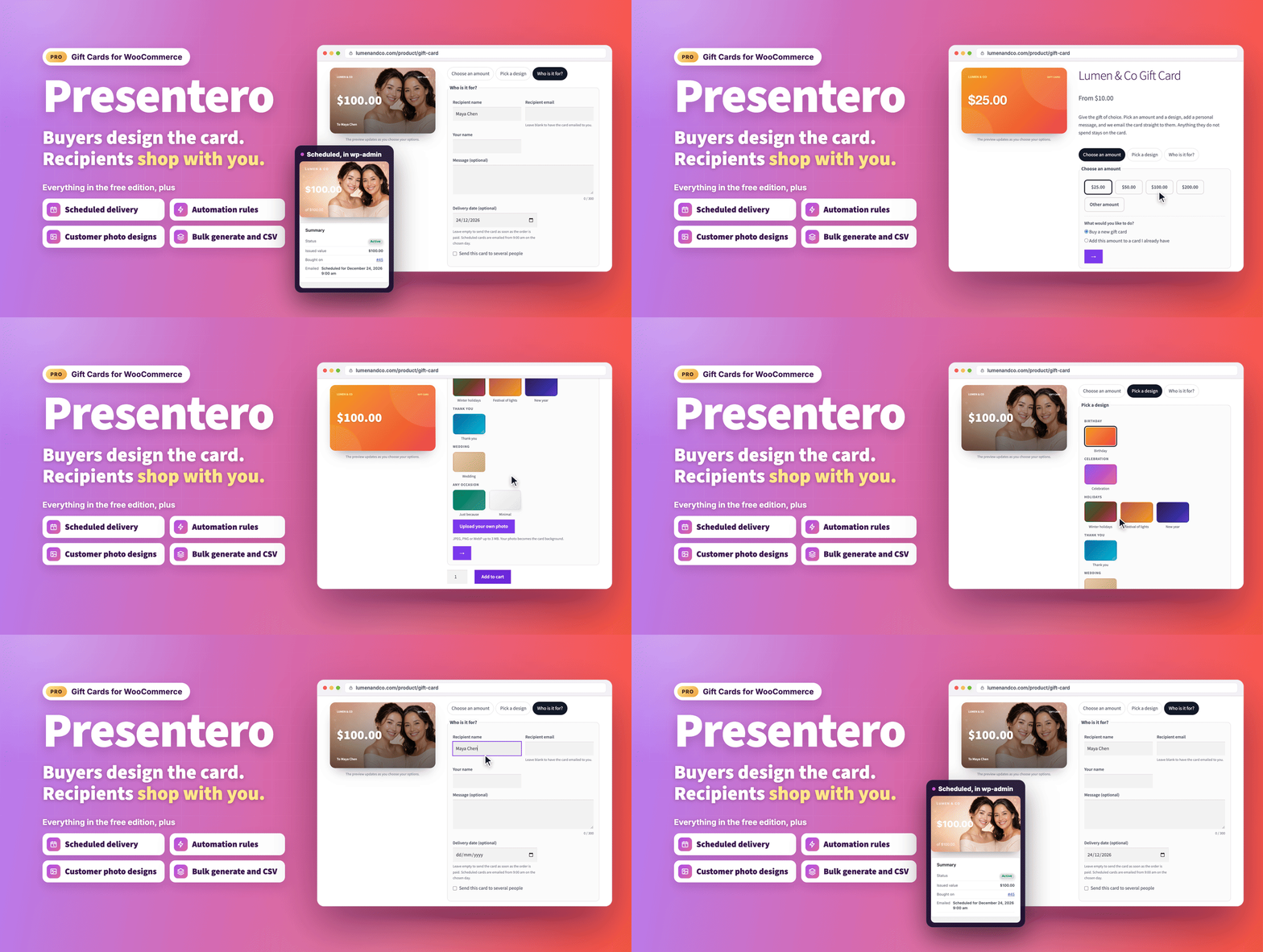
Overview
Presentero - Gift Cards for WooCommerce Pro is a full-featured gift card plugin that lets you sell, manage and deliver gift cards directly from your WooCommerce store. Whether you want to boost holiday sales, reward loyal customers or refund orders as store credit, Pro handles everything in one place, with no add-ons required.
From the moment a customer lands on your product page to the moment the recipient redeems the card at checkout, every step is smooth, beautiful and automatic.
What's new in 1.4.2 (October 21, 2026)
- Codes typed any way. GIFT7KQ2M9XA3HPD, gift 7kq2 m9xa 3hpd and GIFT-7KQ2-M9XA-3HPD all find the same card, through a fast indexed lookup.
- Made for edge caching. The gift card fields, balance checker, wallet buttons and gift card product form keep working on pages cached by your site or Cloudflare for any length of time.
- Real visitor addresses. "Visitor IP address" (Settings, Redeeming) counts wrong codes per real shopper behind Cloudflare and your own proxies, and visitors can't fake their address.
- Buy now, pay later stays off gift cards. On by default (Settings, Selling): Afterpay and Clearpay in Stripe and PayPal Pay Later are not offered while a gift card is being bought. Cards and the PayPal button stay.
- Wallet reminder follows your settings. On the classic cart and checkout it follows the Cart page and Checkout page switches, as in the blocks.
- For developers. apply_code() accepts 'count_failures' => false for combined promo and gift card fields, plus new filters for Cloudflare ranges and pay later.
Earlier releases are listed in the changelog at the end of this page.
A buying experience customers will love
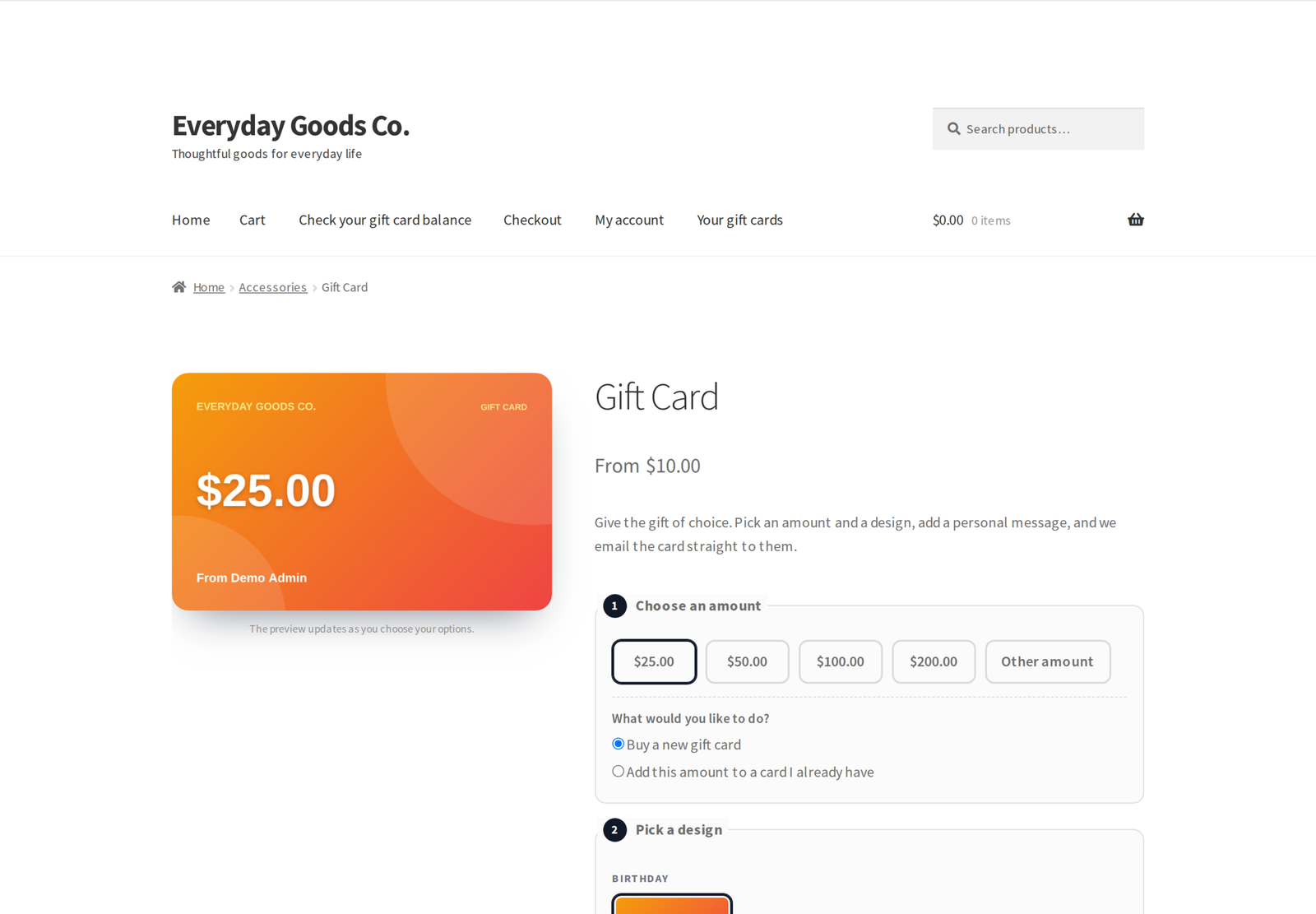
Your customers deserve more than a plain code in an email. Presentero includes a live card preview drawn with the HTML5 Canvas API, so buyers watch their gift card update in real time as they choose the amount, the design, the names and the message. What they see is what the recipient receives.
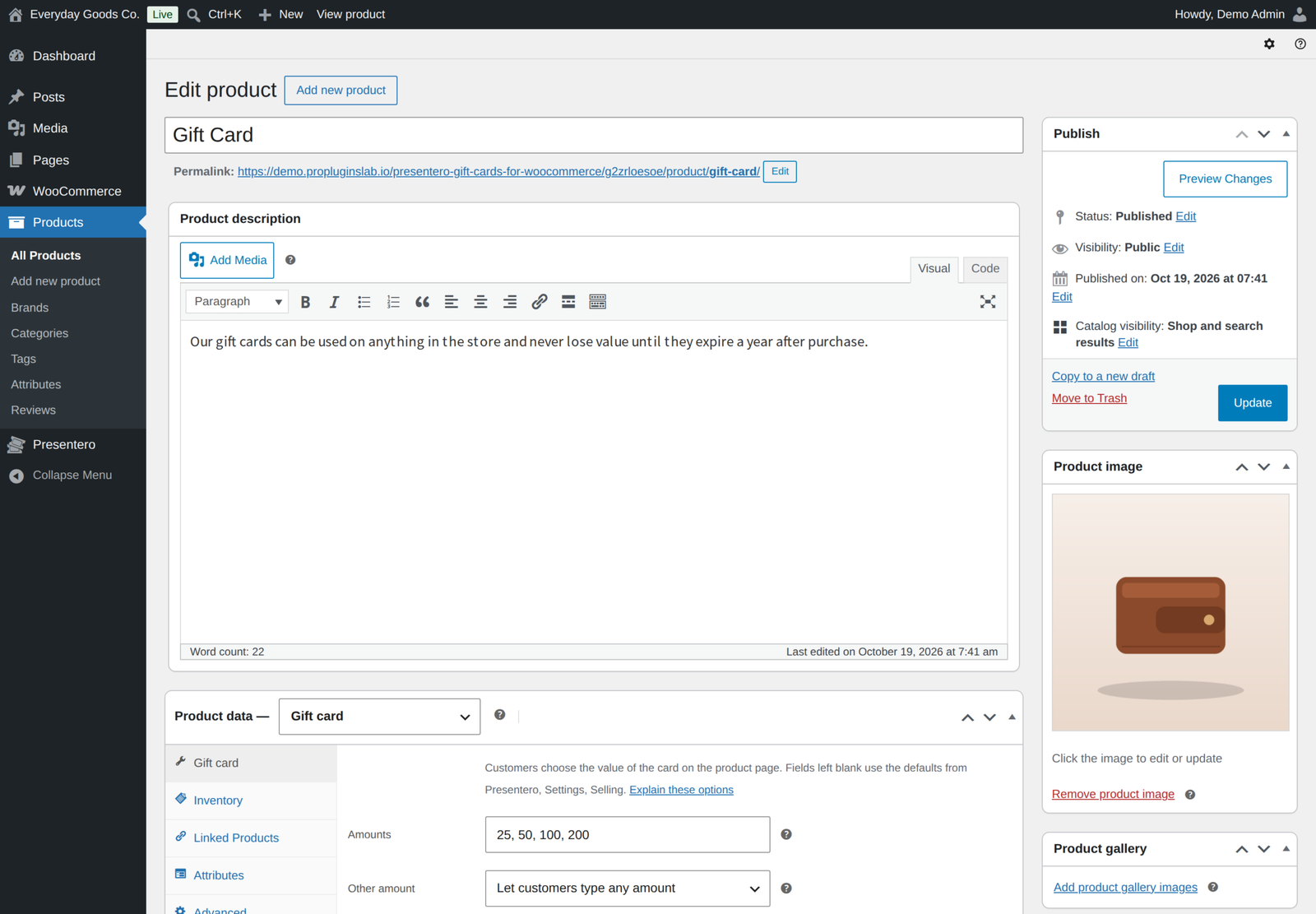
Buyers pick from 9 starter designs, or from the designs you create yourself. In Pro they can even upload their own photo as the card background. Choose how the purchase form looks with four layouts: numbered steps, accordion, tabs or a compact list.
Once the order is paid, the gift card is emailed automatically. Buyers can also schedule delivery for a future date, perfect for birthdays and anniversaries, so the card lands in the recipient's inbox on exactly the right day. Buyers can change the day or the recipient until the card goes out, and a failed email is retried and reported to you. Sending to a whole team? One purchase can send a separate card, with its own code, to up to 10 people.
Every card can also come as a PDF gift card with a QR code, attached to the gift card email and downloadable from My Account.
Powerful admin tools built right in
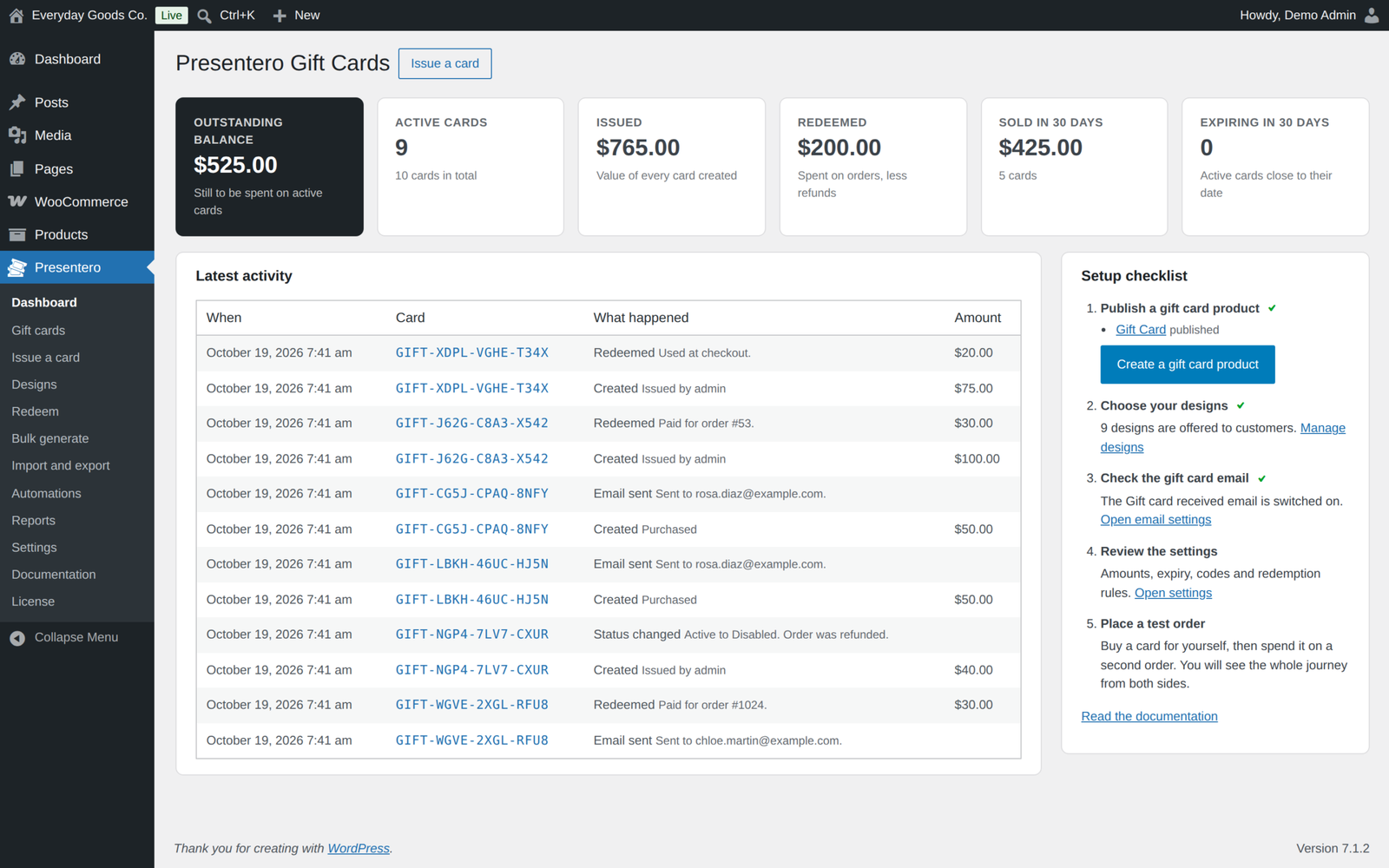
The dashboard gives you an overview of the numbers that matter: outstanding balance, active cards, total value issued and redeemed, cards sold in the last 30 days and cards expiring soon, together with the latest activity and a setup checklist. On stores that sell in more than one currency, each currency is shown on its own.
Every card has its own screen where you can change the balance with a reason, extend or remove the expiry date, edit the recipient and message, switch the design or status, and resend the email. The full history of the card is shown right beside it. From the card list, quick actions and bulk actions let you activate, disable, resend or delete cards in seconds.
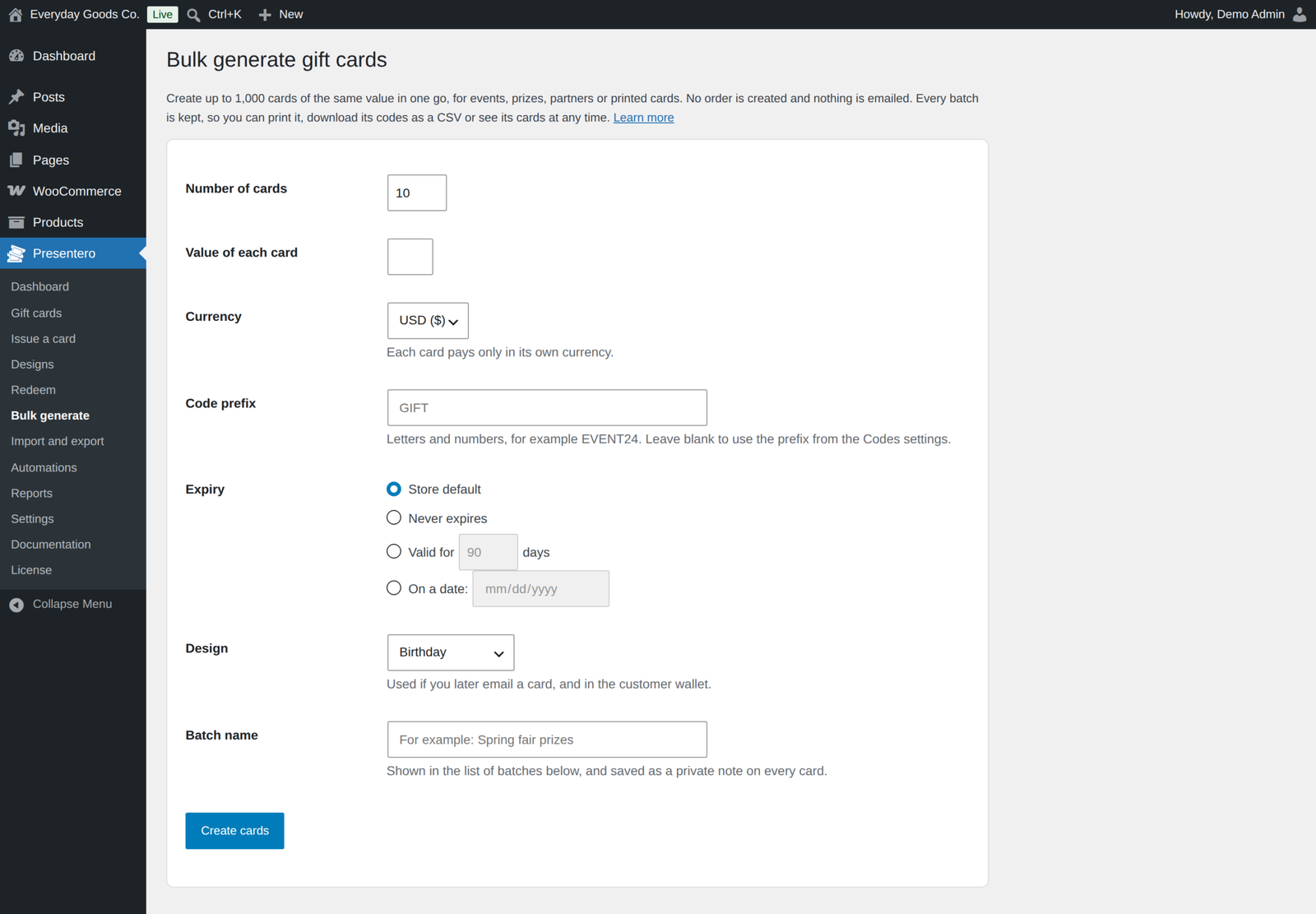
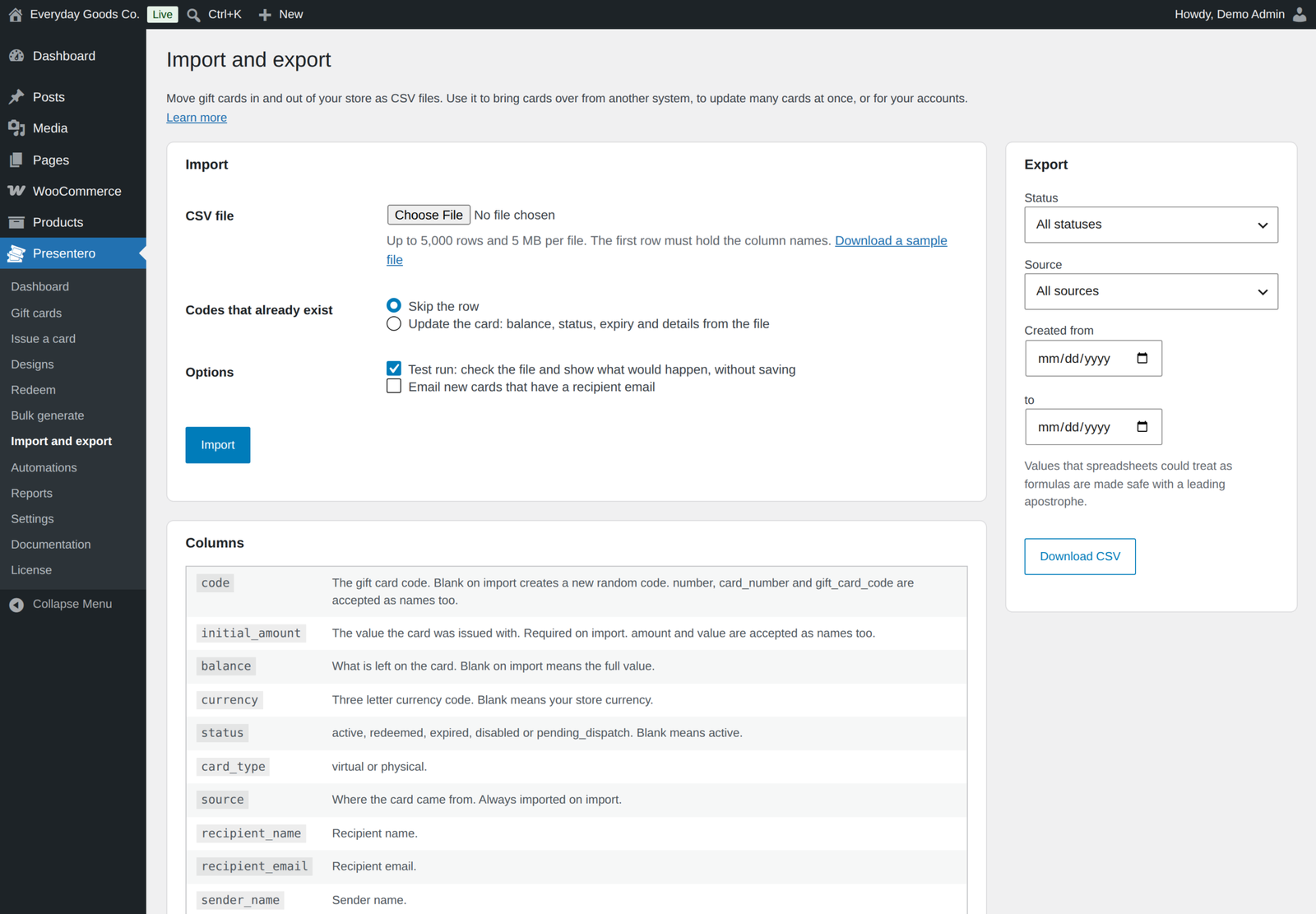
Need cards for a campaign or a corporate order? Bulk Generate creates up to 1,000 gift cards at once, ready to download as a CSV file. Every bulk batch is kept, so you can print it or download its codes at any time. You can import up to 5,000 cards from a CSV file, with a test run that shows the result before anything is saved, and export a filtered list that is safe to open in spreadsheets. Moving from another gift card plugin? The import recognises common column names, so every card keeps its code. Print-ready cards with QR codes are available for a single card, a whole order or a complete batch.
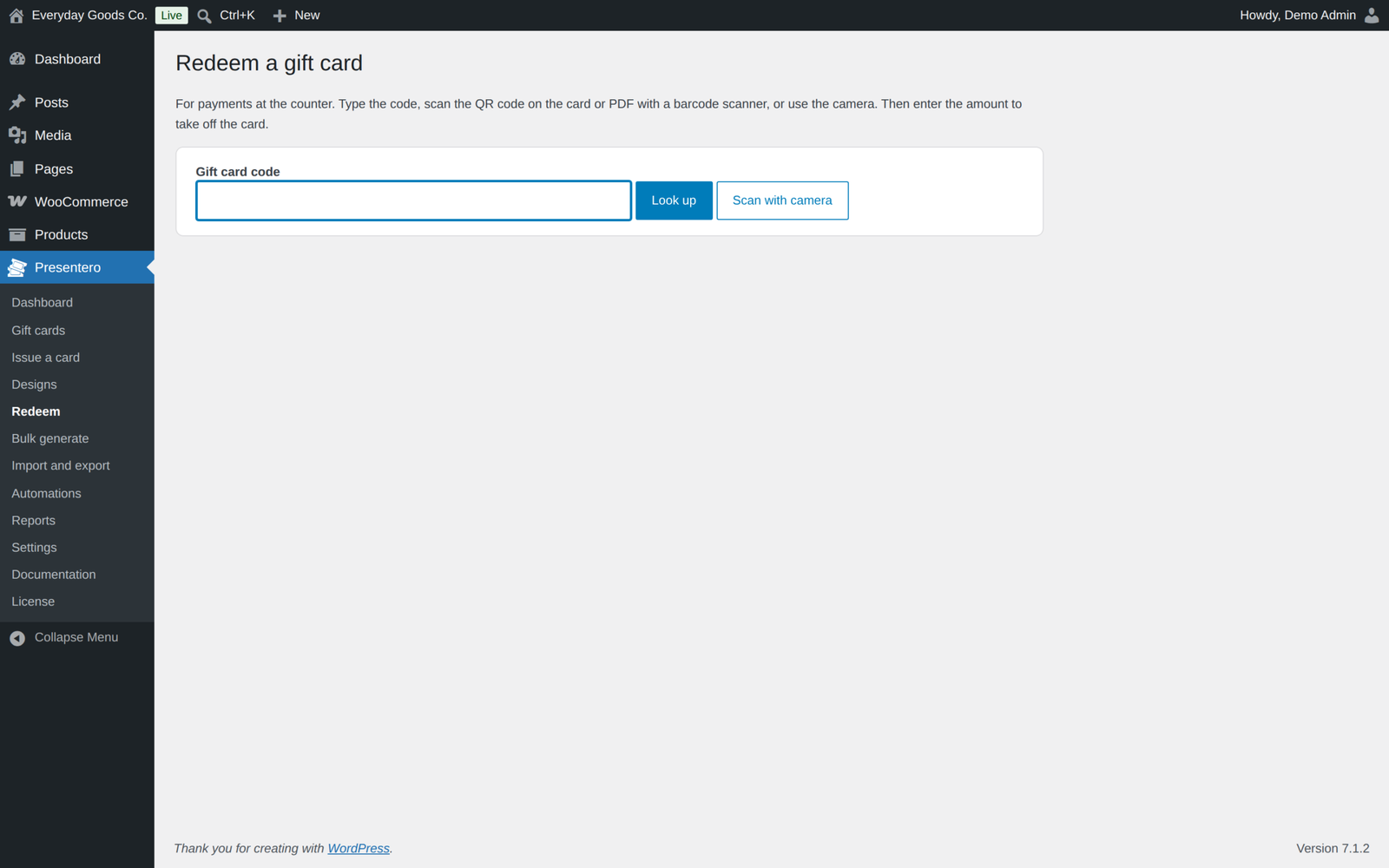
Redeem gift cards in your shop: look a card up by typing, scanning its QR code or using the camera, then take the payment. A PIN is asked for when the card has one.
A secure balance engine, with no double spending
Every balance change in Presentero is a single conditional database update. The database only takes money from a card when the card is active and still holds enough balance, all in one step. Two orders can never spend the same money, even when they are placed at the same moment.
Every purchase, redemption, top-up, refund, transfer and manual change is written to the card's history, so you always know where every cent went. When an order is cancelled, fully refunded or its payment fails, exactly what it took from each card goes back onto that card automatically.
Flexible redemption at cart and checkout
Customers apply their gift card code at the cart or checkout. A gift card works like a payment: it is taken off the final total after tax, so your tax figures stay correct. If the balance is less than the order total, the customer simply pays the difference, and whatever is left stays on the card for next time. Several cards can be used on one order.
- Works with the classic cart and checkout and with the WooCommerce Cart and Checkout blocks.
- Supports High-Performance Order Storage (HPOS).
- Customers paying the rest with PayPal through WooCommerce PayPal Payments are charged only what is left after the gift card.
- On stores that sell in more than one currency, each card pays only in the currency it was issued in.
- Logged-in customers are reminded of their wallet balance at checkout, with a one-click button to use it.
- WooCommerce Subscriptions: customers can pay renewals from their gift card balance.
Protect every balance
- PIN protection for new cards, including on the Cart and Checkout blocks.
- Usage limits: set a smallest order, choose categories cards cannot pay for, and decide whether cards can pay for sale items.
- Guessing protection: after too many wrong codes, the visitor has to wait before trying again. The counter is updated by the database, so rapid parallel attempts are all counted.
- Coupons: store coupons never discount gift cards unless you allow it.
- Transfers give the card a brand new code, so the old code stops working the moment the card changes hands. The card leaves the wallet only once the new holder has been emailed.
Automate your gift card programme
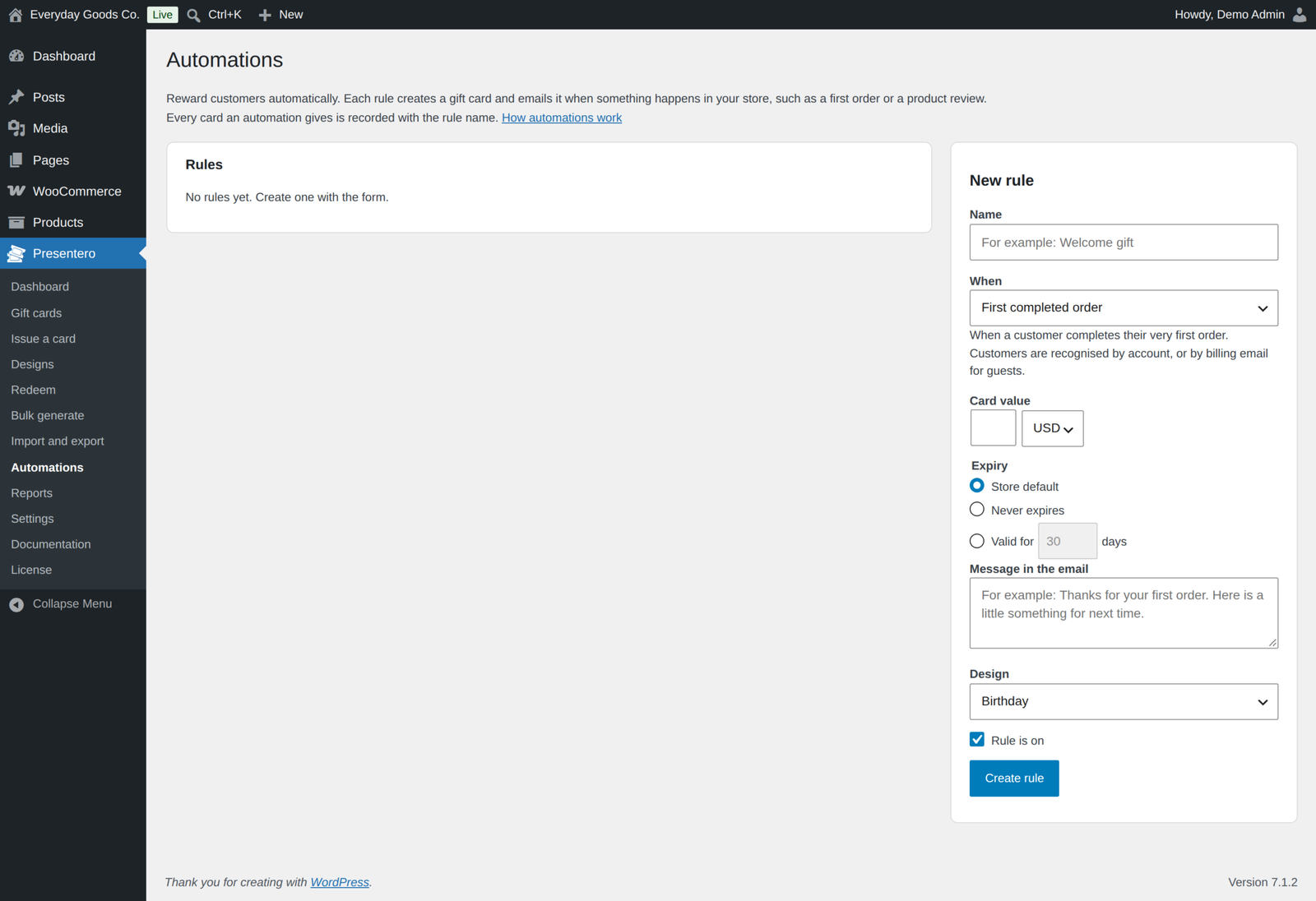
The built-in Automation Rules engine issues gift cards for you. Choose a trigger, set the card value, and the plugin takes care of the rest:
- First completed order
- Order over an amount
- Every so many orders, such as every 5th order
- Lifetime spend reached
- New account, optionally limited to certain roles
- Product review approved
Developers can add their own triggers through a filter and an action. When the order that earned a reward is cancelled or refunded, the reward card is disabled again, unless you switch off Take back rewards.
Keep customers coming back
- Expiry reminders on the days you choose, 30 and 7 days before expiry by default.
- Low balance alerts to the card holder.
- A note to the buyer the first time their gift is used.
- Top-ups: customers add money to a card they already have.
- Discounted cards: sell a $100 card for $90, or take a percentage off amounts customers type themselves.
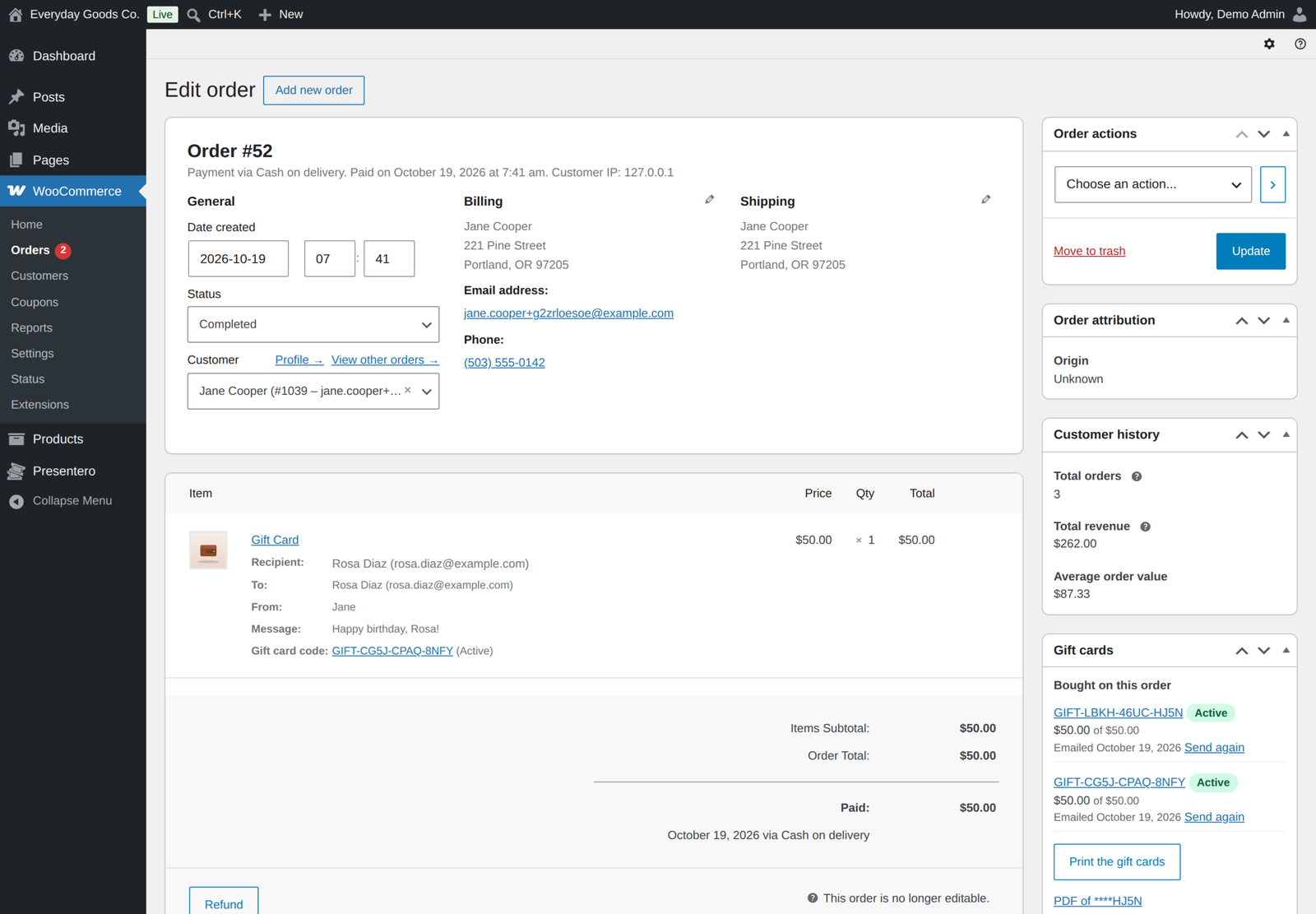
- Store credit refunds straight from the order screen.
- Refund to card: give back part or all of a gift card payment from the order screen, even on orders paid fully by gift card.
Everything included, no hidden extras
- Live HTML5 canvas card preview that updates as customers type
- 9 starter designs, plus your own with colour gradients, custom CSS gradients or background images
- Customer photo designs, checked, resized and saved again without hidden details such as location, on every host
- Four purchase form layouts
- Preset amounts and open custom amounts with a minimum and maximum
- Discounted cards, fixed price or percentage
- Virtual and physical card types, with physical cards activated on completion or when marked as shipped
- Email delivery with an optional scheduled send date that buyers can change until the card goes out
- PDF gift cards with a QR code, attached to the gift card email and downloadable from My Account
- Several recipients in one purchase
- Top-ups of existing cards
- Cart and checkout redemption, classic and block based
- Partial redemption and several cards per order
- PayPal Payments charges only the amount left after gift cards
- Each card pays only in its own currency on multi-currency stores
- WooCommerce Subscriptions renewals paid from the gift card balance
- Redeem screen for in store payments by code, barcode scanner or camera
- Gift card payments shown in order totals, emails and My Account
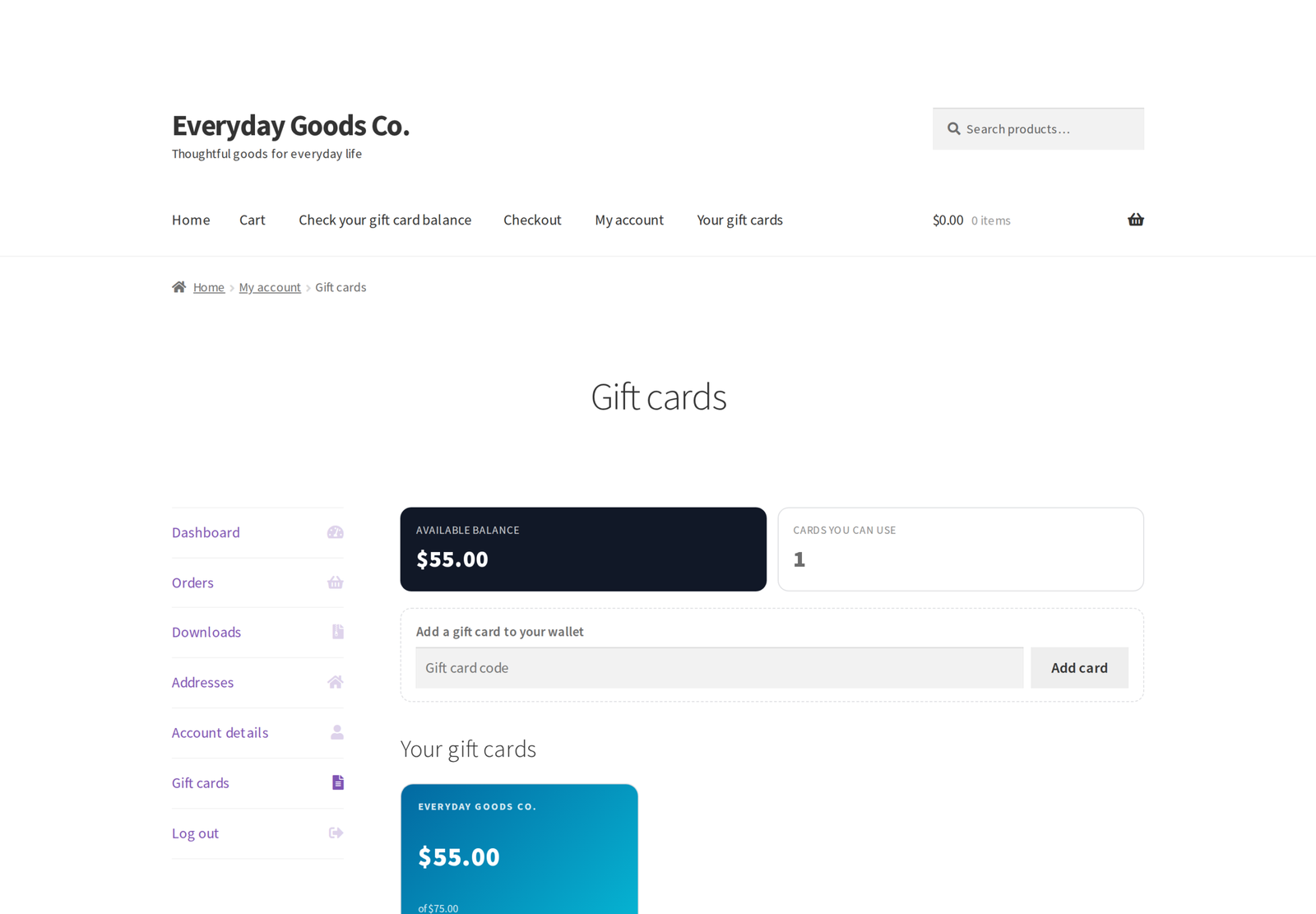
- My Account wallet with balances, codes, expiry dates and history
- Add a card to the wallet by code
- Card transfers from the wallet
- Balance checker and wallet as shortcodes and blocks
- Atomic balance engine with a full history for every card
- Automatic balance return on cancelled, refunded and failed orders
- PIN protection
- Usage limits by order total, category and sale items
- Store coupons never discount gift cards unless you allow it
- Configurable code prefix, length, characters and grouping
- Configurable expiry, with changes per product and per card
- Expiry reminders, low balance alerts and first use notes
- Refund to card and store credit refunds from the order screen
- Admin dashboard with key figures and latest activity
- Quick actions and bulk actions on the card list
- Bulk generate up to 1,000 cards, with every batch kept for printing and CSV download
- CSV import with a test run and other plugins' column names, and filtered CSV export
- Print-ready cards with QR codes for one card, an order or a batch
- Reports per currency for any period, counting the money customers actually paid
- Automation rules with six triggers, plus your own
- REST API for developers, tills and ERP systems
- Built-in documentation explaining every screen and option
- Personal data export and erase through the WordPress privacy tools
- Every request secured with nonces and permission checks
- Permission to manage gift cards controlled by a filterable capability
Reports that show what matters
See gift cards sold and redeemed per day over the last 7, 30, 90 or 365 days, or between any two dates you choose, with a table view of the same data. Reports are shown per currency, and Sold counts the money customers actually paid, including top ups and leaving out refunded cards. Track the outstanding balance, the average card value, the redemption rate and the balance left on expired cards, along with your best-selling gift card products and where your cards came from. The CSV download holds every figure on the screen, followed by the daily series.
Shortcodes and blocks for any page
Add gift card features anywhere on your site, as a shortcode or as a block in the editor.
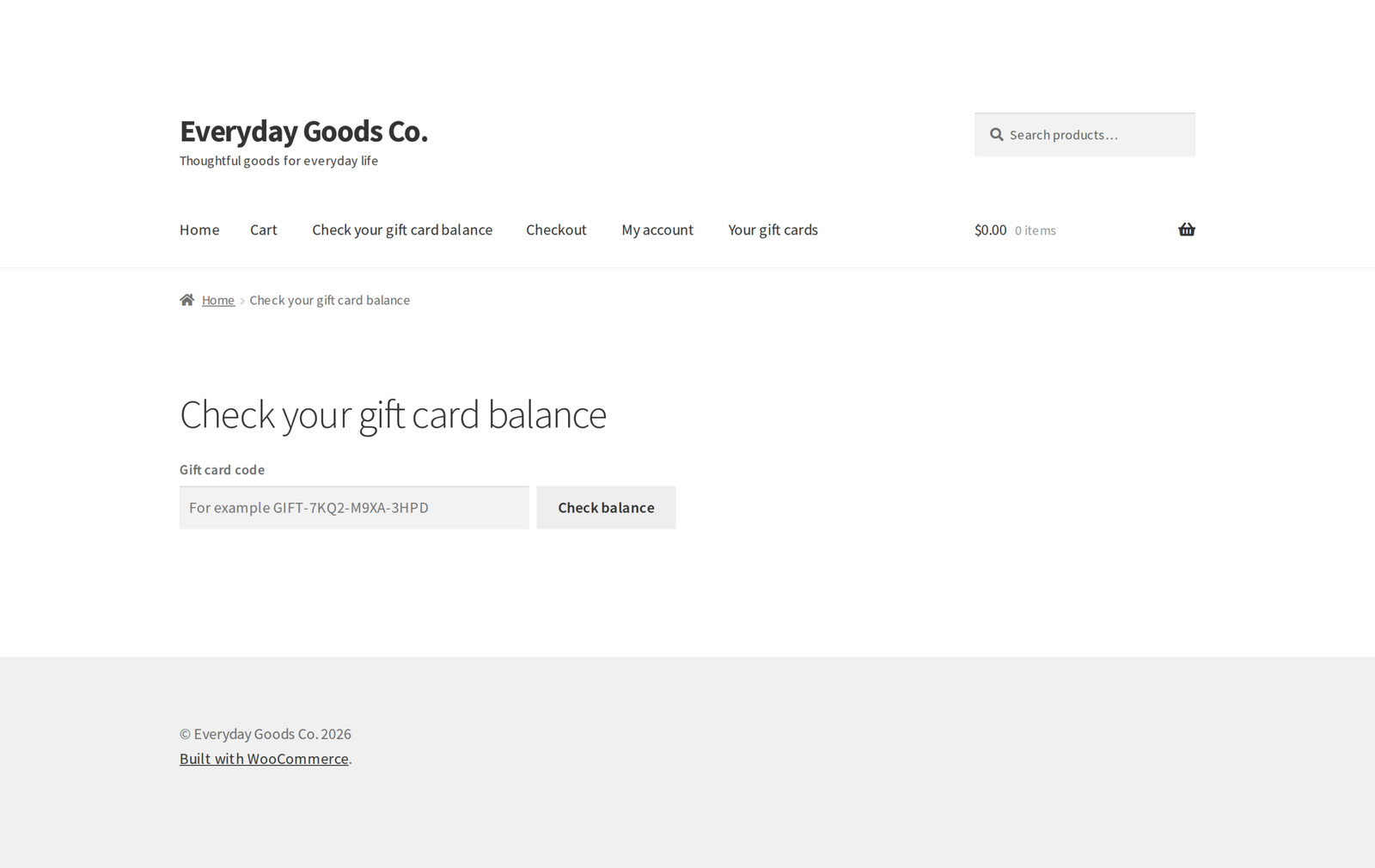
- [[presentero_balance]] or the Gift card balance block: a public form where anyone can check the balance of a gift card without logging in.
- [[presentero_wallet]] or the Gift card wallet block: shows logged-in customers all their gift cards, with balances, codes and expiry dates.
The gift card code field is added to the cart and checkout automatically, so no shortcode is needed there.
For developers
Presentero Pro includes a REST API to create, look up, update, debit and credit cards. Tills, ERP systems and automation tools can make changes with an application password or a WooCommerce REST API key once you allow it, and a reference on each payment stops it being taken twice. The API can also list cards, adjust a balance, read a card's activity, send the gift card email and fetch summary figures. It is available to users allowed to manage gift cards, and can be switched off in the settings.
More than 80 action hooks and filters let you customise the plugin's behaviour without editing its files. The code follows the WordPress and WooCommerce coding standards, uses prepared statements for every database query, and runs on PHP 7.4 and newer.
Requirements
- WordPress 6.5 or newer, tested up to 7.1
- WooCommerce 8.0 or newer, tested up to 11.2.1
- PHP 7.4 or newer
Moving from the free edition
Activate Pro, then deactivate the free edition from the Plugins screen. While both are active the free edition stays idle. Pro uses the same cards, designs and settings, so nothing needs to be moved.
Changelog
Every release, newest first, with the date it came out.
Version 1.4.2 (October 21, 2026)
- New: Visitor IP address setting (Settings, Redeeming). Detect automatically, the default, counts wrong codes by the real visitor address behind Cloudflare and behind load balancers or proxies on your own network, and accepts a forwarded address only from Cloudflare's published addresses or your own network. Server address only and Cloudflare are offered for other setups.
- New: Buy now, pay later setting (Settings, Selling), on by default. While the cart holds a gift card product, on gift card product pages and on the pay page of an order with a gift card, Afterpay and Clearpay in WooCommerce Stripe and Pay Later in WooCommerce PayPal Payments, with its messages, are not offered. Cards, the PayPal button and every other payment method stay.
- Improved: codes can be typed in any letter case, with or without their dashes and with spaces between the groups. GIFT7KQ2M9XA3HPD and gift 7kq2 m9xa 3hpd find GIFT-7KQ2-M9XA-3HPD, through an indexed lookup. Existing and imported codes work in every form.
- Improved: the gift card fields, the balance checker, the wallet Use buttons and the gift card product form work on pages kept in a page cache or a Cloudflare edge cache for any length of time. A page older than its security token fetches a current one with a small request that is never cached, and the balance checker answers without one.
- Improved: the wallet reminder on the classic cart and checkout follows the Cart page and Checkout page settings, as it does in the blocks.
- Improved: the Characters help text says which characters each choice uses.
- New for developers: Presentero_GC_Cart::apply_code() takes 'count_failures' => false for fields that accept promo codes and gift card codes together, and the presentero_gc_cloudflare_ranges, presentero_gc_hide_pay_later and presentero_gc_pay_later_gift_card_involved filters. presentero_gc_client_ip also receives REMOTE_ADDR.
- Improved: a card sent on to someone else answers only to its new code, in every form it is typed.
- Includes everything in Presentero Gift Cards 1.3.1.
Version 1.4.1 (October 19, 2026)
- Fix: requests that ask for the user's own language, such as the users/me request the block editor and the WooCommerce dashboard send with _locale=user, no longer hang until the server times out. The REST API key check now looks at the address first and only reads settings for the plugin's own routes.
- Fix: settings can be read safely while WordPress is still working out the current user, so no other early request can loop either.
Version 1.4.0 (October 17, 2026)
- New: PDF gift cards with the design, code, PIN and a QR code, attached to the gift card email (Settings, Delivery, PDF gift card) and downloadable from My Account, the customer's order page, the order screen and the card screen.
- New: Redeem screen for in store payments. Look a card up by typing, a barcode scanner or the camera, then take an amount off it. A PIN is asked for when the card has one, and a double click never takes the payment twice.
- New: QR codes on printed cards and in the customer wallet.
- New: Refund to card in the Gift cards box of the order screen gives back part or all of what an order paid with a gift card, including orders paid fully by gift card.
- New: WooCommerce Subscriptions renewals can be paid from the customer's gift card balance first, when the customer chooses so on their Gift cards page (Settings, Extras, Subscription renewals).
- New: Changes from other systems (Settings, Extras): tills, ERP systems and automation tools can create cards and change balances through the REST API with an application password or a WooCommerce REST API key. Debits and credits take a reference so a repeated request never charges twice, an optional currency check, and the card schema is published for discovery.
- New: Coupons setting (Settings, Selling). Store coupons no longer discount gift card products unless you switch it on.
- New: every bulk batch is kept. The Bulk generate screen lists batches to print, download or see again, and the gift card list can show one batch. Cards made before 1.4.0 are grouped into batches.
- New: buyers can change the recipient and day of a scheduled card from My Account until it is sent, and get an email when it is delivered.
- New: Gift card not delivered email to the store, and a dashboard notice, when a scheduled card cannot be emailed.
- New: reports for any date range and per currency. Sold now means the money paid for gift cards, including top ups and leaving out refunded cards. The CSV holds every figure, not only the daily series.
- New: bulk generation, REST API card creation and automation rules can choose the card currency.
- New: CSV import and export keep the PIN, wallet owner, buyer, delivery date, delivered time, photo and product. Files separated by semicolons or tabs are read too.
- New: custom automation triggers can fire, through the presentero_gc_automation_should_fire filter for orders and the presentero_gc_run_automation action for anything else.
- Fix: sending a card to someone else never loses it. The card leaves the wallet only once the new holder has been emailed, nothing changes when the email fails, and transfers are not offered while the gift card email is switched off.
- Fix: a scheduled card whose email fails is tried again after 1, 2, 4, 8 and 16 hours instead of being dropped, with an order note and a note in the card history.
- Fix: refunding gift card lines of an order disables that many of its cards, unused ones first. Refunding top up lines takes that part of the top up back.
- Fix: automation rewards are disabled when the order that earned them is cancelled or refunded, or refunded below the amount of an Order over an amount rule (Settings, Refunds, Take back rewards).
- Fix: unused photo clean up matches photos by their place in the uploads folder and also keeps photos of orders not paid yet, so moving to https or another domain never removes live photos.
- Fix: customer photos lose their location and other hidden details on ImageMagick hosts too, at every size, and are turned the right way up first.
- Fix: top ups are refused when the cart currency is not the card's currency.
- Fix: card amounts in emails, the wallet, the balance checker, printed cards and the admin show the card's own currency. Wallet totals, the dashboard, reports and the REST summary never add different currencies together.
- Fix: expiry reminders reach every card, however many expire at the same time, and are not sent before a scheduled card was delivered.
- Fix: the validity of a scheduled card starts on its delivery day.
- Fix: the quantity of a line with several recipients cannot be changed through the Store API either.
- Fix: preset amounts work on stores that write decimals with a comma. Separate amounts with a semicolon there, such as 12,50; 25.
- Fix: the Refund as store credit button no longer submits the order form, so unsaved order changes are not lost.
- Fix: the accordion and tabs layouts show a translatable Next button with a label for screen readers.
- Fix: the photo size limit in the browser matches the server limit.
- Improved: photo designs in the gift card email are shown as an image, which Outlook and other email programs display.
- Improved: the gift card field shows in the Cart and Checkout block editor preview.
- Improved: the CSV import test run reports invalid codes and codes repeated in the file.
- Improved: uninstalling always clears the hourly task, even when the free edition stays installed.
- Includes everything in Presentero Gift Cards 1.3.0.
Show earlier versions (1.0.0 to 1.3.1)
Version 1.3.1 (October 17, 2026)
- Fix: WooCommerce PayPal Payments now charges the amount left after gift cards. The smart buttons on the cart, the express checkouts and shipping changes inside the PayPal window asked for the full amount before.
- Fix: a gift card pays only in the currency it was issued in. On a store that sells in more than one currency, a card in another currency is refused with a clear message, and is removed from a cart whose currency changes. Developers can change this with the presentero_gc_card_accepts_currency and presentero_gc_currency_mismatch_message filters.
- Fix: when a payment fails, the balance the order took is given back to the card, as for a cancelled order (Settings, Refunds, Return spent balance). Paying the order again, at checkout, on the pay page or by a late payment, takes the balance again, and a later cancellation or refund never gives it back twice.
- Fix: CSV import reads number, card_number, gift_card_number and gift_card_code as the code column, remaining_balance as balance and expiration_date as expiry_date, so files from other gift card plugins keep their codes. The result lists the columns it ignored, and warns when the file has no code column, because every card would get a new code.
- Includes everything in Presentero Gift Cards 1.2.1.
Version 1.3.0 (October 15, 2026)
- New: an expiry filter on the gift card list shows the active cards that expire within the next 7, 30 or 90 days. The Expiring in 30 days figure on the dashboard links straight to that list.
- Security hardening: wrong code attempts by logged in customers now also count against their IP address, adding a card to a wallet is a single database step so only one account can claim it, and generated codes always keep at least 40 bits of randomness whatever the code settings.
- Security hardening: changes through the REST API are accepted only from a logged in dashboard session with a valid REST nonce. Application passwords can still read cards.
- Security hardening: wrong PINs are also counted per card; top ups, automation rewards, store credit refunds and card transfers each run only once even when two requests arrive at the same moment; discounted gift cards can no longer be paid for with another gift card's balance.
- Customer photos: uploads are limited per visitor and new photos are stored in uploads/presentero-gift-cards-for-woocommerce-pro/photos. Existing photos stay where they are.
- Review rewards are given once per person for each product.
- Pro no longer switches the free edition off. When both are active, the free edition stays idle and the Plugins screen asks you to deactivate it.
- The print page loads its styles and script as files. The bulk generator asks for a date when the expiry option is a date. CSV import reports a balance it could not change.
- Uninstalling with Remove data on delete also removes the gift card email settings and the cards per page screen option.
- Readme: External services section for the licence and update check, and links to the live demo, documentation and support.
- Includes everything in Presentero Gift Cards 1.2.0.
- Tested with WordPress 7.1.3 and WooCommerce 11.2.1.
Version 1.2.1 (September 2026)
- Fix: the changelog now says where to enter the license key: License in this plugin's menu.
- Tested with WordPress 7.1.1 and WooCommerce 11.1.1.
Version 1.2.0 (September 2026)
- New: automatic updates. Enter your license key under License in this plugin's menu, and new versions appear on the Plugins screen like any other update.
- New: with more than one ProPluginsLab plugin installed, WooCommerce, Licenses also lists them all in one place. The Plugins screen shows a reminder until a key is activated.
- New:
wp ppl-licensecommands (list, activate, deactivate, check) for managing keys from WP-CLI. - Pro features keep working with or without an active license; the license only controls automatic updates.
Version 1.1.0 (September 2026)
- New: optionally show the balance left on each gift card next to its payment on the order received page, in My Account orders and in order emails. Switch it on under Settings, Redeeming, Balance on orders. Off by default.
- Links moved to propluginslab.io.
- Tested with WordPress 7.1.1 and WooCommerce 11.1.1.
Version 1.0.0 (September 2026)
- First release.
Details
At a glance
- Latest version
- 1.4.2
- Last updated
- October 22, 2026
- Type
- Pro plugin
Requirements
- PHP version
- 7.4
- WordPress (min)
- 6.5
- WordPress (tested)
- 7.1
- WooCommerce (min)
- 8.0
- WooCommerce (tested)
- 11.2.1
Share
You might also like
 Pro
Kitero Composite Products for WooCommerce
Let shoppers build their own kits and bundles in WooCommerce, priced live. Includes logic rules, price overrides, multi choice components and a visual preview.
From $49.00 One-time
Live demo-
Free
Anticipo Pre-Orders for WooCommerce Free
Sell products before they exist in WooCommerce. Take pre-orders, hold each order until launch day, then release it automatically.
Free
Live demo -
Pro
Anticipo Pre-Orders for WooCommerce
Sell products before they exist: deposits, pay on release or cards charged on release. Add allocation limits, reports and an automatic release day.
From $49.00 One-time
Live demo