Your cart is empty.
Browse plugins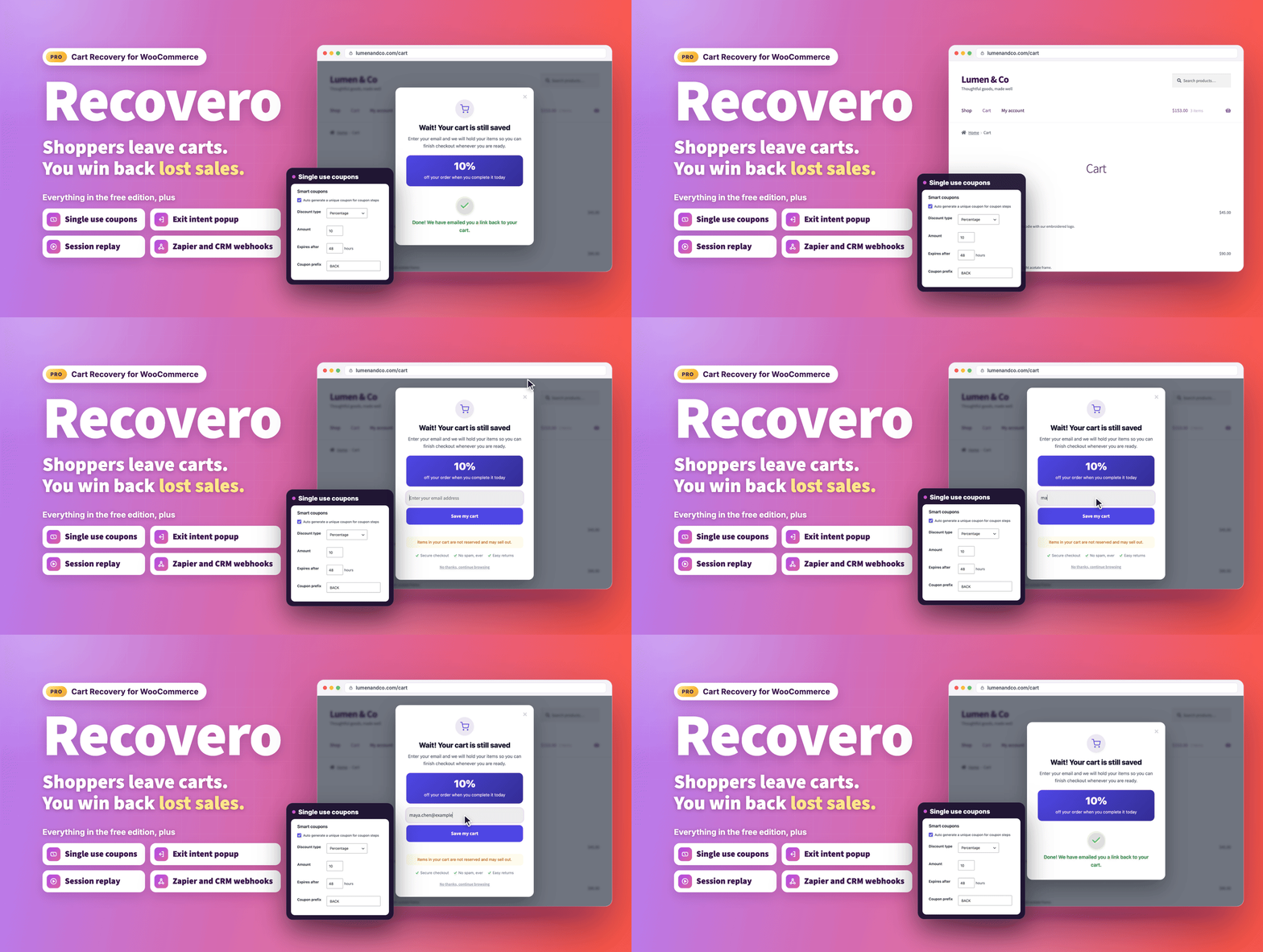
Overview
Stop losing sales you have already earned.
Most stores lose the majority of their carts before checkout is finished. Recovero - Cart Recovery for WooCommerce captures every cart in real time, including guests, then brings those shoppers back with automated recovery emails, optional SMS and WhatsApp messages, one click cart restore and smart coupons.
It works the moment you activate it. A five step recovery series and seven ready to use email templates are installed for you, so there is nothing to configure before your first cart is saved. The plugin is built for store owners who want recovery running today, and for busy stores that need it to keep up at volume.
- Live demo: demo.propluginslab.io/recovero-cart-recovery-for-woocommerce
- Documentation: docs.propluginslab.io/recovero-cart-recovery-for-woocommerce
- Support: propluginslab.io/support
What's new in 1.4.0 (October 17, 2026)
- SMS and WhatsApp steps. A campaign step can go out as a text message through your own Twilio account, only to shoppers who tick a separate text message box at checkout.
- Emails in the shopper's language. Add a translation to any template, and shoppers whose cart was saved in that language receive it with its own subject.
- Audience rules. Target a campaign by products or categories in the cart, new or returning customers, earlier paid orders, customer role or guest, and country.
- Coupons set per step. Each coupon step can have its own type, amount, expiry, minimum spend and product or category limits, so the last reminder can offer more.
- One click unsubscribe. Every email carries List-Unsubscribe headers, as Gmail and Yahoo require, and the unsubscribe link asks for confirmation so mail scanners cannot unsubscribe anyone.
- A do not email list. Opt outs are kept as a one way hash, so they survive the data retention sweep and the privacy eraser.
- Webhooks you can rely on. Failed deliveries are retried in the background, and a delivery log and a test button show what was sent.
- Revenue per currency. The dashboard and reports show one line per currency instead of adding different currencies together.
- Safer sending. Overlapping queue runs can no longer send the same email twice, emptied carts are no longer chased, and pausing a campaign holds its queued messages.
- Honest starter templates. The seven starters no longer make claims on your behalf, such as reviews, ratings, or shipping and returns promises.
Works the moment you activate it
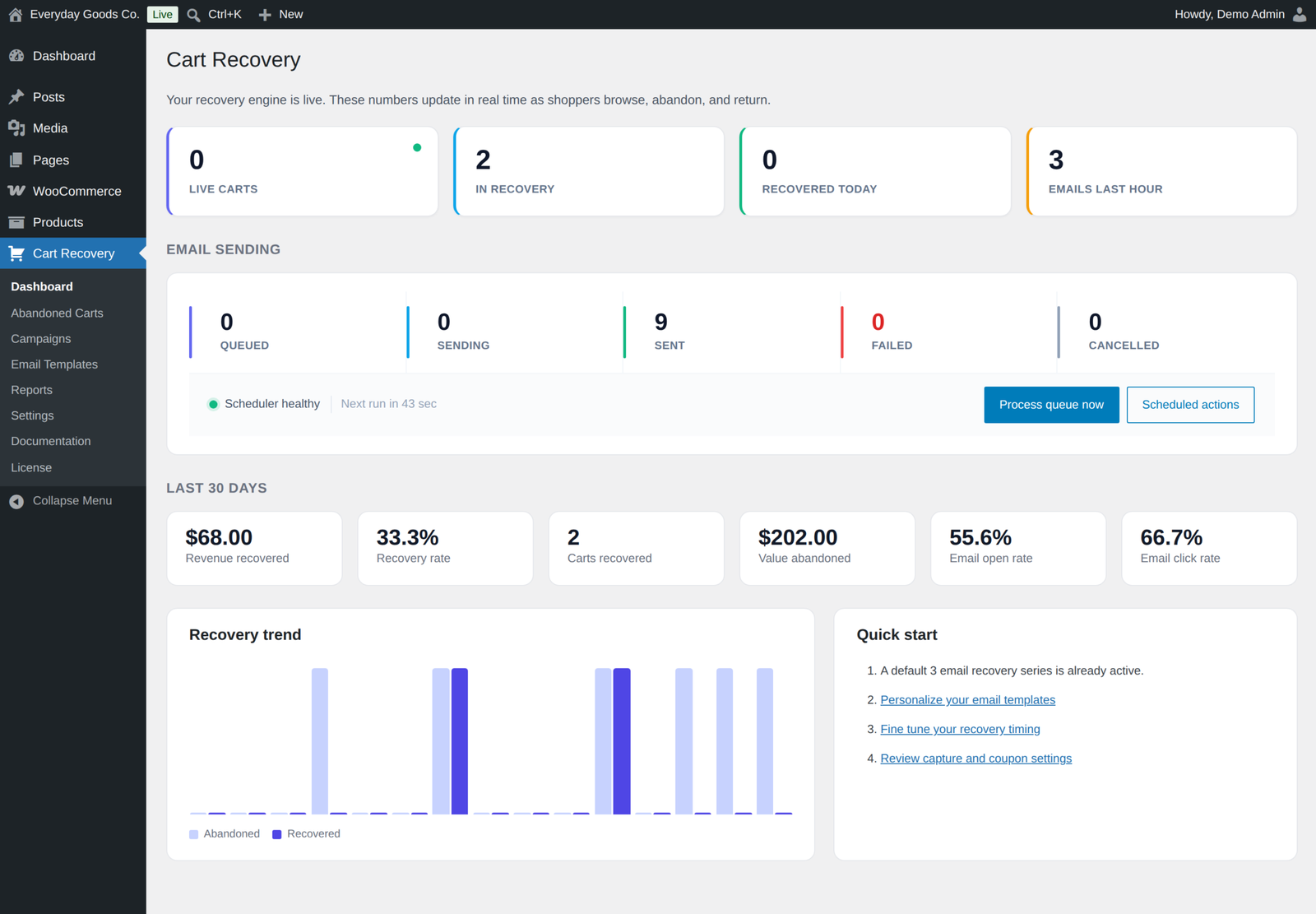
There is nothing you have to set up first. Activation creates the tables, installs seven mobile friendly starter templates and a default recovery series, then starts capturing carts straight away.
A five step series over three days is installed on activation: a reminder after 1 hour, a second after 12 hours, a discount at 24 hours, a check in at 48 hours, and a last reminder with a discount at 72 hours. Each coupon step can set its own amount, expiry, minimum spend and product limits. Every step can be edited, removed or extended.
Captures every cart, including guests
- Real time capture. Carts are saved as shoppers add items, for guests and logged in customers alike.
- Live email capture. A guest's email is captured the moment it is typed at checkout, long before the order is submitted, on both the classic and the block based checkout. The capture script loads on the checkout only, and the block checkout is also captured on the server.
- Full contact details. First and last name, company and phone are captured too, and pulled from the customer account when someone is signed in.
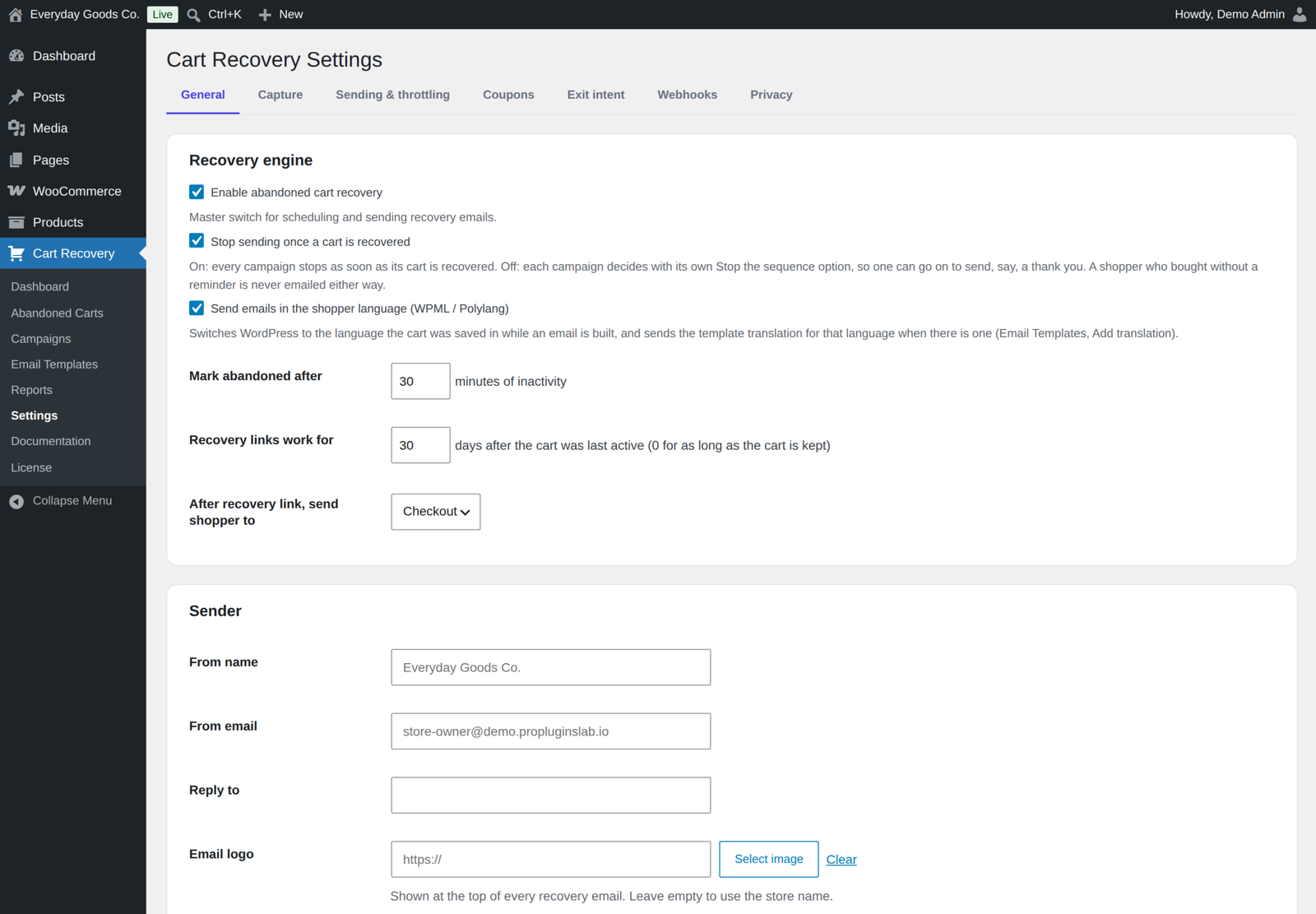
- You decide what counts as abandoned. Set how many minutes of inactivity mark a cart as abandoned (30 by default) and a minimum cart total worth capturing.
- Exclusions. Skip carts from chosen user roles, specific email addresses or whole domains such as @yourstore.com, and carts that hold excluded products or categories, so staff and test carts never receive recovery emails. Queued emails to an excluded address are cancelled.
- Emptied carts are left alone. When a shopper empties their cart, its pending reminders are cancelled.
- One cart per shopper. Carts with the same email from another browser or device are merged into the newest one, signing in keeps the guest cart, and a recovery link opened on another device continues the original cart.
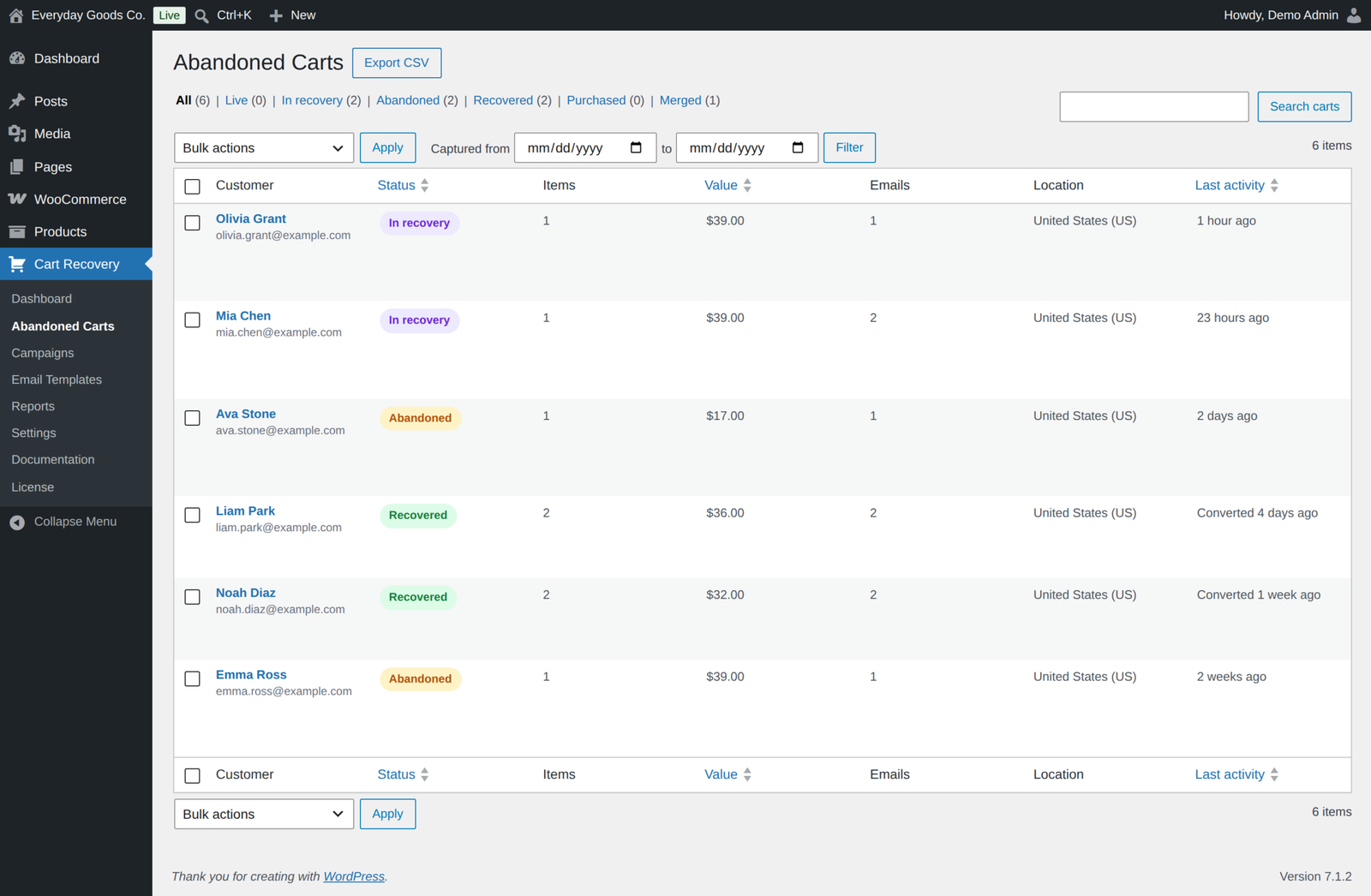
- Shopper location. The country is looked up in the geolocation database WooCommerce keeps on your server and shown in a Location column, never looked up through an online service.
A visual email builder anyone can use
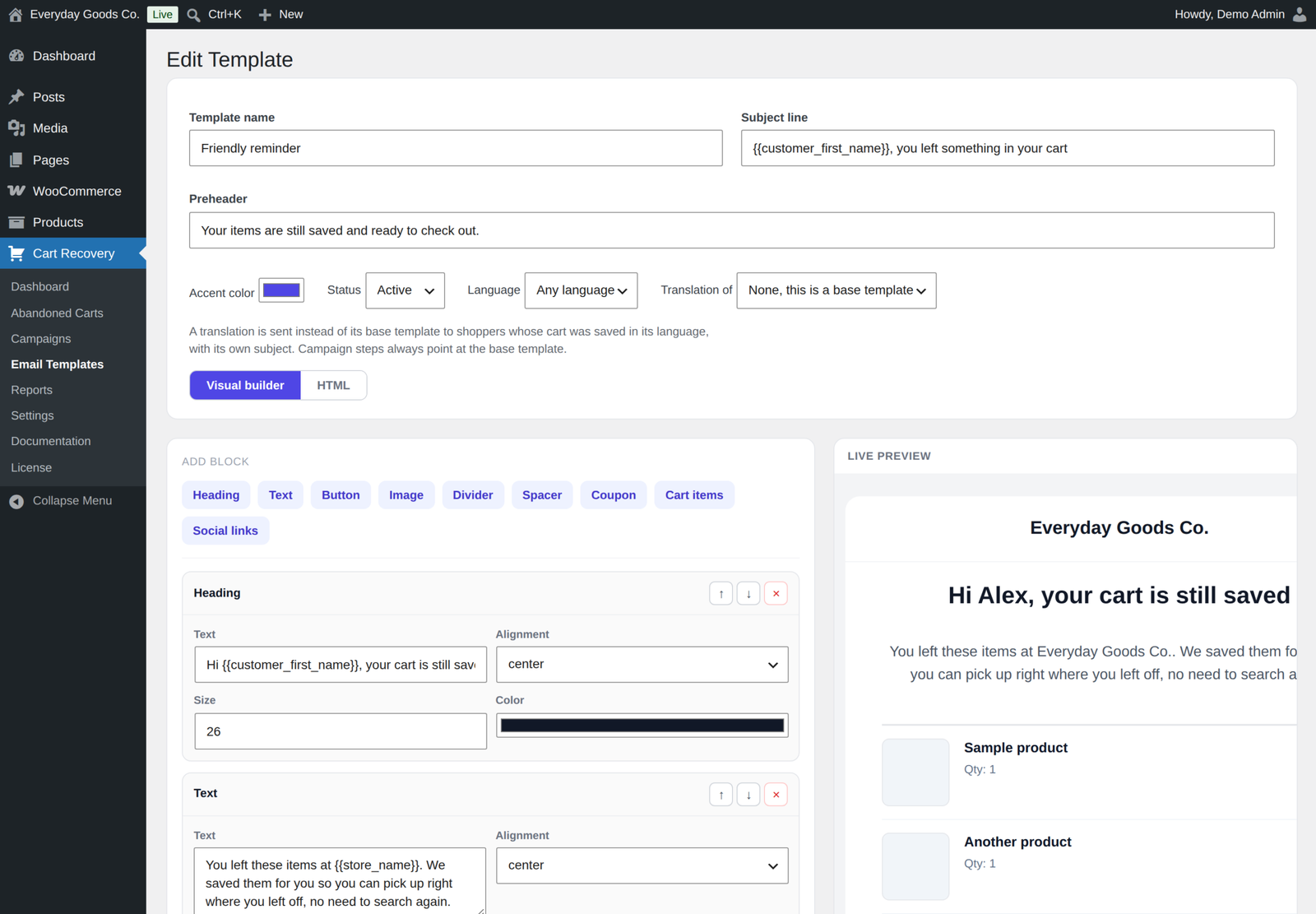
Build emails by adding blocks: heading, text, button, image, divider, spacer, coupon, cart items and social links. Edit each block inline and watch a live preview update as you work. Prefer to write your own markup? Switch to HTML mode at any time.
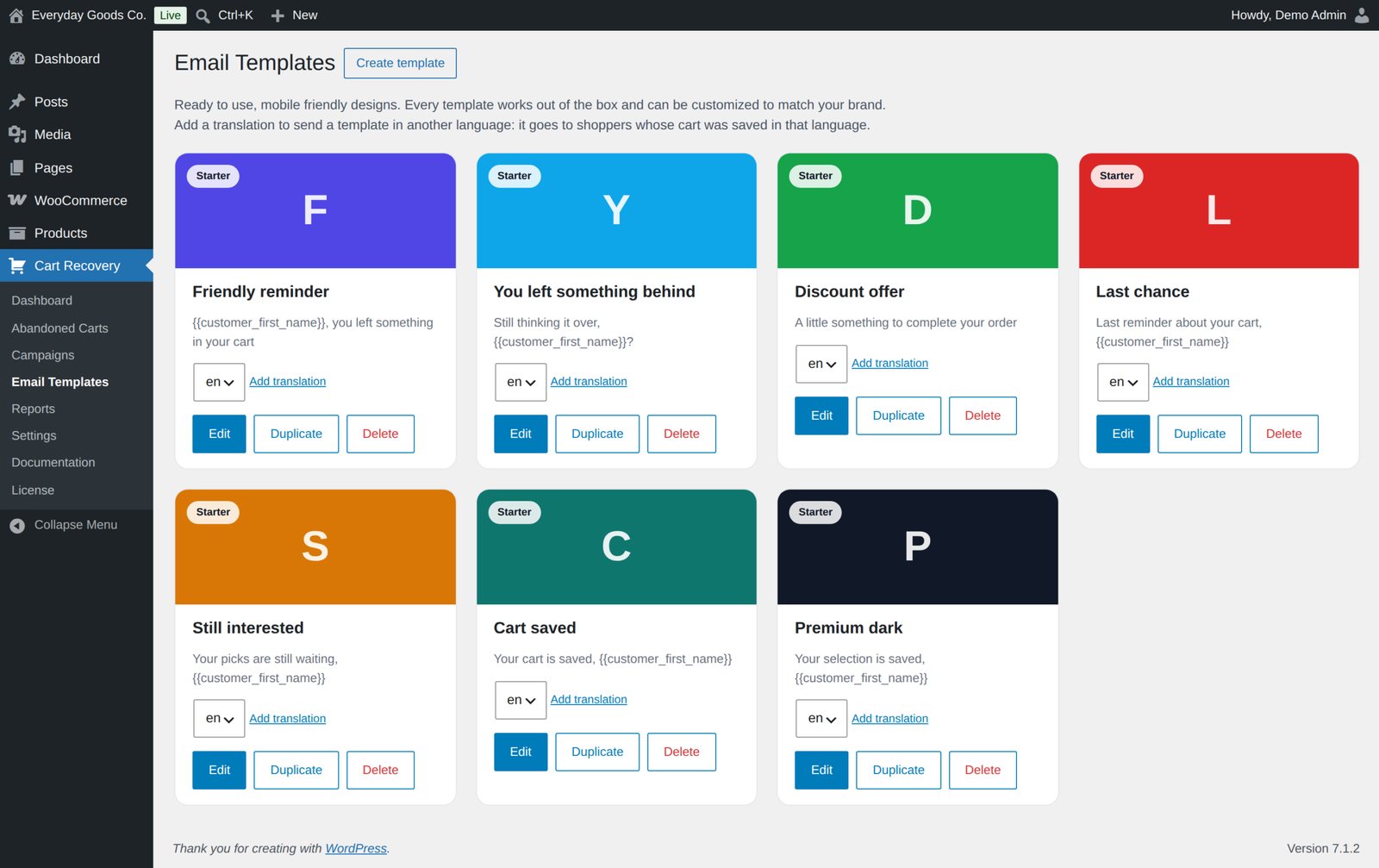
- Seven starter templates. Friendly reminder, You left something behind, Discount offer, Last chance, Still interested, Cart saved and Premium dark, all mobile friendly and ready to edit. They make no claims on your behalf (no reviews, ratings, shipping or returns promises), so you add your own proof points in the builder.
- Translations. Add a translation to any template. Shoppers get the version for the language their cart was saved in, with its own subject.
- Merge tags. The tags use double braces. Available tags:
{{customer_first_name}},{{customer_name}},{{customer_email}},{{customer_company}},{{store_name}},{{store_url}},{{cart_items}},{{cart_total}},{{cart_subtotal}},{{cart_item_count}},{{recovery_url}},{{recovery_button}},{{coupon_code}},{{coupon_block}},{{coupon_expiry}},{{unsubscribe_url}}and{{current_year}}. - Test sends. Send any template to yourself and check exactly what a shopper receives.
- Your branding. Set the from name, from email, reply to address, a logo and footer text once for every email.
Recovery sequences that convert
- Unlimited campaigns and steps. Give each step its own delay in minutes, hours or days, its own template and subject line, and an optional coupon. A step can be an email, an SMS or a WhatsApp message.
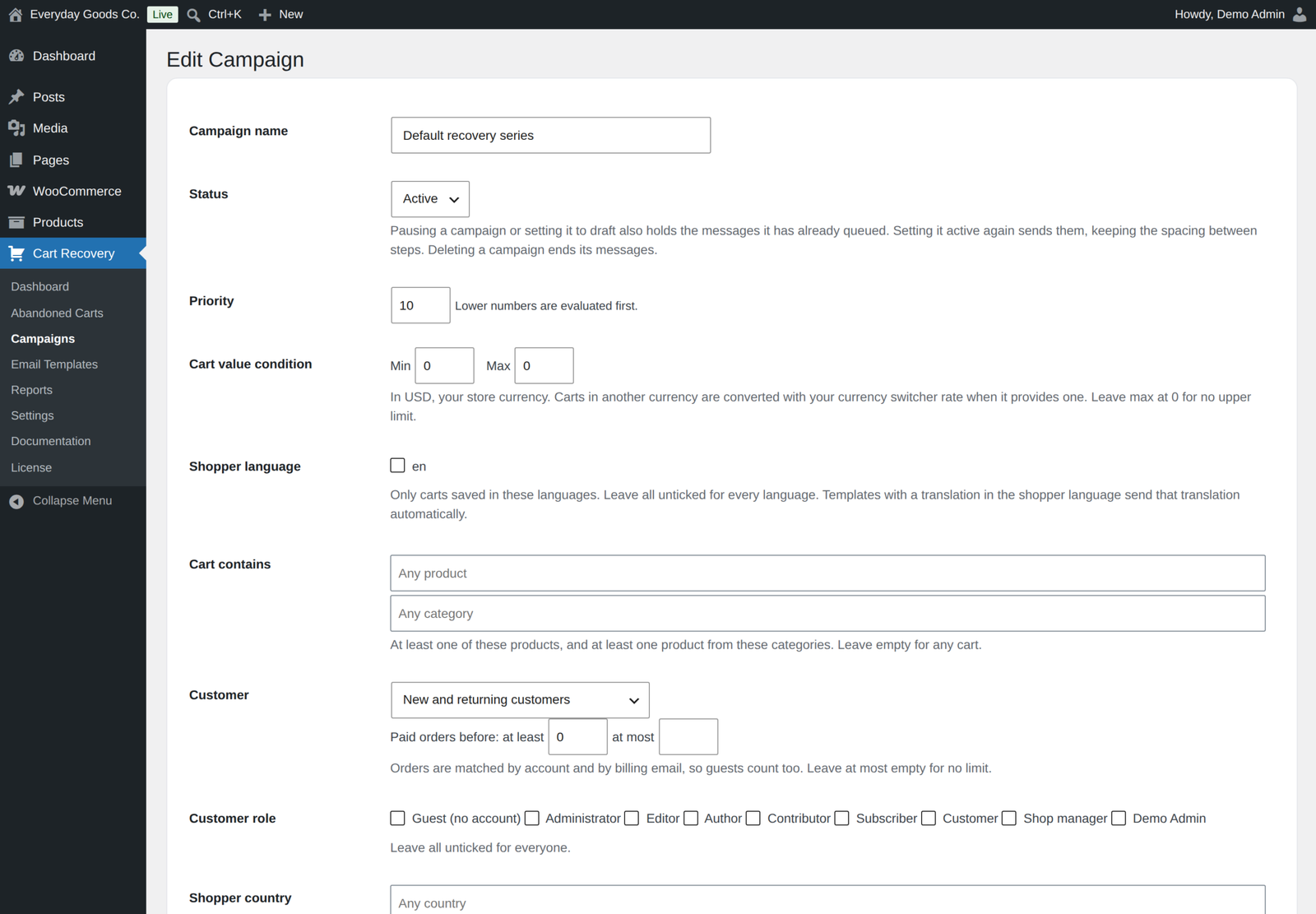
- Audience rules. Set a minimum and maximum cart value, products or categories in the cart, new or returning customers, the number of earlier paid orders, customer role or guest, country and language. A priority per campaign lets high value carts get their own treatment.
- Stops when the shopper buys. By default a sequence stops once the cart is recovered or a new order is placed, and reminders pause while an order is waiting for payment.
- Safe to edit while live. Changing a step delay moves the messages already queued, and a step added to a running campaign also reaches carts still working through it. Pausing a campaign holds its queued messages until it is active again.
Smart coupons that cannot be abused
Generate a unique WooCommerce coupon per cart that is time limited, single use by default and locked to that shopper's email address, so your discounts cannot be shared or scraped. Each coupon step can set its own type, amount, expiry, minimum spend, sale item and free shipping options, and product or category limits. A step with a different offer gets a new code, and expired unused codes are cleaned up. The recovery link applies the coupon for the shopper automatically.
Exit intent that captures the leavers
Show a cart saver popup the moment a shopper is about to leave. Guests are asked for their email, signed in customers are not asked for anything, and submitting can email the shopper a link back to their cart straight away. When you require consent, the popup shows the consent box. It is off until you switch it on.
- Targeting. Choose the devices and operating systems it appears on, and whether the shopper must have a cart.
- Triggers. On desktop: the mouse leaving the window, a fast scroll up or inactivity. Mobile uses the back gesture, an upward scroll or inactivity.
- Frequency capping. Show it once per session, once per day or every time, armed after a number of seconds on the page.
- Your words and offer. Edit the heading, message, button label, badges and accent colour, and show one of your existing coupons as a headline discount that can be applied to the cart when the shopper saves it.
Session replay
Watch what a shopper did on the storefront before a cart was abandoned, right from the cart screen. Recordings mask everything a shopper types in their browser and never record payment fields or account pages. When you require marketing consent, recording only starts for shoppers who gave it.
- Record on cart and checkout only, or every page once the shopper has a cart
- Record a share of sessions, with a time limit and a size limit per cart
- Each page visit plays on its own, latest first
- Recordings are deleted after the number of days you choose, and with their cart
- Off by default, rate limited, and consent is checked on the server
Built for volume
Sending runs on WooCommerce Action Scheduler, not fragile WordPress cron. Large backlogs drain in chained batches. Each email is claimed before it is sent, and the claim is checked again right before sending, so it can never go out twice. Failures retry with backoff before being reported.
- Throttling. Limit emails per queue run, per hour and per cart.
- Daily send window. Restrict sending to set hours in your store timezone to protect your sender reputation.
- Your own mail setup. Emails go through
wp_mail, so any SMTP plugin you use already works. - Text messages through Twilio. SMS and WhatsApp steps use your own Twilio account, and a shopper who replies STOP is never texted again. Off by default.
One click recovery that respects your stock
The recovery link adds the saved items back to the shopper's current cart, with add on and bundle details and their own coupons, and takes them straight to checkout, or to the cart if you prefer, with their recovery coupon applied. Stock is re-checked at that moment, never assumed: sold out items are skipped, quantities are reduced to what is available, and the shopper is told clearly what changed instead of hitting a wall at checkout. A cart that was already bought is not refilled, and links stop restoring a cart 30 days after its last activity unless you change that.
Know exactly what you earned
Attribution is automatic. A shopper who receives your emails and comes back on their own, even on another device, is still matched and credited. A cart only counts as purchased once its order is paid, and an order that fails, is cancelled or is refunded reopens its cart, so your numbers stay honest.
- Live dashboard. Real time counters for live carts, carts in recovery, recoveries today and emails in the last hour, plus a sending health panel.
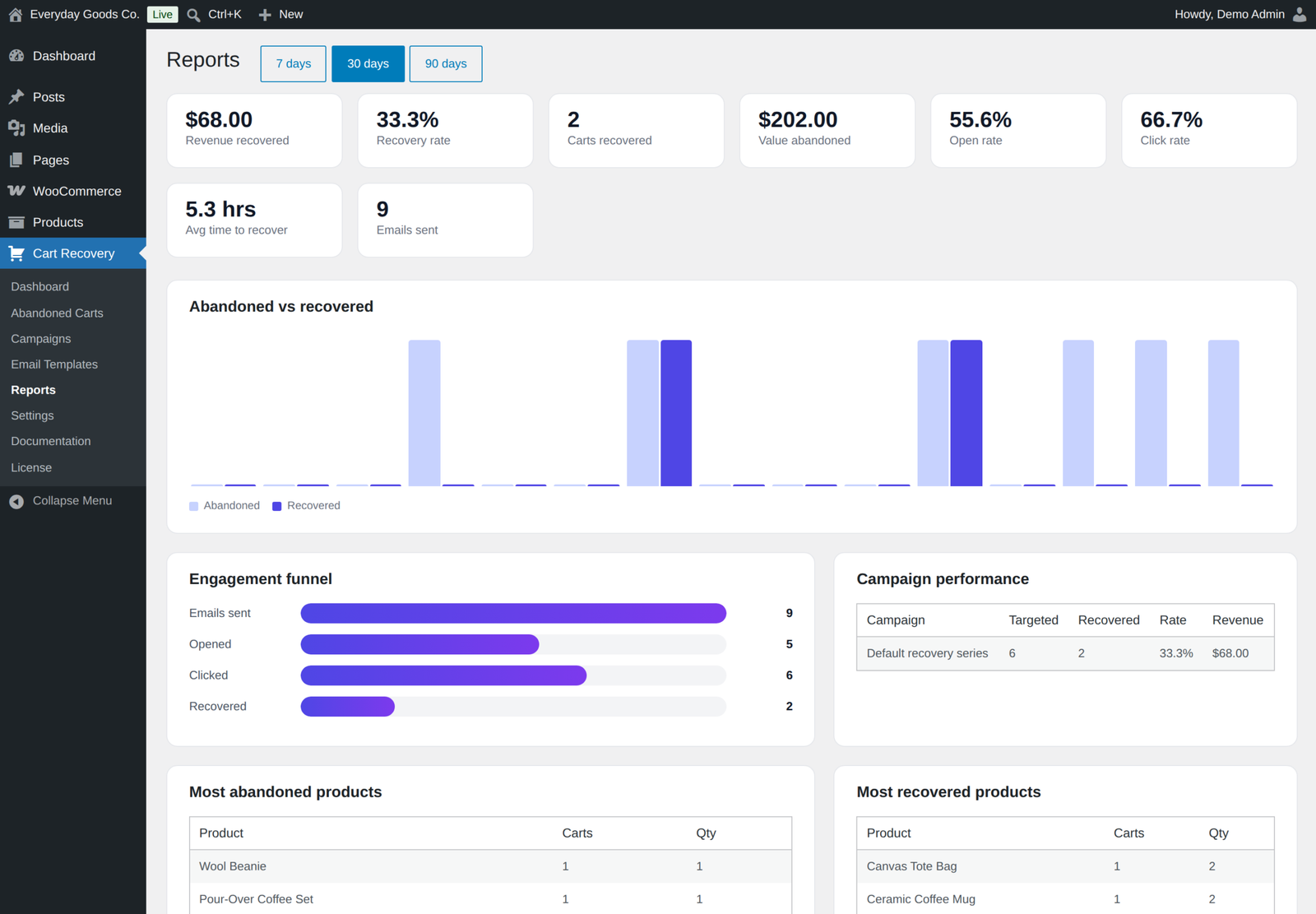
- Reports. Revenue recovered, recovery rate, carts recovered, value abandoned, open and click rates, average time to recover and an engagement funnel, across 7, 30 or 90 days.
- Revenue per currency. Amounts in different currencies are never added together. Revenue and abandoned value show one line per currency.
- Campaign performance. Carts targeted, recovered, rate and revenue for every campaign.
- Products. Your most abandoned and most recovered products.
Cart management
- Abandoned cart list with status filters, a captured date range, search, sortable columns and bulk actions
- CSV export of exactly the carts the list shows
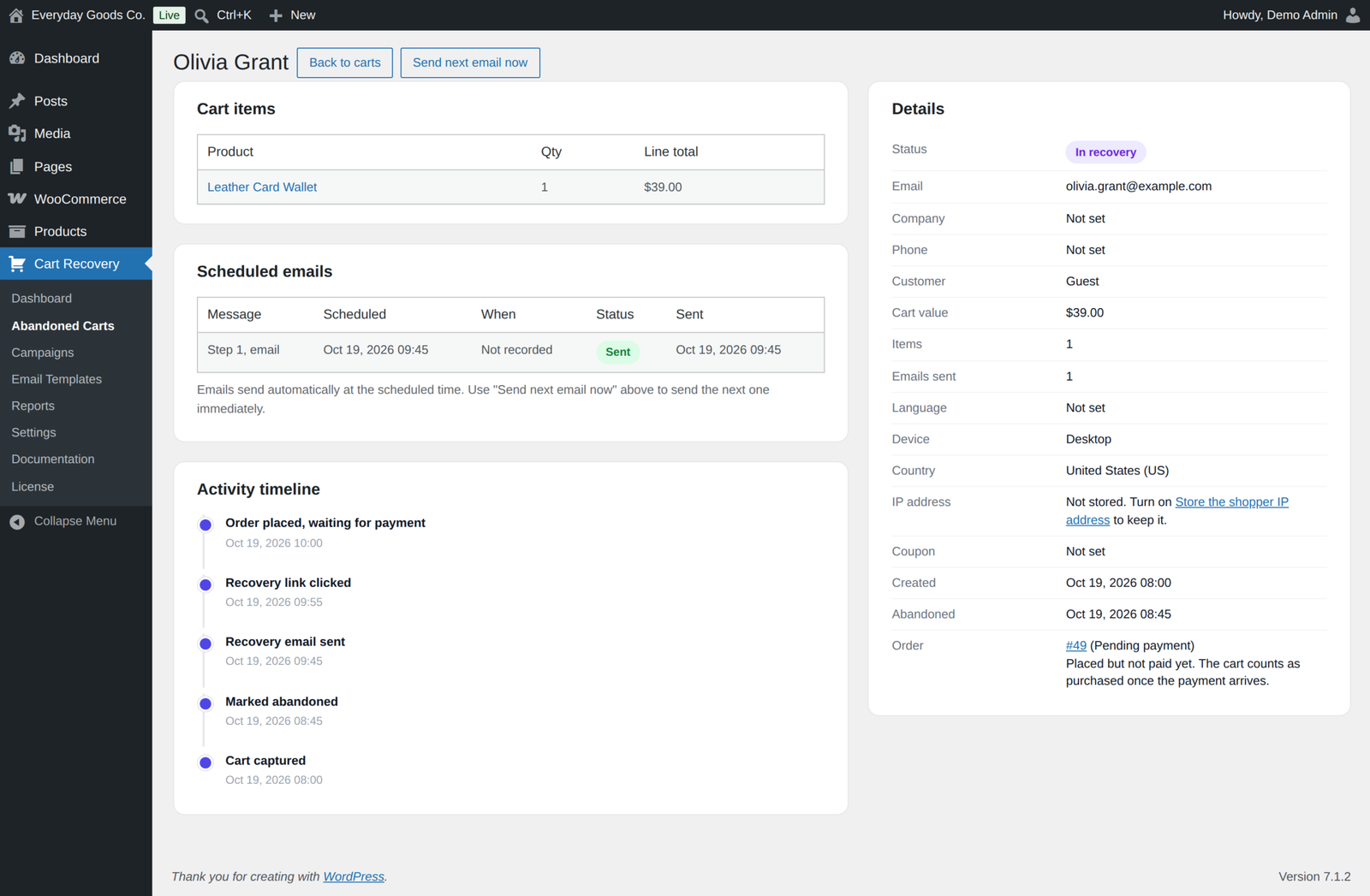
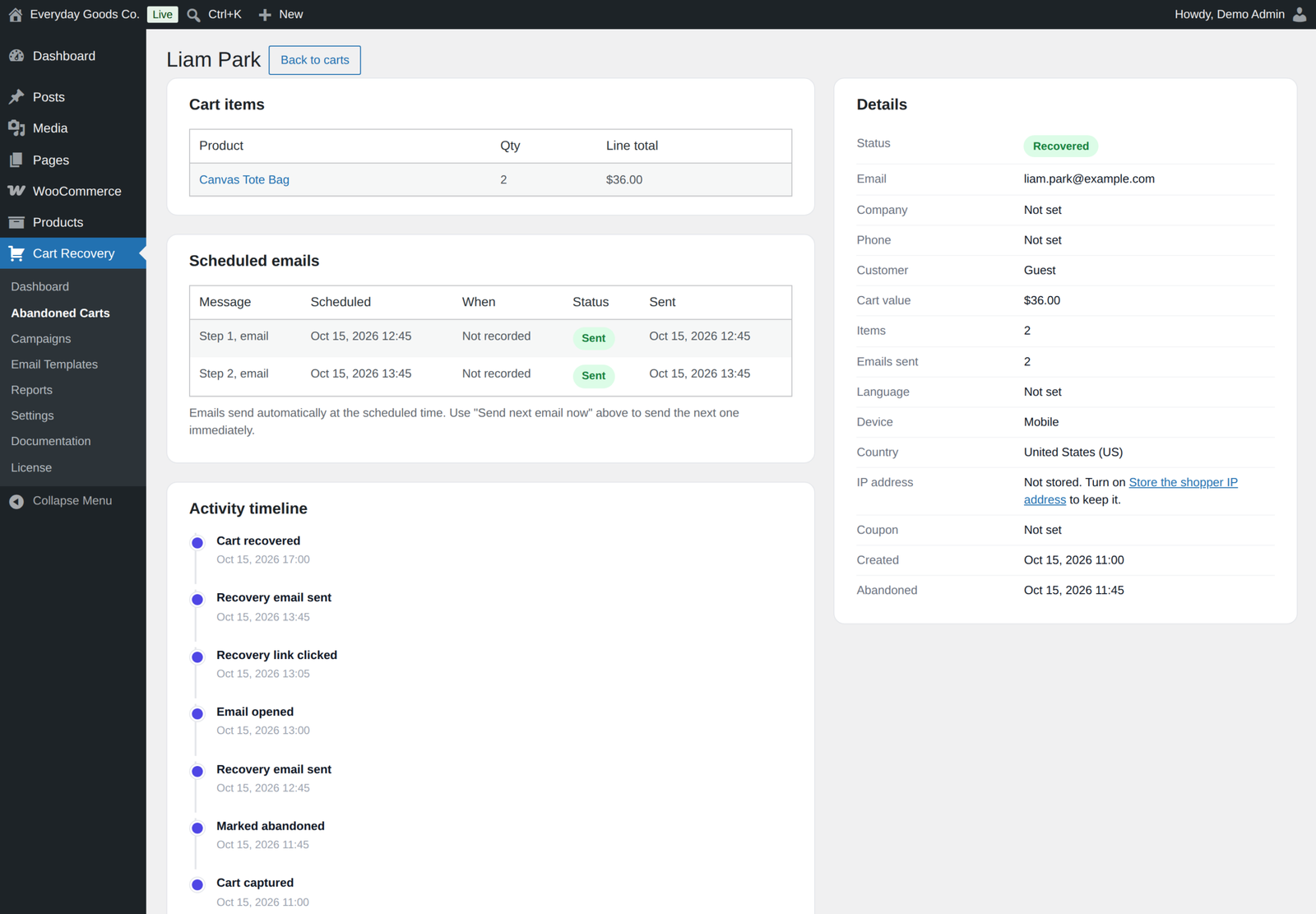
- A detailed cart view with items, contact details, device, country, the linked order and its status, scheduled messages with their channel, the reason a message was not sent, and a full activity timeline
- A Send next email now button on every cart
- Open and click tracking
Outgoing webhooks
Send cart events to Zapier, Make, your CRM or any endpoint when a cart is captured (once per cart, when its email is first known), abandoned or recovered. Payloads are JSON with the cart id, status, total, currency, item count, line items, language, recovery link and the shopper's email, name and phone. Add a signing secret and every request carries an HMAC SHA256 signature header. Failed deliveries are retried in the background, a log keeps the last 20 deliveries, and a test button sends a test event. Webhooks are off by default.
Privacy and GDPR
- Consent. An optional consent box on the classic and block checkout, with your own text. Unticking it withdraws consent given earlier, and new stores in the EU, the EEA, the UK and Switzerland start with it switched on.
- One click unsubscribe. Every email carries one click unsubscribe headers (List-Unsubscribe), as Gmail and Yahoo require, and an unsubscribe link that cannot be switched off. Opening the link asks for confirmation, so mail scanners cannot unsubscribe anyone.
- Do not email list. An unsubscribe covers the shopper's whole email address. Add or remove addresses under Settings, Privacy.
- Data retention. Carts are anonymized or deleted after the retention period you set (60 days by default). Carts that became orders are anonymized, keeping their totals for reports. Opt outs are kept as a one way hash so they are never lost.
- Export and erase. Full support for the WordPress personal data export and erase tools, including carts saved under a customer account, sent messages, the activity log and session recordings.
- IP addresses. The shopper country is looked up in WooCommerce's local geolocation database. The IP address is stored as a keyed hash; the address itself is kept only if you switch that on.
- Nothing phones home. Cart capture, emails, session replay, the exit intent popup and reports make no remote requests. Only the licence check, webhooks and Twilio text messages you set up contact another server.
Works with what you already run
- High Performance Order Storage, declared compatible
- Cart and Checkout Blocks, including live email capture and the consent boxes
- WPML and Polylang, so each shopper gets the template translation for their own language
- Full page caching, because no session or cookie is forced on an anonymous visitor
- Settings import and export, so a tuned configuration moves between stores
For developers
Actions include ppl_acrw_loaded, ppl_acrw_cart_captured, ppl_acrw_cart_contact_captured, ppl_acrw_cart_abandoned, ppl_acrw_cart_emptied, ppl_acrw_sequence_scheduled, ppl_acrw_cart_recovered and ppl_acrw_coupon_created. Filters include ppl_acrw_default_settings, ppl_acrw_starter_templates, ppl_acrw_merge_tags, ppl_acrw_should_send, ppl_acrw_queue_batch_size, ppl_acrw_recovery_url and ppl_acrw_rendered_email. The full hook reference is on the built in Documentation screen.
Moving from the free edition
Both editions read and write the same tables and settings, so every cart, campaign, template and setting carries straight over. Activating Pro does not switch the free plugin off: while Pro is active the free plugin stays idle and shows a notice so you can deactivate it yourself. Recovery emails are never sent twice.
Licence
A one-time payment with lifetime updates. Enter your licence key under License in the Cart Recovery menu and new versions appear on the Plugins screen like any other update. The licence controls updates, not features: every Pro feature works the same with or without it.
FAQ
Does it work right after activation?
Yes. A default campaign and email templates are installed on activation, so carts are recovered without any setup.
Does it support guest checkouts?
Yes. Guest emails are captured in real time from the checkout email field, before the order is placed.
How do I stop my own test carts from being tracked?
Go to Cart Recovery, Settings, Capture. Under Exclusions, tick the user roles to skip and list any email addresses or domains, one per line.
Requirements
- WordPress 6.2 or newer, tested up to 7.1
- WooCommerce 8.0 or newer, tested up to 11.2.1
- PHP 7.4 or newer
Changelog
Every release, newest first, with the date it came out.
Version 1.4.0 (October 17, 2026)
- New: SMS and WhatsApp steps. A campaign step can be sent as a text message through your own Twilio account, only to shoppers who tick a separate text message box at checkout. Off by default.
- New: template translations. Add a translation to any template; shoppers whose cart was saved in that language receive it, with its own subject. Campaigns can be limited to chosen languages.
- New: per step coupons. Each coupon step can set its own type, amount, expiry, minimum spend, sale item and free shipping options, and product or category limits. A step with a bigger offer gets a new code and the earlier unused code is expired. The coupon block shows when the code expires, and a new {{coupon_expiry}} merge tag does too.
- New: campaign audience rules: products or categories in the cart, new or returning customers, number of earlier paid orders (guests included), customer role or guest, and shopper country.
- New: one click unsubscribe. Every recovery email has List-Unsubscribe and List-Unsubscribe-Post headers, as Gmail and Yahoo require. The unsubscribe link opens a confirmation page instead of acting on its own, so mail scanners cannot unsubscribe anyone, and it can no longer be switched off.
- New: a do not email list. Opt outs are kept as a one way hash of the address, so they survive the data retention sweep and the privacy eraser. Add or remove addresses under Settings, Privacy.
- New: product and category exclusions on Settings, Capture, and a coupon usage limit on Settings, Coupons.
- New: webhook retries, a delivery log of the last 20 deliveries and a Send a test event button. Payloads now include the line items.
- New: recovery links stop restoring a cart 30 days after its last activity (Settings, General). Set 0 to keep them working.
- New: exit intent badges are your own text (none by default), the popup shows the consent box when consent is required, and the discount code can be applied to the cart when the shopper saves it.
- Fix: two queue runs that overlapped could send the same email twice, because a claimed email was handed out again 10 minutes after it was queued rather than after it was claimed.
- Fix: a shopper who emptied their cart was still sent the whole reminder series and coupons. The saved copy is now emptied and its reminders cancelled.
- Fix: any script could send source=exit_intent to the capture endpoint to get a cart link email sent and to skip the consent requirement, even with the popup switched off. The popup now needs a token issued by the site, works only while switched on, and asking for the link no longer counts as consent to the reminder series. The cart link email also respects the recovery master switch.
- Fix: pausing a campaign or setting it to draft now stops the messages it had already queued; they are held and sent when the campaign is active again. Deleting a campaign ends them.
- Fix: subject lines showed HTML entities, for example D'Angelo or & in a store name.
- Fix: the "Cart captured" webhook was sent on every change to a cart. It is now sent once per cart.
- Fix: reports added amounts in different currencies together. Revenue and abandoned value are now shown per currency, and cart value conditions compare in the store currency.
- Fix: "Stop sending once a cart is recovered" (global and per campaign) and "Track recovery link clicks" did nothing. Both now work.
- Fix: the exit intent headline showed the generated coupon amount next to a different coupon code, and codes such as SAVE-10 were rewritten to codes that do not exist. The headline is now read from the chosen coupon, the code is kept as typed, and a missing or expired code is not shown.
- Fix: the starter templates contained an invented "Verified customer" review, ratings, "thousands of shoppers", free shipping and 30 day returns promises, and an "about to expire" deadline. They now make no claim on the store's behalf; untouched starters are updated automatically.
- Fix: a recovery link replaced the shopper's newer cart, dropped add on and bundle data, did not re-apply the shopper's own coupons, and refilled the cart of someone who had already bought. All four are fixed.
- Fix: an inactive or deleted template was still sent, or silently swapped for another one. The step is now skipped with the reason on the cart screen, and a template a step uses cannot be deleted.
- Fix: changing a step delay now moves the messages already queued.
- Fix: after 30 wrong links from one address, valid recovery links stopped working for every shopper behind that address.
- Fix: the capture script loaded on every page and could take an email typed into a newsletter or contact form. It now loads on the checkout only, and the block checkout is also captured on the server through the Store API.
- Fix: unticking the consent box at checkout now withdraws consent given earlier.
- Fix: test emails reported "sent" when sending failed, and Send now reported "no pending email" when the email was cancelled. Both now say what happened and why.
- Fix: the View order link on the carts list now opens the right screen with High Performance Order Storage.
- Fix: deactivating left the recordings purge and batch jobs scheduled, and sites without Action Scheduler never purged recordings.
- Improved: the exit intent cart link email counts towards the hourly cap and the reports, and has open and click tracking.
- Improved: carts that became an order are now anonymized after the retention period too (totals are kept), the privacy export includes the messages sent, the activity log and session recordings, and the suggested privacy policy text covers tracking, location and the optional features.
- Improved: new stores in the EU, the EEA, the UK and Switzerland start with Require marketing consent switched on.
- Improved: only one campaign can be the default, and the default campaign setting follows the campaign editor.
- Improved: settings that did nothing were removed (capture from account, delete captured field, restore cart link, stop on new order, admin new order notice, settings mode, and the switch that could hide the unsubscribe link).
- Improved: bulk Mark as abandoned says when some carts were skipped, and the cart screen shows each message's channel and the reason it was not sent.
- Improved: the product name in notices, the privacy tools and the docs is now Recovero.
Version 1.3.1 (October 16, 2026)
- Fix: the "Send next email now" button on a single cart screen no longer fails with "The link you followed has expired."
Version 1.3.0 (October 15, 2026)
- New: date range filter on the Abandoned Carts screen (Captured from / to). Export CSV now exports exactly the carts the list shows, following the status, search and date range you picked.
- Improvement: unsubscribing now applies to the shopper's email address, so no cart from the same address is emailed again, not only the cart whose link was clicked.
- Improvement: Require marketing consent now works end to end. A consent box (with your consent text) is added to the classic and block checkout, no contact details are captured until it is ticked, and recovery emails are only sent to carts that recorded consent. It stays off unless you switch it on.
- Improvement: the personal data export now includes every stored field (email, name, company, phone, browser, consent, cart items) and also finds carts saved under the customer's account. Erasing also clears the company, cancels queued reminders and covers account carts.
- Fix: the data retention sweep now also clears the company, and no longer picks the same already anonymized carts every day, so older carts are reached.
- Security hardening: request limits on the public capture endpoint and on recovery, unsubscribe and tracking links; country lookup uses the local WooCommerce database only and never an online geolocation service; spreadsheet safe CSV export; settings import accepts only a small JSON file; admin screens no longer print inline scripts or click handlers.
- Uninstall (when you chose to delete data) now also removes the plugin's leftover options, temporary values, scheduled jobs and per user notice state.
- Change: activating Pro no longer switches the free plugin off. While Pro is active the free plugin stays idle and shows a notice so you can deactivate it yourself. Pro tables are created on the next admin page load in that case.
- Security hardening: the exit intent popup can send at most a few cart link emails per visitor per hour; webhooks use WordPress' safe HTTP request, which refuses local network addresses; the webhook signing secret is no longer shown again after saving and is left out of settings exports; session replay uploads are rate limited and check consent on the server; replay routes use named permission checks.
- Fix: uninstalling Pro with data deletion on now also drops the session recordings table.
- Tested with WordPress 7.1.3 and WooCommerce 11.2.1.
Show earlier versions (1.0.0 to 1.2.2)
Version 1.2.2 (October 2026)
- Fix: a cart is now marked purchased only when its order is paid (or put on hold for a bank transfer or cheque). Before, it was marked the moment the order was created, so an order left at Pending payment showed as a purchase and the shopper was never sent a recovery email.
- Fix: an order that fails, is cancelled or refunded now reopens its cart, also for purchased carts, not only recovered ones.
- Fix: one shopper no longer ends up with several carts. Carts with the same email from another browser or device are merged into the newest one, signing in keeps the guest cart, and a recovery link opened on another device continues the original cart.
- Fix: when a shopper pays, every other open cart with the same email or account is closed, so no reminders go out about a cart from another browser.
- Fix: reminders are paused for an hour while an order waits for payment, and are never sent once the shopper has paid for an order.
- New: Merged filter on the Carts screen. Merged duplicates are kept for reference and left out of All and the abandoned totals.
- New: the cart screen shows the order with its current status, and says when it is still waiting for payment.
- After updating, existing carts are put straight in the background: carts marked purchased whose order was never paid are reopened (without sending emails), duplicates are merged, and open carts of shoppers who have since paid are closed.
- Fix: session replay. Each page visit is now recorded and played on its own, so a visit always starts from a full page snapshot instead of failing with an error. The first snapshot is saved straight away, unsent events are retried until the server confirms them, and recordings of signed in customers are no longer rejected.
- Fix: a long session no longer stops recording before the checkout. When a recording reaches its size limit the oldest visits are dropped, not the newest.
- New: the replay player lists every recorded visit, plays the latest one first, and explains why a visit cannot be played or when the page needs a reload.
Version 1.2.1 (September 2026)
- Fix: the changelog now says where to enter the license key: License in this plugin's menu.
- Tested with WordPress 7.1.1 and WooCommerce 11.1.1.
Version 1.2.0 (September 2026)
- New: automatic updates. Enter your license key under License in this plugin's menu, and new versions appear on the Plugins screen like any other update.
- New: with more than one ProPluginsLab plugin installed, WooCommerce, Licenses also lists them all in one place. The Plugins screen shows a reminder until a key is activated.
- New:
wp ppl-licensecommands (list, activate, deactivate, check) for managing keys from WP-CLI. - Pro features keep working with or without an active license; the license only controls automatic updates.
Version 1.1.0 (September 22, 2026)
- New: Choose user roles to exclude from cart tracking, under Settings, Capture, Exclusions.
- New: Exclude email addresses and whole domains from tracking. Matching carts are not captured, and queued recovery emails to an excluded address are cancelled.
- Links moved to propluginslab.io.
- Tested with WordPress 7.1.1 and WooCommerce 11.1.1.
Version 1.0.2 (August 21, 2026)
- Improvement: The minimum PHP version is now 7.4, so the plugin installs on more hosts. Every file has been checked for compatibility across 7.4 and later.
- Improvement: Tested with WordPress 7.1 and WooCommerce 11.0.1.
- Fix: The session replay player now stays inside its panel instead of spilling past it when the recorded window was wider than the screen.
- Fix: Cart CSV export now sets its escaping explicitly, so a field containing a backslash exports the same way on every supported PHP version.
- Fix: The currency symbol shown in the admin now decodes the same way on PHP 8.1 and later, where the default changed.
Version 1.0.1 (August 17, 2026)
- New: Session replay. Watch what a shopper did on the storefront before a cart was abandoned, from the cart screen. Every field they type is masked in their browser, and payment and account areas are never recorded.
- New: Optional IP address storage for captured carts. It is off by default and can be switched on under Settings, Privacy.
- New: The shopper country is recorded automatically and shown in a Location column on the Abandoned Carts screen, and on each individual cart.
- Improvement: Adding a step to a campaign that is already running now schedules that step for carts still working through the sequence, timed from when each cart was abandoned.
- Fix: Email open tracking no longer counts an image prefetch by a mail provider as an open.
Version 1.0.0 (August 2026)
- Initial release.
Details
At a glance
- Latest version
- 1.4.0
- Last updated
- October 19, 2026
- Type
- Pro plugin
Requirements
- PHP version
- 7.4
- WordPress (min)
- 6.2
- WordPress (tested)
- 7.1
- WooCommerce (min)
- 8.0
- WooCommerce (tested)
- 11.2.1
Share
You might also like
 Free
Free
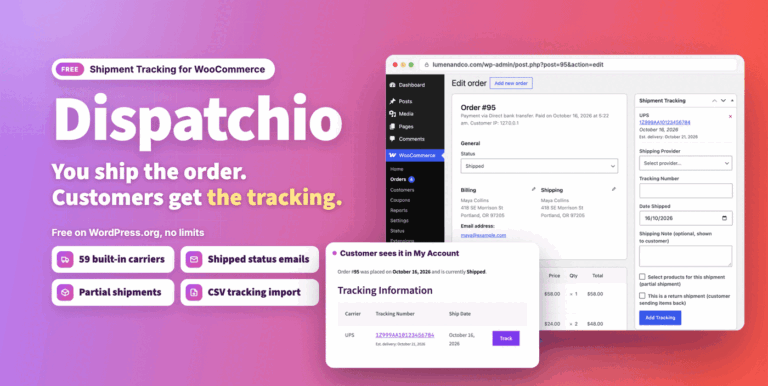
Dispatchio Advanced shipment Tracking for WooCommerce Free
Free WooCommerce shipment tracking with 285 built-in carriers, Shipped and Delivered statuses and tracking emails. Existing tracking from other plugins appears instantly.
Free
Live demo-
Pro
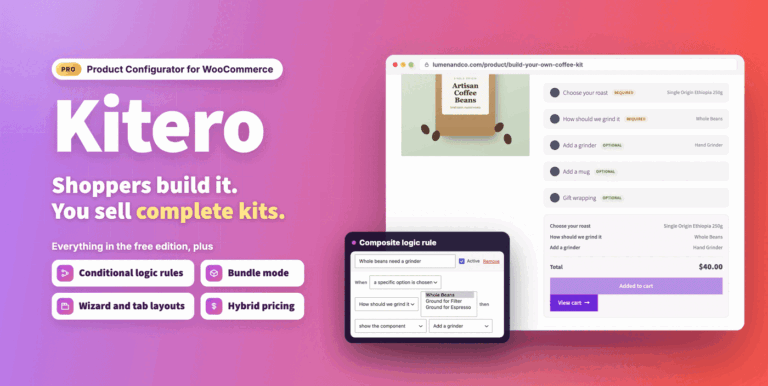
Kitero Composite Products for WooCommerce
Let shoppers build their own kits and bundles in WooCommerce, priced live. Includes logic rules, price overrides, multi choice components and a visual preview.
From $49.00 One-time
Live demo -
Pro
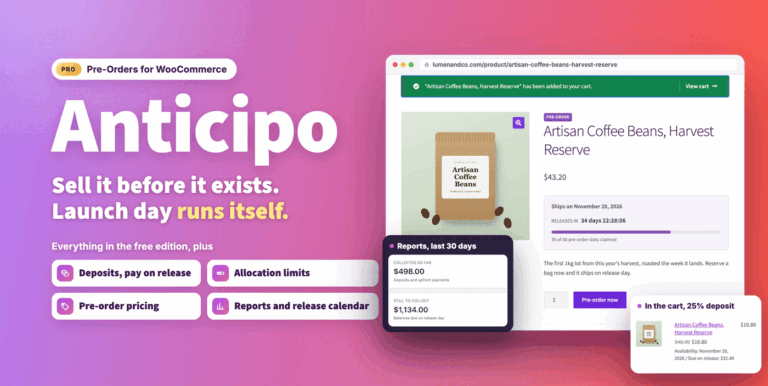
Anticipo Pre-Orders for WooCommerce
Sell products before they exist: deposits, pay on release or cards charged on release. Add allocation limits, reports and an automatic release day.
From $49.00 One-time
Live demo