Your cart is empty.
Browse plugins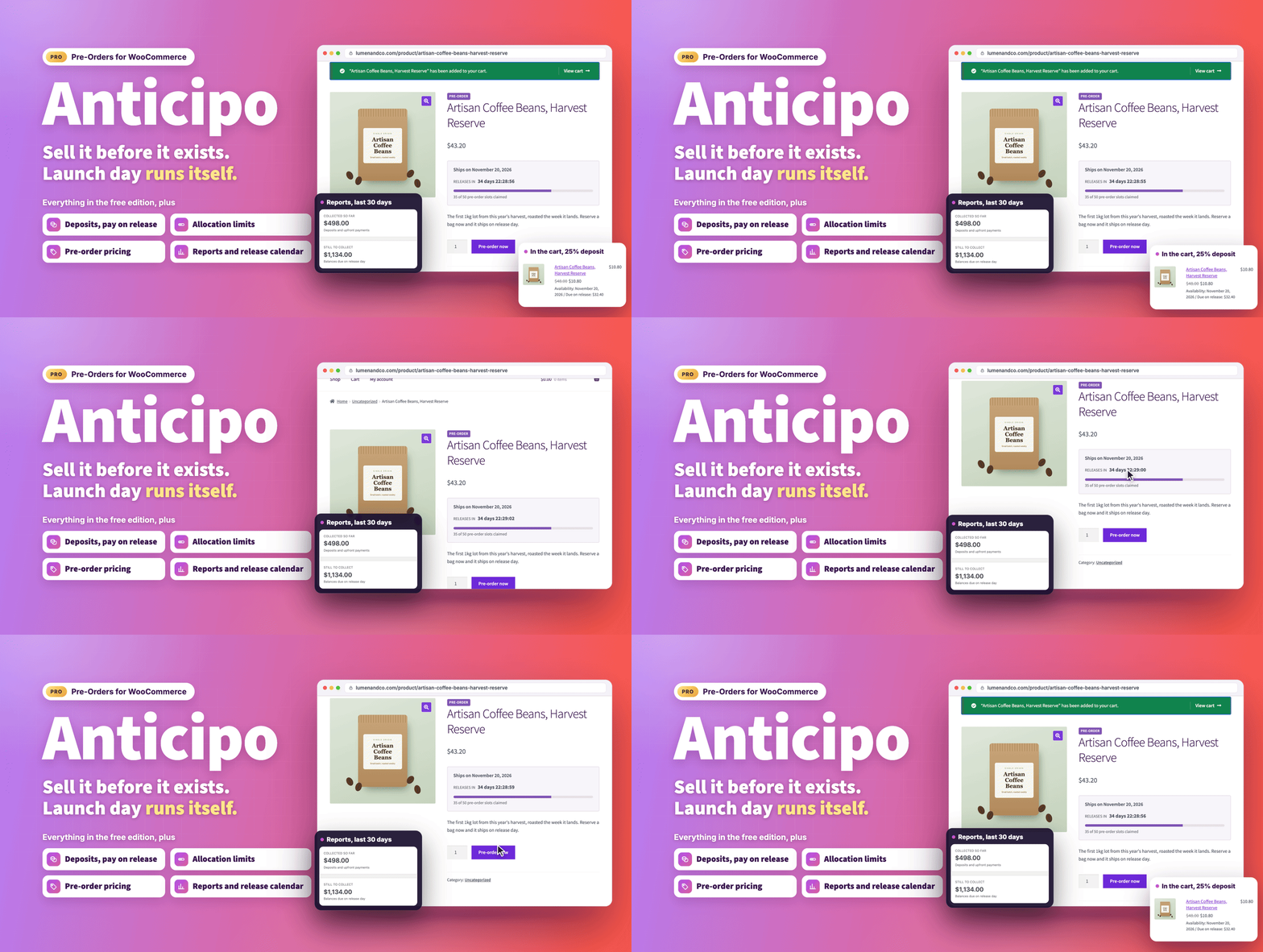
Overview
Sell it before it exists.
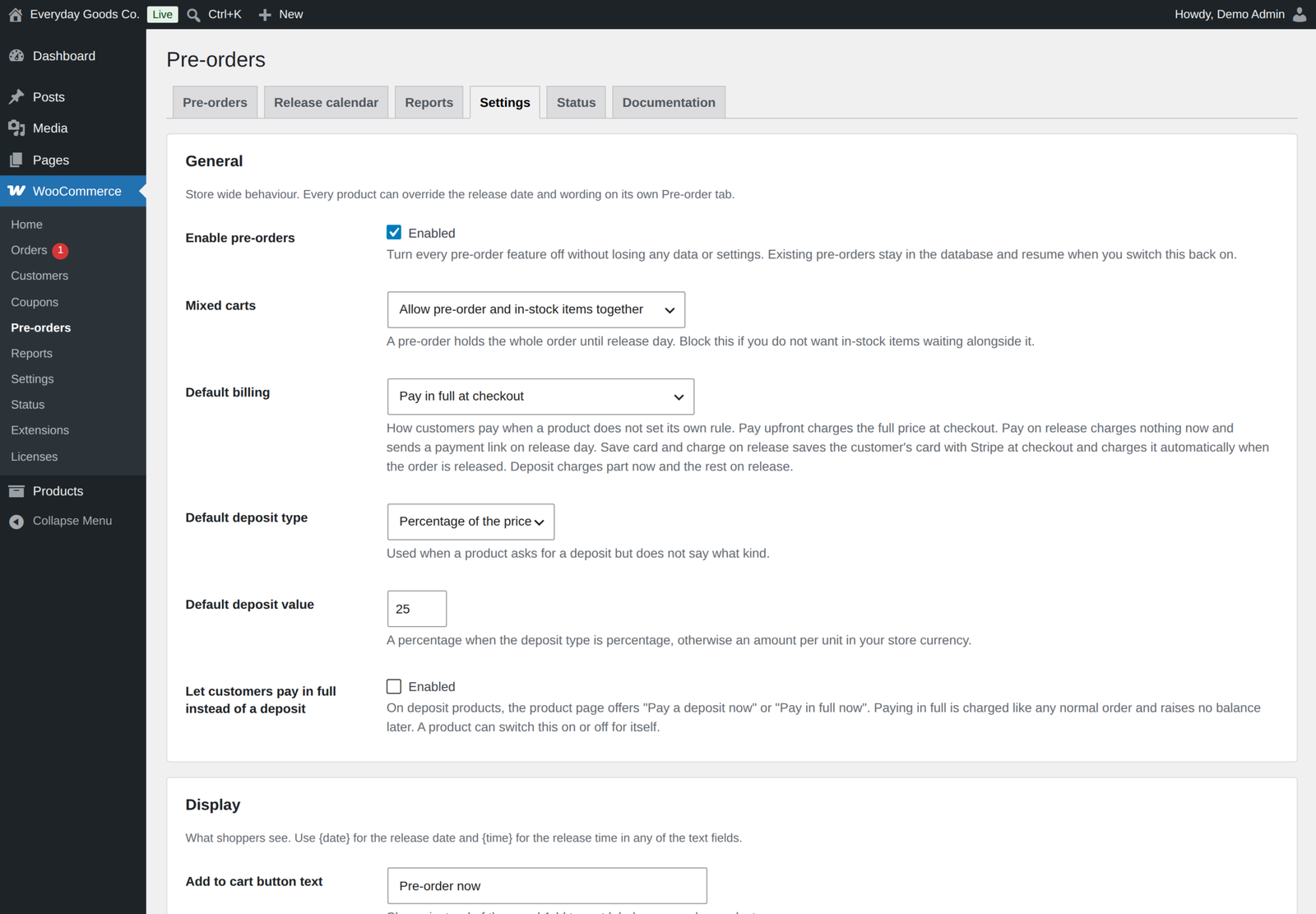
Anticipo - Pre-Orders for WooCommerce lets you take money for a product weeks or months before it lands, then hands the whole launch back to you as a normal WooCommerce order on release day. No spreadsheets, no manual chasing, no launch morning spent clicking.
What's new in 1.5.2 (October 21, 2026)
- Buy now, pay later stays off pre-orders. "Hide buy now, pay later on pre-orders" (Payments, on by default) hides Afterpay, Clearpay, Klarna and Affirm in Stripe, and PayPal Pay Later buttons and messages, while the cart holds a pre-order. Cards and the PayPal button stay.
- No card needed when a gift card covers it. With charge on release, when gift cards or discounts cover the whole order, checkout asks for no card and the order settles on release.
- Coupons count from checkout. A one-time coupon counts as used as soon as the pre-order is placed, on the classic and the block checkout, and comes back if the order is cancelled.
- The current release date everywhere. The "Pre-order release" line in WooCommerce emails, My Account and the order screen shows the current date once you set or change it.
- Cancellations settle cleanly. An item cancelled while its release charge is being taken comes off the amount to charge, or is refunded to the card if the charge went through.
- Clear refund notices. When a customer cancels a paid pre-order, you get an order note and an admin notice with the exact amount to refund.
- Your choice for tiny balances. "Amounts below the card minimum" lets you write off an amount below the card minimum, stated exactly, or email the customer a payment link.
Earlier releases are listed in the changelog at the end of this page.
Four ways to get paid
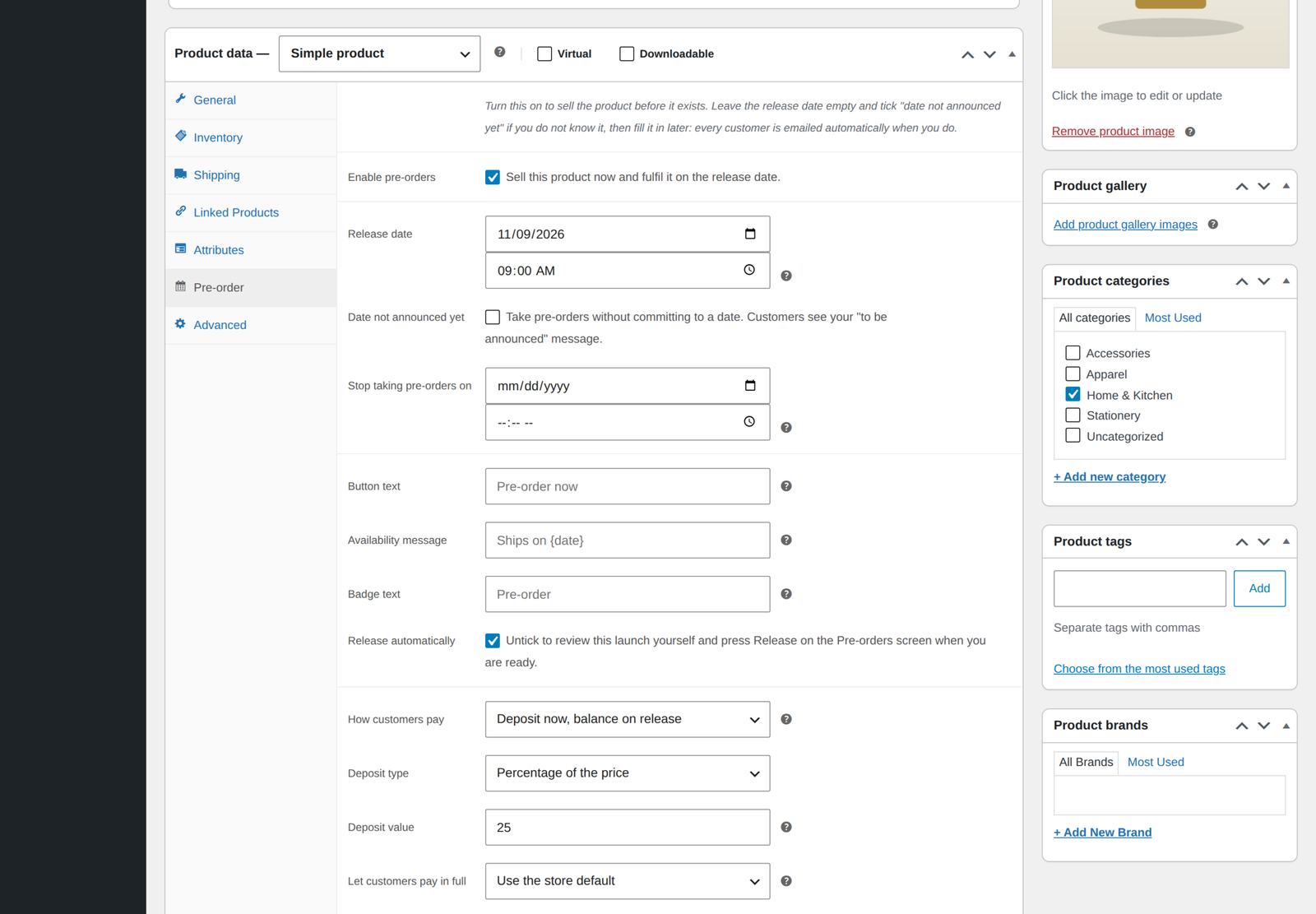
- Pay in full. At checkout: the full price. On release day: nothing more to pay.
- Deposit. At checkout: a percentage, or a fixed amount per unit, plus shipping and fees. On release day: the remainder, through a balance order with a secure payment link. You can let customers choose to pay the full price instead.
- Pay on release. At checkout: shipping and fees only. On release day: a balance order for the product price, with a secure payment link.
- Save card, charge on release. At checkout: nothing. The card is saved with the WooCommerce Stripe Gateway. On release day: the whole order is charged automatically, with retries and a payment deadline. Cancelling an item lowers the charge.
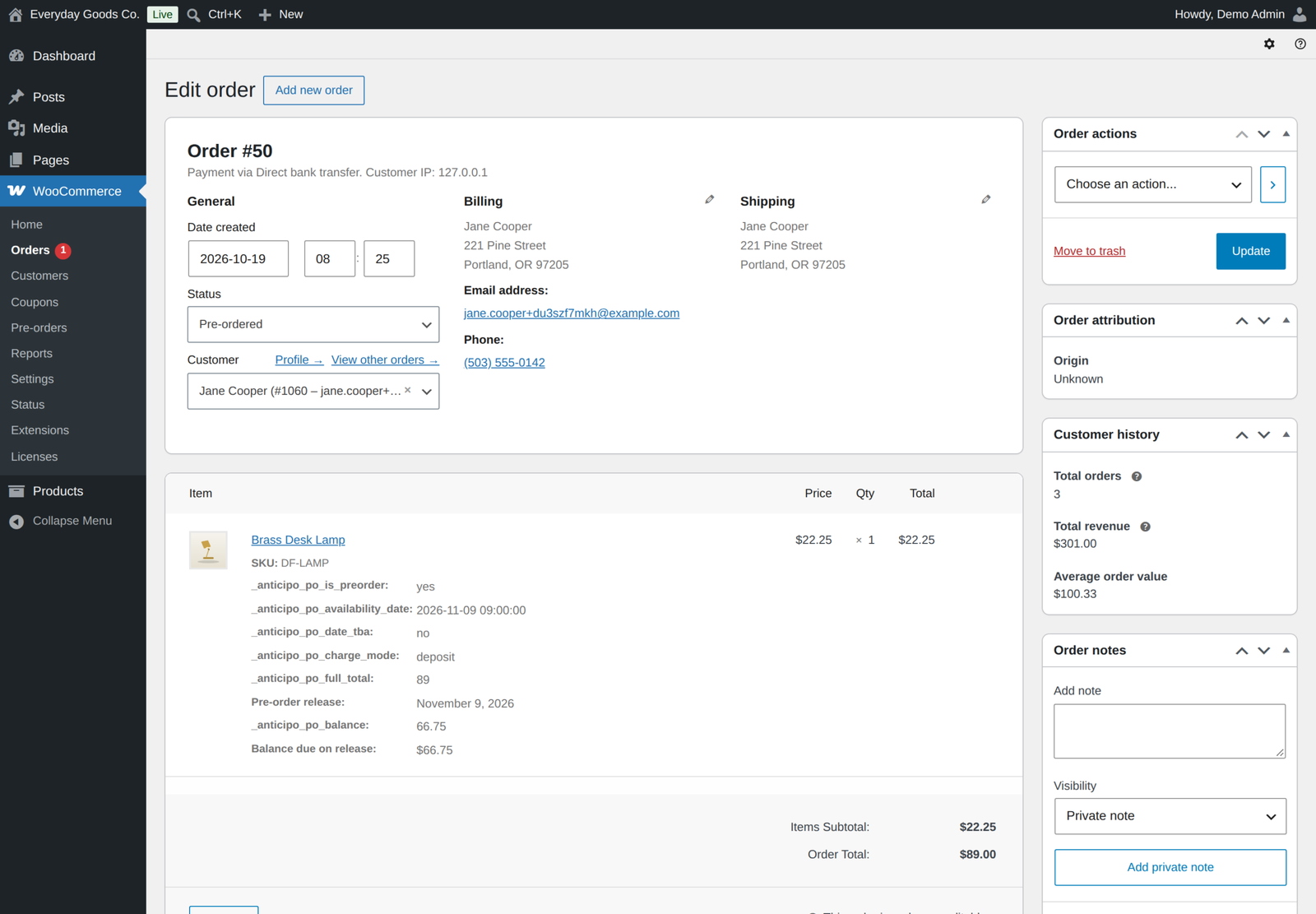
Deposit and pay on release raise a real, linked WooCommerce order for the balance and email the customer a secure payment link. Your gateway, your fraud checks, your 3D Secure flow and your refund tools all work exactly as they already do.
Charge on release, in detail
- One charge, on the original order. The order is charged once, when every pre-ordered item on it has been released, including when you release by hand with no date set. WooCommerce sends its normal Processing email once.
- Only what is left. Coupons, tax, shipping and gift cards are worked out at checkout as usual, so the release charge is exactly what the customer would have paid that day.
- Cancellations lower the charge. Cancelling an item takes its value off the amount charged on release. Cancel every item and the order is cancelled without a charge.
- Built for launches. Charges run in the background, spaced a few seconds apart, so a big release never hits Stripe's limits. A charge Stripe is still confirming is never taken a second time. Each order also has a Charge now button.
- When a card fails. Declined cards are retried after the days you set (1 and 3 by default). If the bank asks the customer to confirm the payment, or the retries run out, the customer gets a "payment needs attention" email with a secure payment link, and the order is cancelled at your deadline (7 days by default) if it is still unpaid.
- Stock stays reserved while a payment is retried, and an account is required so the saved card always belongs to someone.
- Requirements. The official WooCommerce Stripe Gateway. Without it, products set to this mode fall back to pay on release. No other gateway charges on release out of the box.
This plugin never stores a card number. Saved cards are held and charged by Stripe itself. For deposit balances you can also switch on automatic charging with Stripe, and if a charge cannot be taken for any reason the customer is emailed a payment link instead. Nothing is ever silently lost.
Launch day runs itself
A background job releases every waiting order in small batches through WooCommerce Action Scheduler. Stock is reduced, orders move into your normal fulfilment queue, balances are invoiced, saved cards are charged, customers are emailed, and you get a summary with the totals. None of it needs anyone logged in, and a launch with thousands of orders never blocks a page load.
Selling from backorder? Waiting pre-orders can be released as soon as stock arrives, oldest order first, only for the units that came in.
Miss a release because of a server restore or a plugin conflict? A nightly sweep finds anything overdue and releases it on its own.
Sell scarcity, honestly
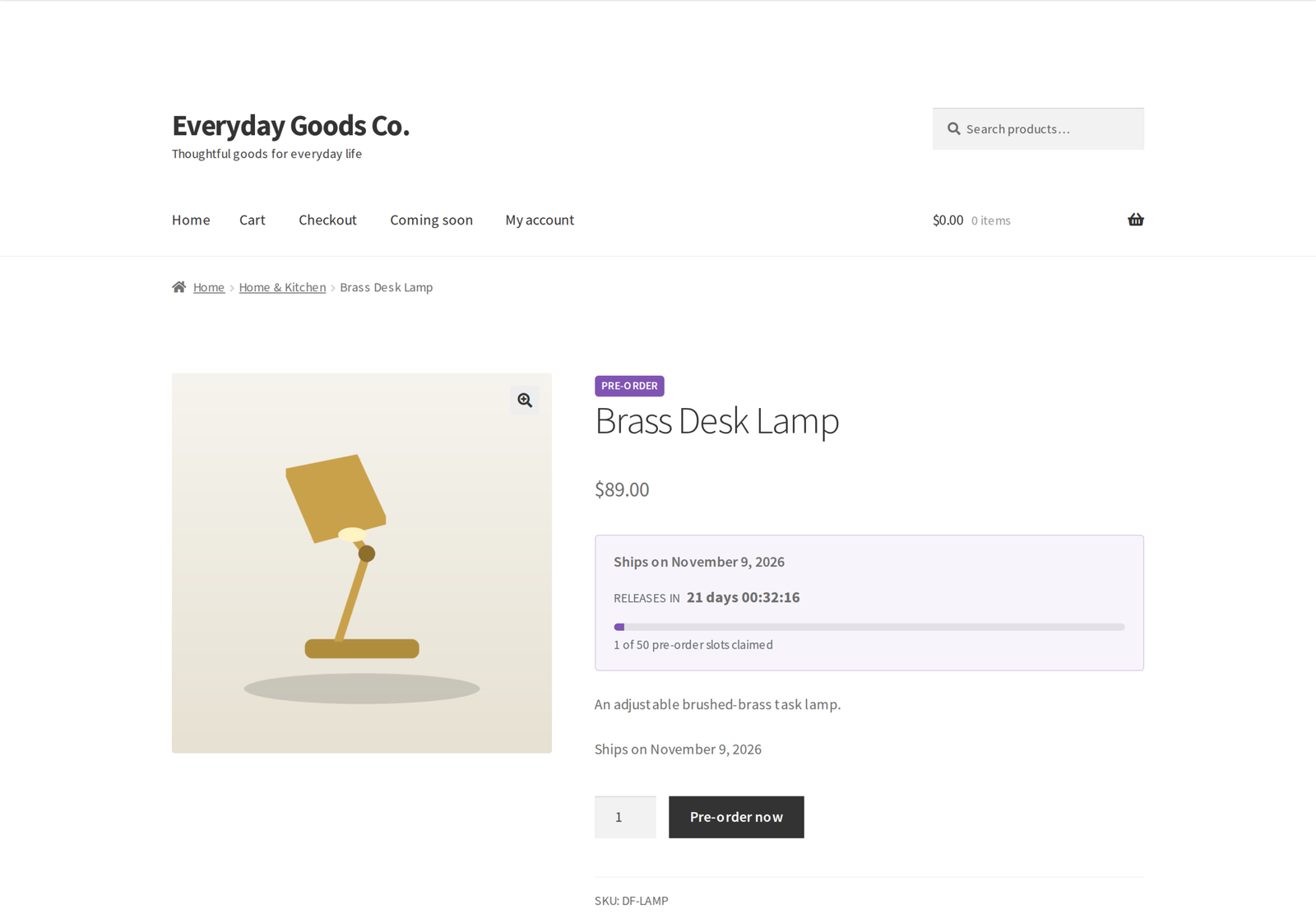
Cap the total units you are willing to promise and the maximum any one customer can take. The cap counts every variation of a product together. Shoppers see a live progress bar: "82 of 100 pre-order slots claimed." Cancelled pre-orders return their slot to the pool immediately, so the number is always true.
Add a cut-off date to close orders before release while you confirm quantities with your supplier. Or take pre-orders with no announced date at all, then fill the date in later and have every waiting customer emailed automatically.
Dates move. Customers find out from you.
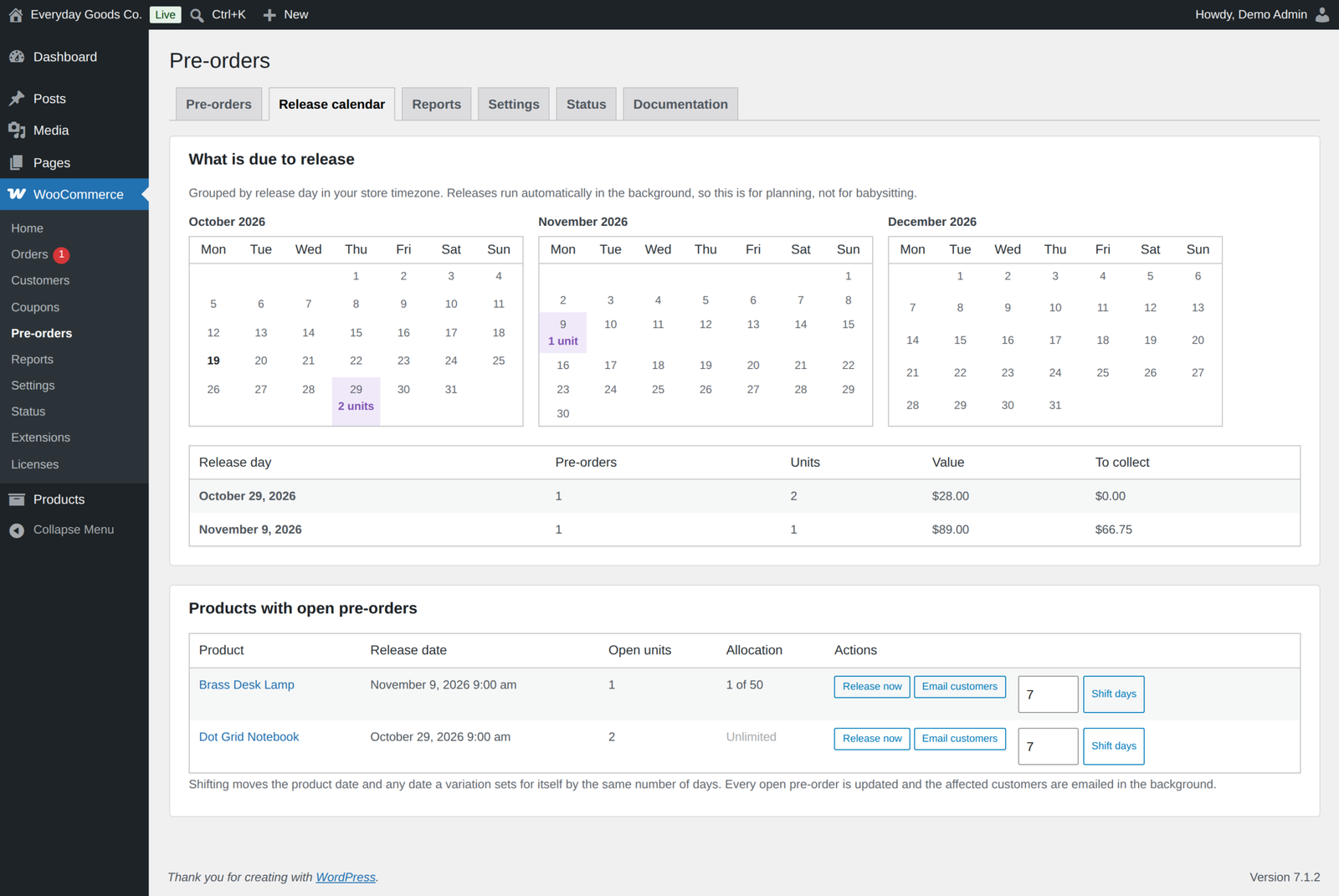
Shift a whole launch forwards or backwards in one click. Every open pre-order is updated and every affected customer is emailed the new date, in the background. Handling a slip well is the single biggest thing that stops pre-order cancellations, so the plugin makes it a one-click job instead of a mail merge.
Know what you have pre-sold
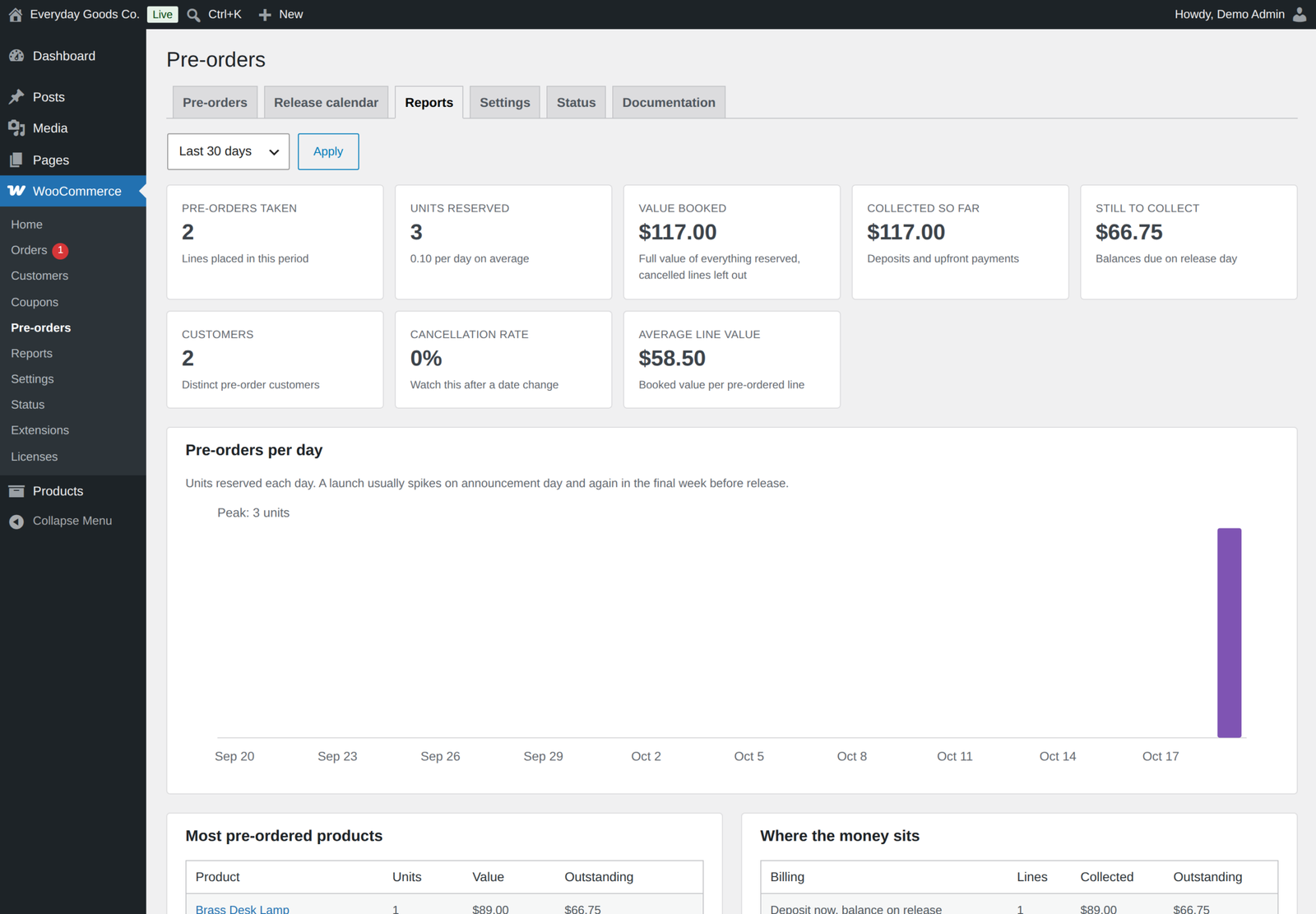
- Value booked, money collected, money still to collect
- Units reserved per day, with a peak marker
- Most pre-ordered products, cancellation rate, average line value
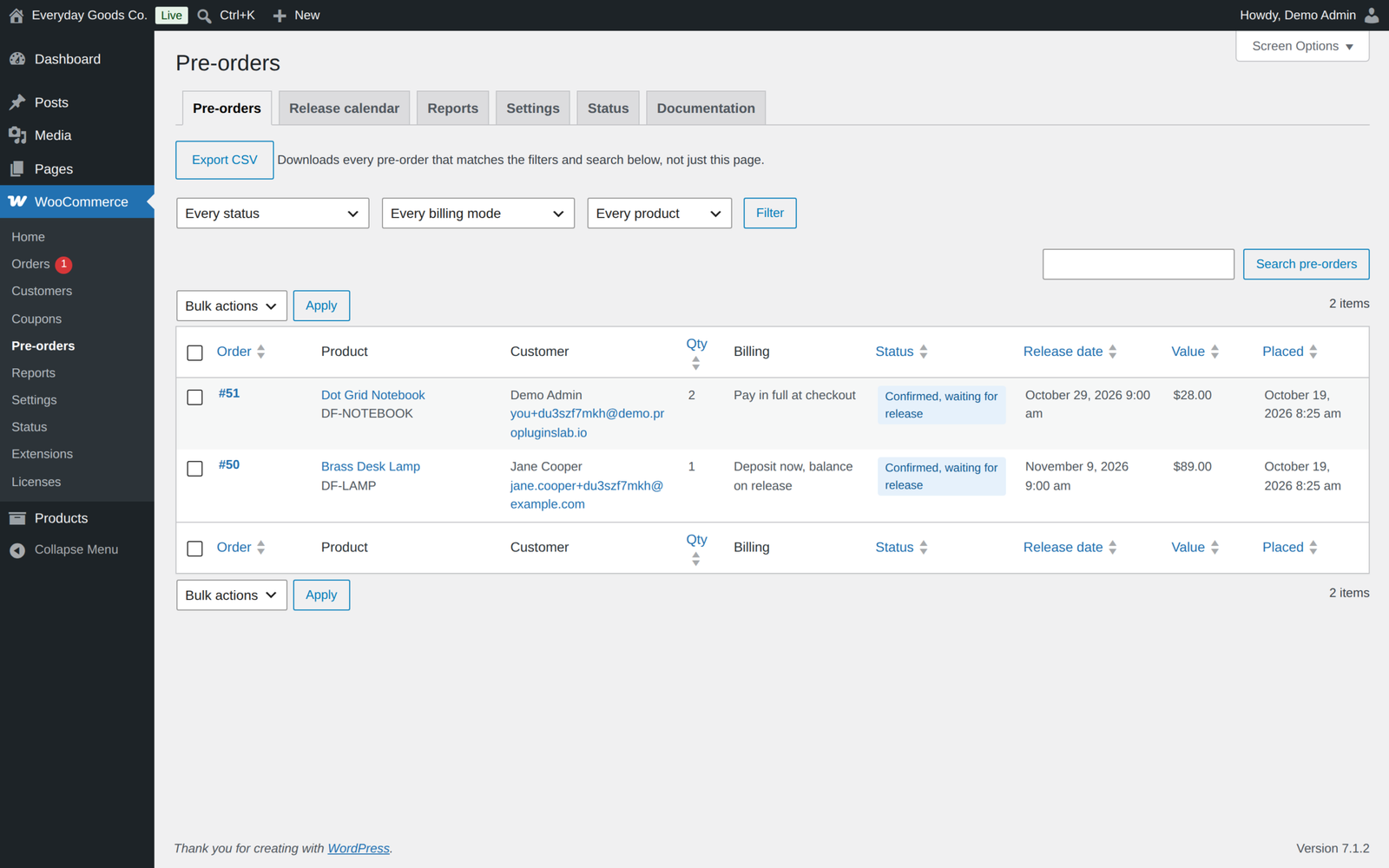
- Release calendar with a month grid, one click release, date shifting and a message to every waiting customer
- CSV export of the Pre-orders list for your warehouse, with your current filters
Cancelled and failed lines are left out of the figures, days follow your store timezone, and only the store currency is added up.
Charts are inline SVG generated in PHP. No charting library to download, and nothing phones home.
Twelve emails you actually control
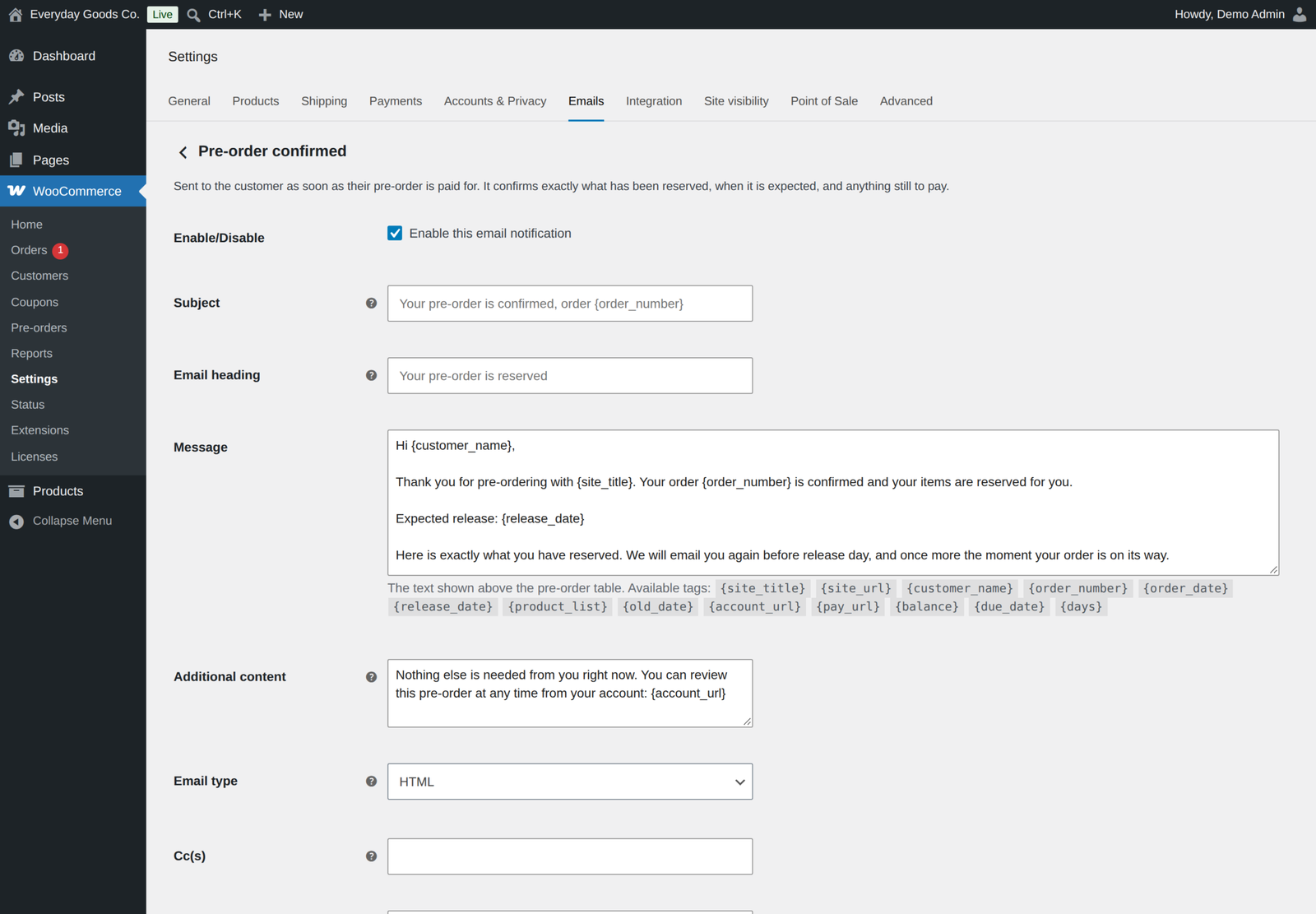
Twelve editable WooCommerce emails, including a store alert when a customer cancels and your own message to every waiting customer.
For customers: pre-order confirmed, release reminder, date changed, released, balance due, balance payment failed, payment needs attention, cancelled and your own update message. For you: new pre-order, pre-order cancelled by the customer and release summary. Every one is a real WooCommerce email you manage under WooCommerce, Settings, Emails, with an editable message, merge tags and a table of the products pre-ordered, in HTML and plain text, all overridable from your theme.
Built to stay fast
Pre-orders live in their own indexed table, not order meta, so nothing turns into a slow meta query as you grow. Product settings are read from the object WooCommerce already loaded and cached for the request, so a shop page of pre-orders costs zero extra queries. The CSS and JavaScript are not loaded at all on pages with no pre-orders.
Works with what you already run
- High Performance Order Storage and legacy order storage, both declared and tested
- Cart and Checkout Blocks, with limits and cart rules enforced through the Store API. The blocks show the pre-order notice and the amount due or charged on release.
- WPML and Polylang, configured once on the original product, with release emails sent in the language the customer originally ordered in
- Any payment gateway for pay in full, deposit and pay on release, because those are ordinary WooCommerce orders. Save card and charge on release needs the official WooCommerce Stripe Gateway.
For developers
Over a hundred hooks, listed in docs/HOOKS.md. There is also a helper function API, six overridable templates, and a full activity log of every action taken on every pre-order.
REST API for ERP and headless integrations: read and filter pre-orders, release, cancel and set release dates. Changes through application passwords are off until you switch them on.
Developers can offer another gateway for charge on release with anticipo_po_release_charge_gateways and take the charge with anticipo_po_pre_charge. Documentation ships inside the plugin and in the docs folder.
Everything included
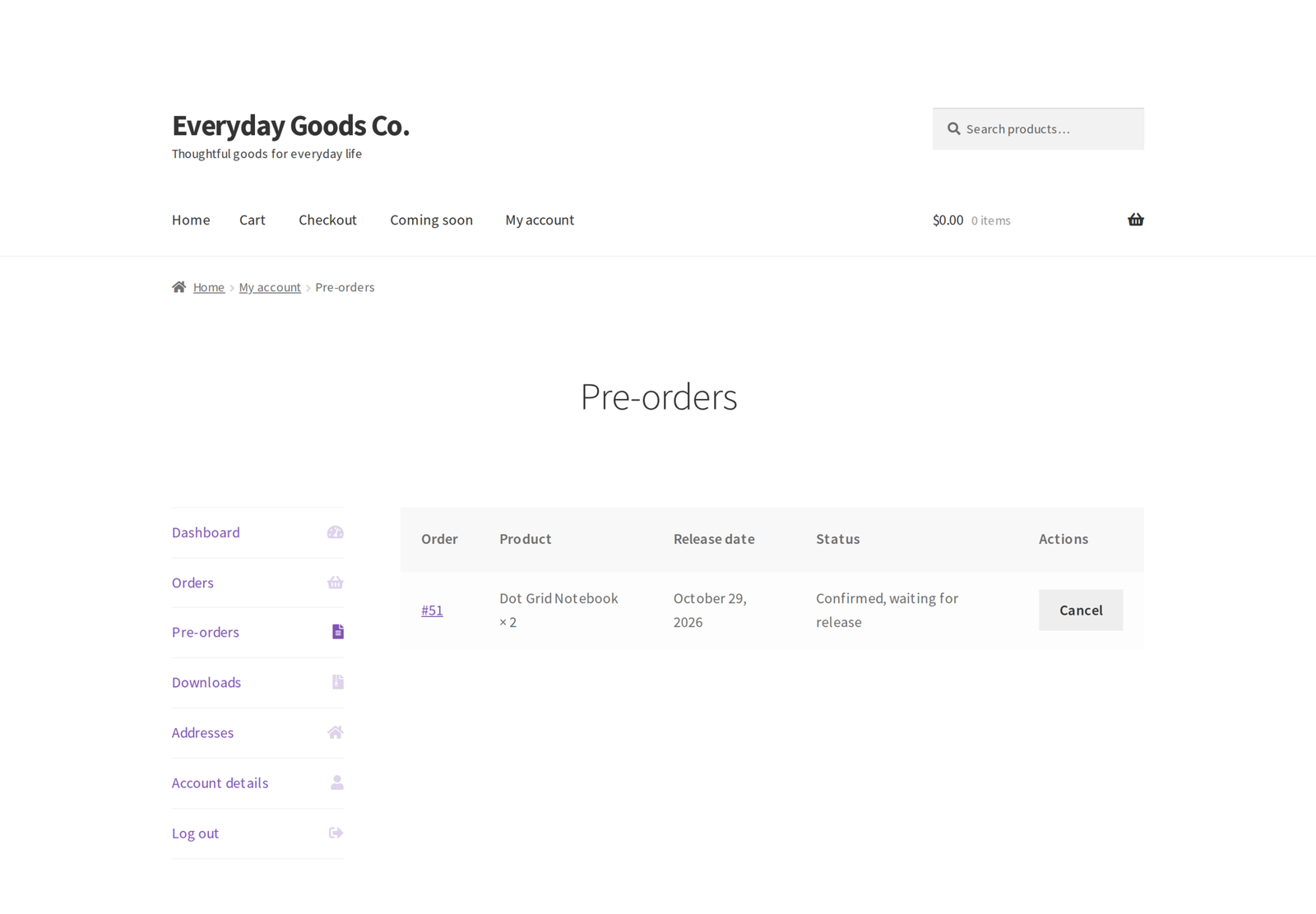
- Customer self-service portal in My Account, with card selection
- Customers can cancel until a cut-off before release. The store is emailed the amount to refund; refunds are made from the order screen.
- Per variation pre-order switch, release date and "to be announced", each released, reminded and emailed on its own date
- Pre-orders while on backorder, and automatic release when stock arrives, oldest order first
- Let customers choose to pay the deposit or the full price
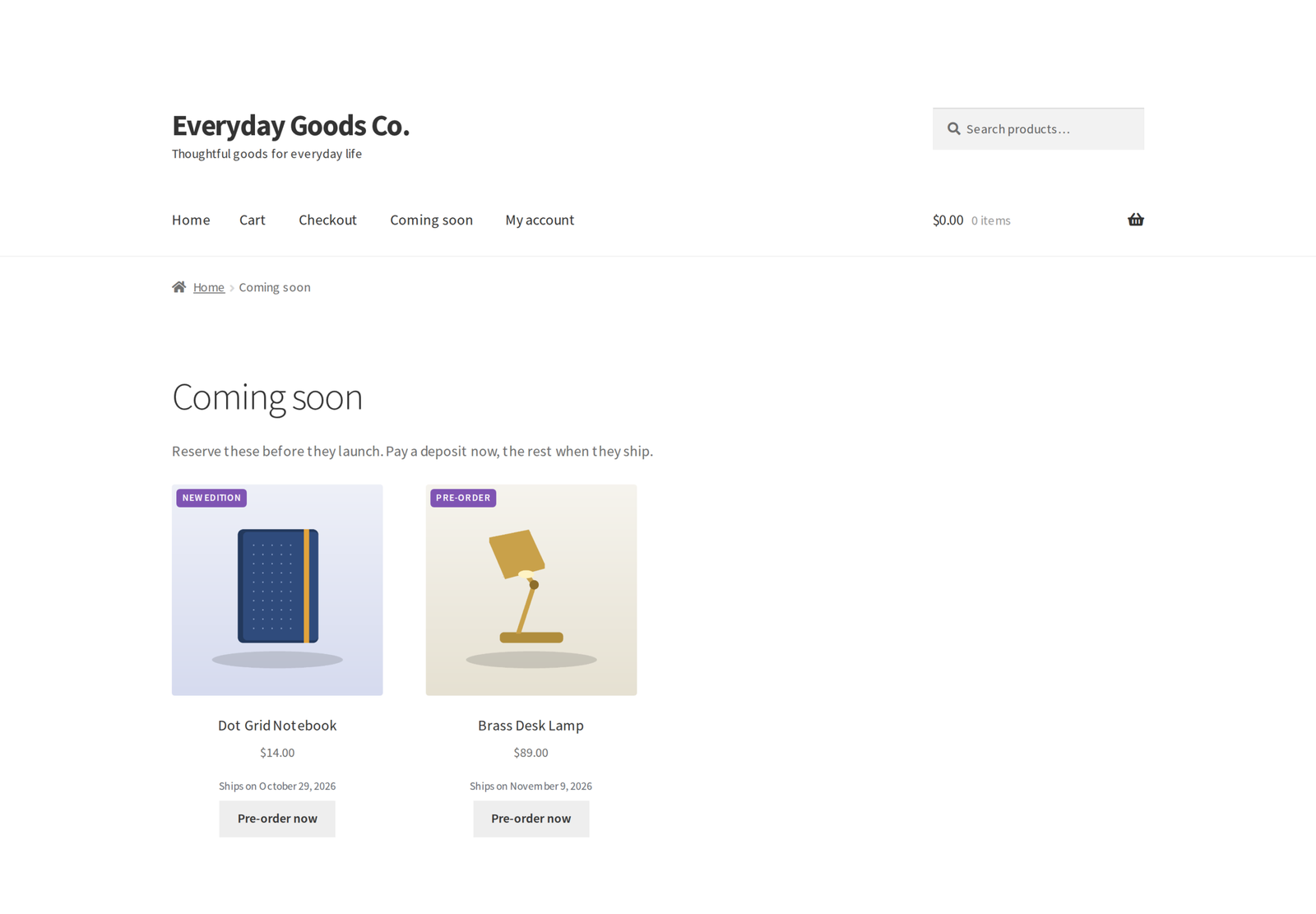
- Open pre-orders on a date of your choice, with "Coming soon" until then
- Bulk edit and product CSV import and export of pre-order settings
- Pre-order pricing that stops at launch, with discounts shown as a sale
- Deferred stock reduction
- Mixed cart rules
- Activity log, and a health and status screen
- GDPR export and erasure
- Full documentation built into the admin
Requirements
- WordPress 6.4 or newer, tested up to 7.1
- WooCommerce 8.2 or newer, tested up to 11.2.1
- PHP 7.4 or newer
- For charge on release: the official WooCommerce Stripe Gateway
Changelog
Every release, newest first, with the date it came out.
Version 1.5.2 (October 21, 2026)
- New: "Hide buy now, pay later on pre-orders" setting under Payments, on by default. While the cart holds a pre-order, Afterpay, Clearpay, Klarna and Affirm in the WooCommerce Stripe Gateway and PayPal Pay Later buttons and messages in WooCommerce PayPal Payments are hidden. Cards and the PayPal button stay.
- New: "Skip the card when a gift card covers the whole pre-order" setting for charge on release, on by default. When gift cards or discounts cover the order, checkout needs no card and the order settles on release.
- New: "Amounts below the card minimum" setting for charge on release: mark the order as paid and write the amount off (the default), or email the customer a payment link.
- Improved: one-time coupons count as used from checkout on pre-orders, while the order waits in Pre-ordered or Awaiting balance, with the classic and the block checkout alike.
- Improved: the "Pre-order release" line in WooCommerce emails, My Account and the order screen shows the current release date once a date is set or changed.
- Improved: on charge on release orders, an item cancelled while the release charge is being taken is settled once the charge finishes: it comes off the amount to charge, or is refunded to the customer's card if the charge went through. An order cancelled during the charge is refunded the same way.
- Improved: when a customer cancels a paid pre-order from My Account, the confirmation says the store has been notified, and the store gets an order note and an admin notice with the amount to refund, kept until it is marked as refunded.
- Improved: an amount written off below the card minimum is stated exactly in the order note, on the order screen and in an admin notice.
Version 1.5.1 (October 20, 2026)
- Fix: merge tags such as {customer_name}, {order_number}, {release_date} and {account_url} written in the "Email customers" message on the Release calendar are now filled in, instead of reaching the customer as typed.
- Fix: on a charge on release order paid partly with a Presentero gift card, cancelling one item worth more than what is left to charge now returns the difference to the gift card. Without Presentero, an order note and an admin notice say how much to give back to the customer.
Version 1.5.0 (October 17, 2026)
- Fix: filling in a release date for a product that was "to be announced" now updates every waiting pre-order, emails those customers the date and schedules the release. Pre-orders left without a date by earlier versions are repaired by the nightly sweep.
- Fix: saving a variation no longer switches its pre-orders off. Each variation now has a "follow the parent / take pre-orders / no pre-orders" choice, and a notice offers to repair variations earlier versions switched off.
- Fix: deposit and pay on release balances no longer have tax added on top when your prices include tax.
- Fix: with save card and charge on release, cancelling an item lowers the amount charged on release, and cancelling every item cancels the order without a charge.
- Fix: allocation limits count every variation of a product together, and the per customer limit is checked against a guest's billing email at checkout.
- Fix: variations with their own release date are scheduled, released and emailed on that date, a parent date change or "Shift days" no longer overwrites them, and variations that take pre-orders on their own get a product page notice and countdown.
- Fix: percentage coupons apply to the balance as well as the deposit, and unused fixed coupons come off pay on release balances.
- Fix: a fixed deposit is charged per unit.
- Fix: when the last waiting item on an order is cancelled, the order is cancelled, or moved on when other items remain, instead of waiting forever. Cancelled lines are taken off unpaid balance orders, and cancelling an order cancels its unpaid balance orders.
- Fix: "Cancel the pre-order if the balance is never paid" now cancels the pre-order and closes the order, not only the balance order. A new order action raises a balance order again after one was cancelled.
- Fix: the nightly balance sweep and the charge requeue no longer stop at the first 200 records.
- Fix: a release charge that Stripe is still confirming is never charged a second time.
- Fix: cash on delivery and bank transfer orders move to Pre-ordered instead of Processing while items still wait for release.
- Fix: releasing several lines of one order by hand raises one balance order and sends one email. Large selections are released in the background. A release held back by an extension is no longer reported as released.
- Fix: reports leave cancelled and failed lines out of units and money, add up only the store currency, use the store timezone for days, and refresh after a release, a cancellation or a settings save.
- Fix: links between balance orders and original orders work with legacy order storage.
- Fix: the "payment needs attention" email only mentions automatic cancellation when it is switched on, and explains a missing card separately from a declined one.
- Fix: the balance payment failed email describes when it is really sent.
- Fix: switching from Pro back to the free edition keeps releases scheduled, and orders waiting for a balance stay visible.
- New: the Cart and Checkout blocks show the pre-order notice and the amount due or charged on release, from the Store API data.
- New: Export CSV button on the Pre-orders list, exporting everything that matches the filters.
- New: let customers choose to pay the deposit or the full price.
- New: take pre-orders automatically while a product is on backorder, and release waiting pre-orders as soon as stock arrives, oldest first.
- New: "Open pre-orders on" date, with "Coming soon" until then.
- New: pre-order fields in Products bulk edit and in the WooCommerce product CSV importer and exporter.
- New: email every customer waiting on a product from the Release calendar.
- New: a month grid on the Release calendar.
- New: store email when a customer cancels a pre-order, with the amount to refund.
- New: REST route to set release dates, a modified_after filter, and an opt-in setting that lets application passwords release, cancel and set dates.
- New: anticipo_po_release_charge_gateways filter to offer another gateway for charge on release, and anticipo_po_convert_amount for currency switchers.
- Improved: pre-order discounts show as a sale with the normal price struck through, and are worked out before currency switchers convert the price.
- Improved: Pro documentation for every Pro feature on the Documentation tab, docs/HOOKS.md and docs/CONFIGURATION.md, and the free edition upsell no longer shows inside Pro.
- Improved: settings and product help text describe every billing mode.
Show earlier versions (1.0.0 to 1.4.0)
Version 1.4.0 (October 17, 2026)
- New: "Save card now, charge automatically on release" billing. Nothing is charged at checkout; the customer's card is saved with the WooCommerce Stripe Gateway, and the original order is charged automatically once every pre-ordered item on it has been released, including when you release by hand with no release date. Coupons, tax, shipping and gift cards are applied at checkout as normal and only the remainder is charged.
- New: declined release charges are retried on a schedule you choose (1 and 3 days by default). If the bank asks the customer to confirm the payment, or the retries run out, the customer gets a new "Pre-order payment needs attention" email with a secure payment link, and the order is cancelled automatically if it is still unpaid at the deadline.
- New: customers can see and change the card a pre-order will be charged to from the Pre-orders page in My Account.
- New: a Charge on release panel on the order screen shows the amount, card, status, attempts and next retry, with a Charge now button.
- Improved: with "Try to charge the saved card automatically" on, deposit balances paid with Stripe are now charged off-session to the card saved at checkout.
- Fix: a failed balance payment no longer loses track of its balance order, and paying one balance no longer moves an order on while another balance is still unpaid.
- Fix: unpaid (pending) pre-orders are no longer released.
- Fix: stock taken on release is recorded on the order line, so cancelling a released order puts it back.
- Fix: the cancellation email and notice only promise a refund when a payment was actually taken.
- New hooks: anticipo_po_pre_charge, anticipo_po_charge_state_changed, anticipo_po_release_charge_failed, anticipo_po_release_charge_paid, anticipo_po_release_charge_retry_days, anticipo_po_release_charge_minimum, anticipo_po_release_charge_mixed_cart_message, anticipo_po_line_paid_amount.
- Tested with WooCommerce Stripe Gateway 11.1.1, WordPress 7.1.3 and WooCommerce 11.2.1.
Version 1.3.0 (October 15, 2026)
- New: "Filter by pre-order" dropdown above the Products list, to show only the products taking pre-orders or only those that are not.
- Changed: activating Pro no longer switches the free edition off. If both are active, the free edition stands by and shows a notice so you can deactivate it yourself.
- Security hardening: REST routes that release or cancel pre-orders now accept only a logged in dashboard session with a valid REST nonce (application passwords can still read), CSV export cells that could be read as spreadsheet formulas are escaped, and templates are rendered through WooCommerce's own template loader.
- Improved: saving the settings keeps any stored setting the running edition does not use, and admin notices use proper singular and plural wording.
- Deleting the plugin keeps the shared pre-order data while the free edition is still installed.
- Readme: the External services section now describes the licence and update check, which only runs once a licence key is entered.
- Tested with WordPress 7.1.3 and WooCommerce 11.2.1.
Version 1.2.1 (September 2026)
- Fix: the changelog now says where to enter the license key: WooCommerce, Licenses.
- Tested with WordPress 7.1.1 and WooCommerce 11.1.1.
Version 1.2.0 (September 2026)
- New: automatic updates. Enter your license key under WooCommerce, Licenses, and new versions appear on the Plugins screen like any other update.
- New: WooCommerce, Licenses lists every ProPluginsLab plugin on the site in one place. The Plugins screen shows a reminder until a key is activated.
- New:
wp ppl-licensecommands (list, activate, deactivate, check) for managing keys from WP-CLI. - Pro features keep working with or without an active license; the license only controls automatic updates.
Version 1.1.0 (September 2026)
- New: Badge text field on the product Pre-order tab, so one product can say "Coming soon" while the rest keep the store wide wording. Used on the product image, in shop listings and in the cart.
- New:
[[anticipo_preorder_products]]shortcode that lists every product currently taking pre-orders, soonest release first. - New:
anticipo_po_badge_textandanticipo_po_shortcode_product_idsfilters. - Links moved to propluginslab.io.
- Tested with WordPress 7.1.1 and WooCommerce 11.1.1.
Version 1.0.0 (August 27, 2026)
- First release.
Details
At a glance
- Latest version
- 1.5.2
- Last updated
- October 22, 2026
- Type
- Pro plugin
Requirements
- PHP version
- 7.4
- WordPress (min)
- 6.4
- WordPress (tested)
- 7.1
- WooCommerce (min)
- 8.2
- WooCommerce (tested)
- 11.2.1
Share
You might also like
 Free
Free
Visuaro Product Designer for WooCommerce Free
Free product designer that lets customers add text, photos and clipart to WooCommerce products. You get print ready PDF, SVG and PNG files automatically.
Free
Live demo-
Free
Anticipo Pre-Orders for WooCommerce Free
Sell products before they exist in WooCommerce. Take pre-orders, hold each order until launch day, then release it automatically.
Free
Live demo -
Free
Plusero Extra Fees for WooCommerce Free
Free conditional fees for WooCommerce by product, cart, checkout, shipping method or payment gateway. A guided builder explains every option as you go.
Free
Live demo