Your cart is empty.
Browse plugins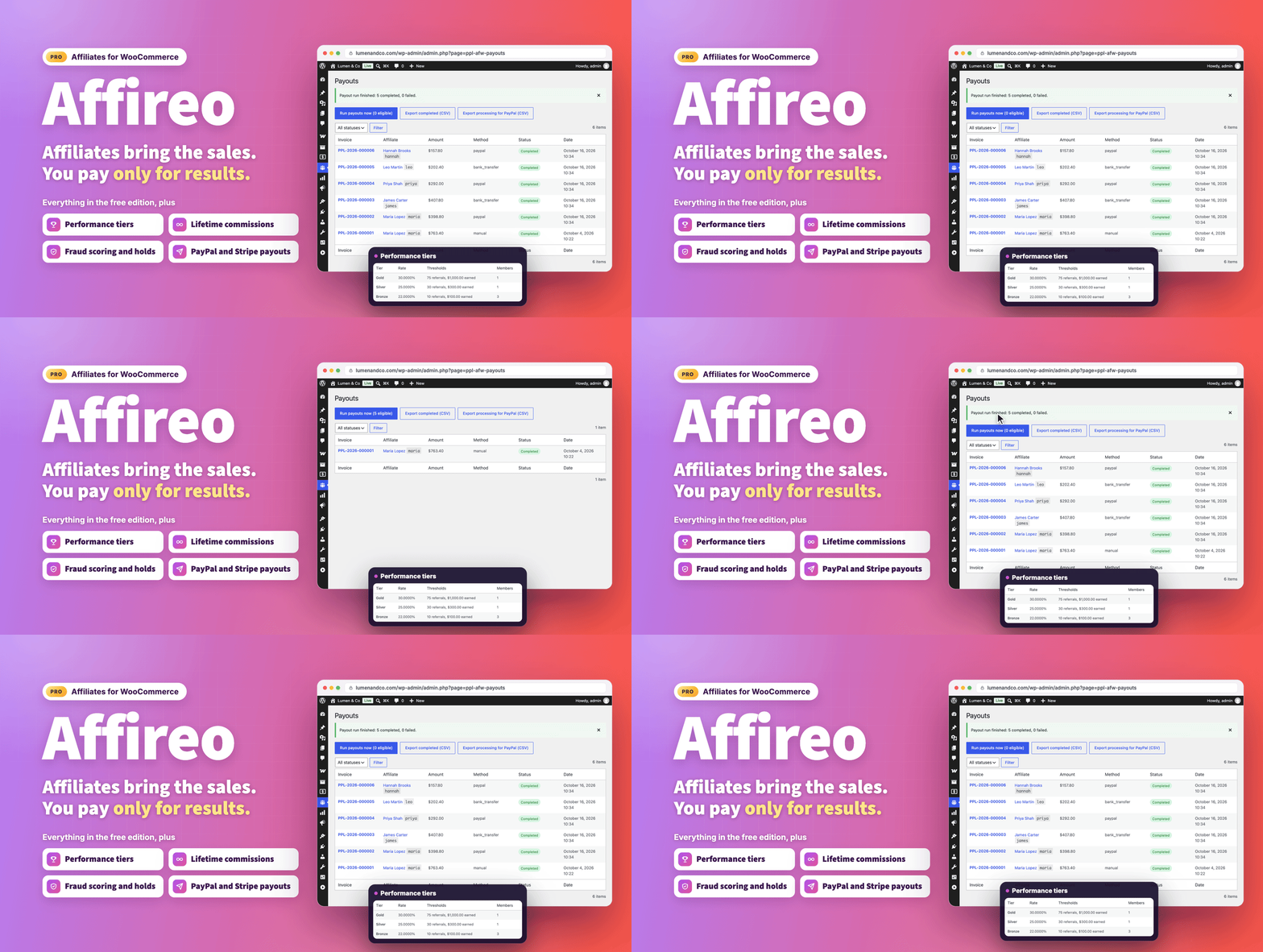
Overview
Everything you need to run an affiliate program on WooCommerce, in one plugin.
Affireo Pro lets your customers and partners earn commission by sending buyers to your store. They share a personal link or coupon, you review and pay their commissions, and the whole affiliate experience lives on a single page of your site.
It is built for real stores run by real people: a setup wizard gets you live in minutes, and a simple settings mode hides the advanced options until you need them. Pro is a complete, standalone plugin, so every feature below is active the moment you switch it on.
What's new in 1.6.1 (October 18, 2026)
New customers only works as described. With it on, a commission is paid only on a customer's first purchase. Returning customers are recognised by their earlier paid orders with the same billing email or customer account, guests included, and an abandoned checkout no longer blocks the first real purchase.
1.6.1 follows 1.6.0 (October 17, 2026), which made commissions and payouts more accurate and gave affiliates a much fuller dashboard:
- Commissions per item. Every line of an order gets its own rate, a fixed product rate pays per item sold, and a partial refund removes only the refunded part.
- Nobody is told they were paid before the money moves. Bank transfer, manual and PayPal payouts wait as awaiting payment until you click Mark as sent, and only then is the affiliate emailed.
- Optional PayPal Payouts API. Switch it on and PayPal sends the money from your account, and each payout completes when PayPal confirms it.
- SEPA bank file and payout exports. Export euro bank transfers as a SEPA pain.001 file, or export unpaid balances and payouts awaiting payment as CSV.
- Refunds after payout are clawed back. A refund on a commission you already paid is deducted from the affiliate's next payout.
- Five new dashboard tabs. Affiliates get Creatives, Campaigns, Network, Coupons and Leaderboard tabs when you use those features.
- Direct link tracking. Credit visitors who arrive from an affiliate's verified website, even without a referral link.
- One step signup. Visitors create their customer account and apply in the same form, and affiliates find their dashboard under an Affiliate program tab in My Account.
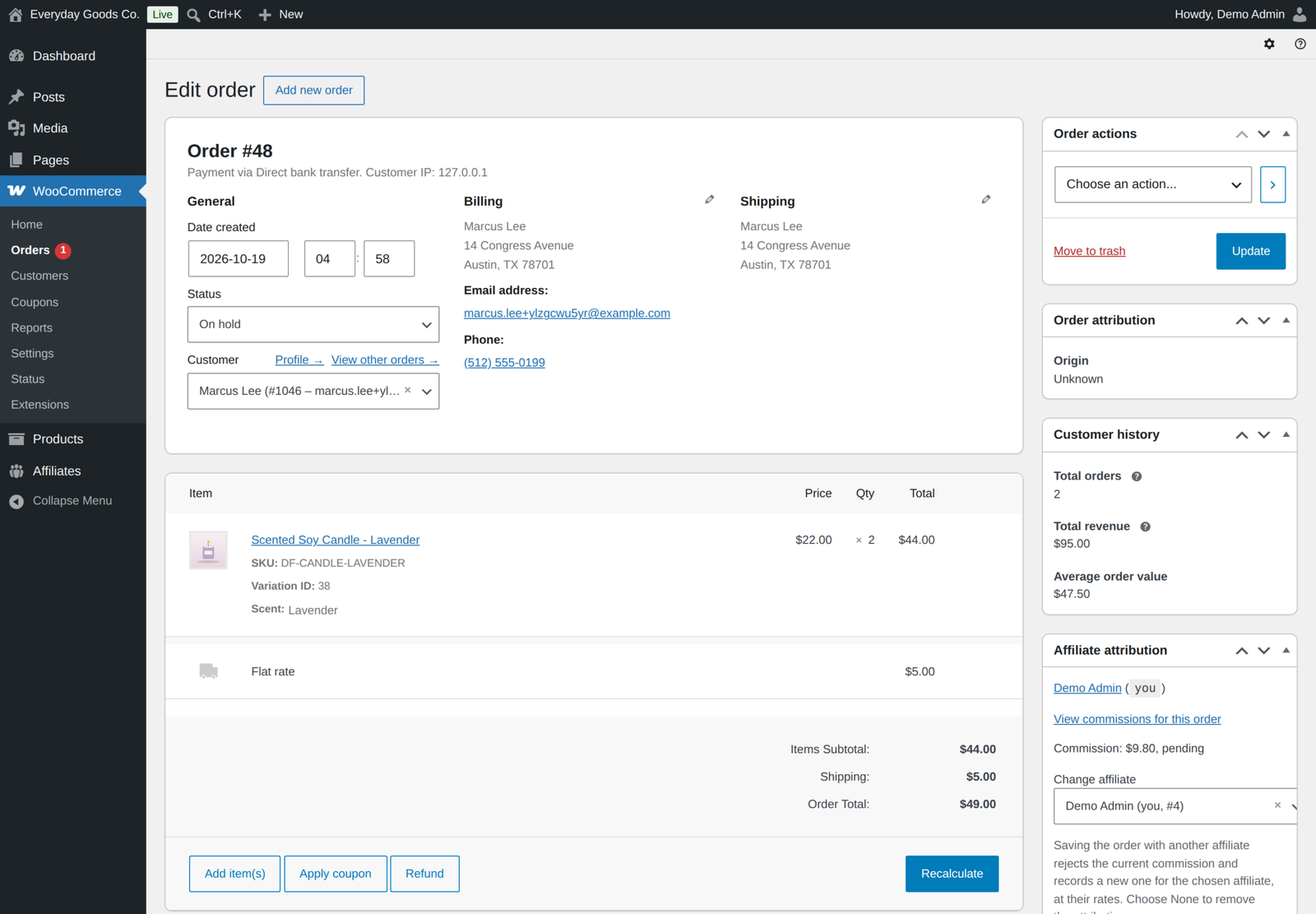
- Change the affiliate on an order. Move or remove an order's commission from the order screen, and see the affiliate in the orders list.
- Coupons for affiliates. Optionally create a coupon for each affiliate when you approve them, with the discount you choose.
One page for affiliates, start to finish
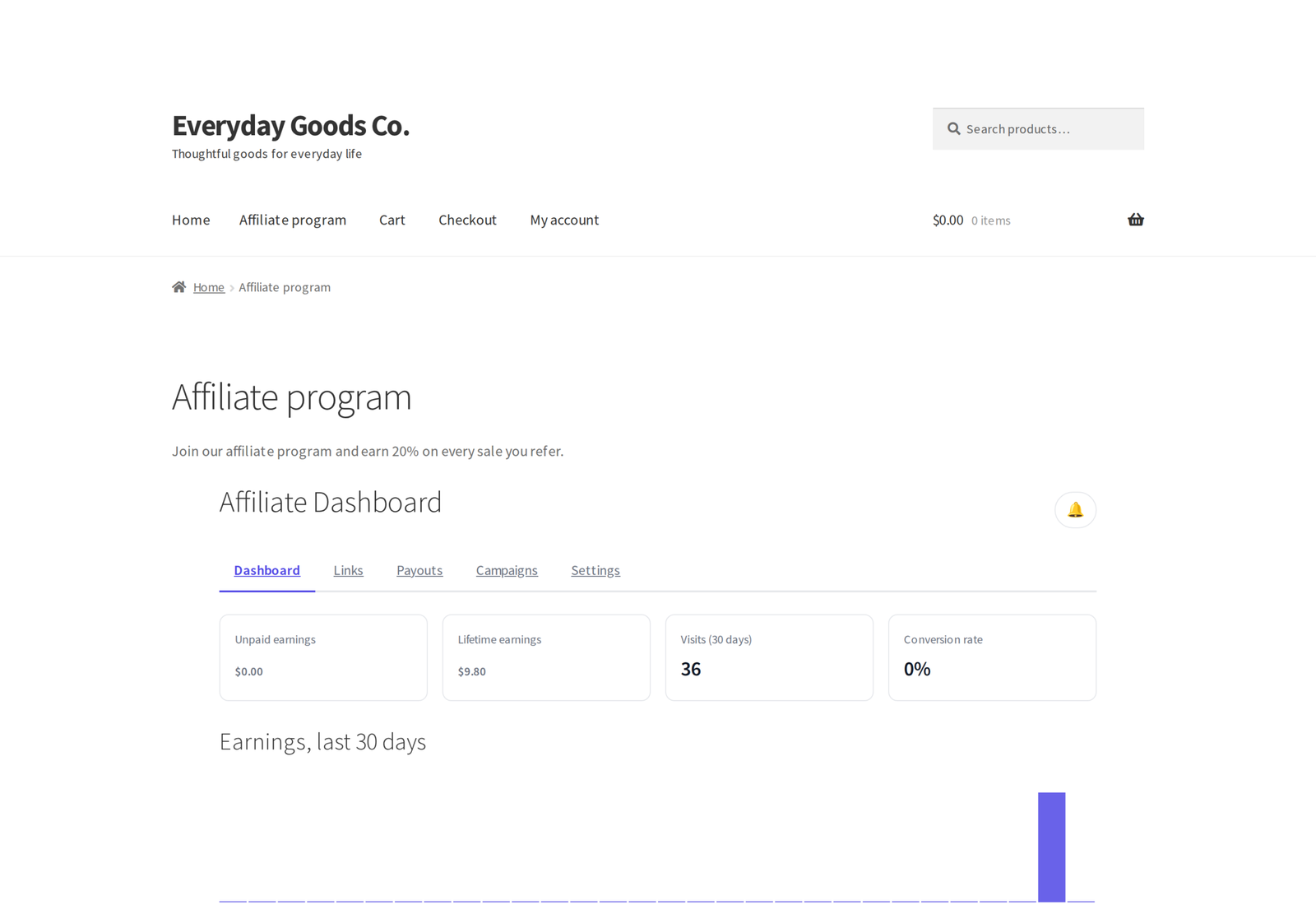
Add one shortcode, [ppl_afw_portal], to any page and you are done. Visitors see the signup form, which also creates their customer account, and the same page becomes their full dashboard the moment you approve them. There are no separate signup and login pages to juggle, and the dashboard also appears as an Affiliate program tab in WooCommerce My Account.
The dashboard shows earnings for the last 30 days, referral links ready to copy, commission and payout history with printable invoices, notifications and achievement badges. A link builder turns any page or product URL from your store into a tracked link, with an optional campaign name. Depending on the features you use, affiliates also get tabs for creatives, campaigns, their network, their coupons and an opt in leaderboard. Affiliates can pick a vanity slug, choose how they want to be paid and set which emails they receive. It has a light and dark mode, works down to 320px wide, is keyboard accessible and every tab and form still works with JavaScript turned off.
Reliable tracking
- Referral links three ways.
?ref=yoursluglinks, tidy/go/yourslug/links and custom vanity slugs, with the parameter and the link base under your control. - Tamper proof cookies. Signed tracking cookies with a tracking window you set, 30 days by default.
- First or last click. Decide whether the first or the most recent affiliate gets the credit.
- Cookieless fallback. Visitors who block cookies are still attributed to the right affiliate.
- Coupon tracking. Link a coupon to an affiliate and they earn on every order that uses it, without anyone clicking a link.
- When sources disagree. Choose whether a coupon or the referral link wins when they point to different affiliates.
- Direct link tracking. Credit visitors from an affiliate's verified website, even without a referral link. You verify up to 10 domains per affiliate, and it stays off until you switch it on.
- Campaigns. Affiliates add a campaign name to their link or create named campaigns in their dashboard, and every visit and referral from it is tagged with that campaign, with clicks and sales counted per campaign, in the affiliate's dashboard and your reports.
- Clean data. Bot filtering keeps crawlers from creating fake clicks, and IP addresses are stored hashed.
- Toolbar shortcut. An active affiliate browsing your store gets the tracked referral link for the page they are on, copied in one click.
Commissions that fit your business
Set a store wide rate as a percentage or a fixed amount, then override it where it matters. The most specific rule wins, and the rule used is saved on each referral so you can always see why it paid what it did.
Rates per product, per variation and per category apply to each line of the order, and a fixed rate on a product pays per item sold.
- Per affiliate rates for your best partners, plus rates per product or variation for a single affiliate, which beat every other rate.
- Purchase sequence rules, for example 30% on a customer's first order, 10% on orders 2 to 5, then 5%, counted from all of the customer's paid orders.
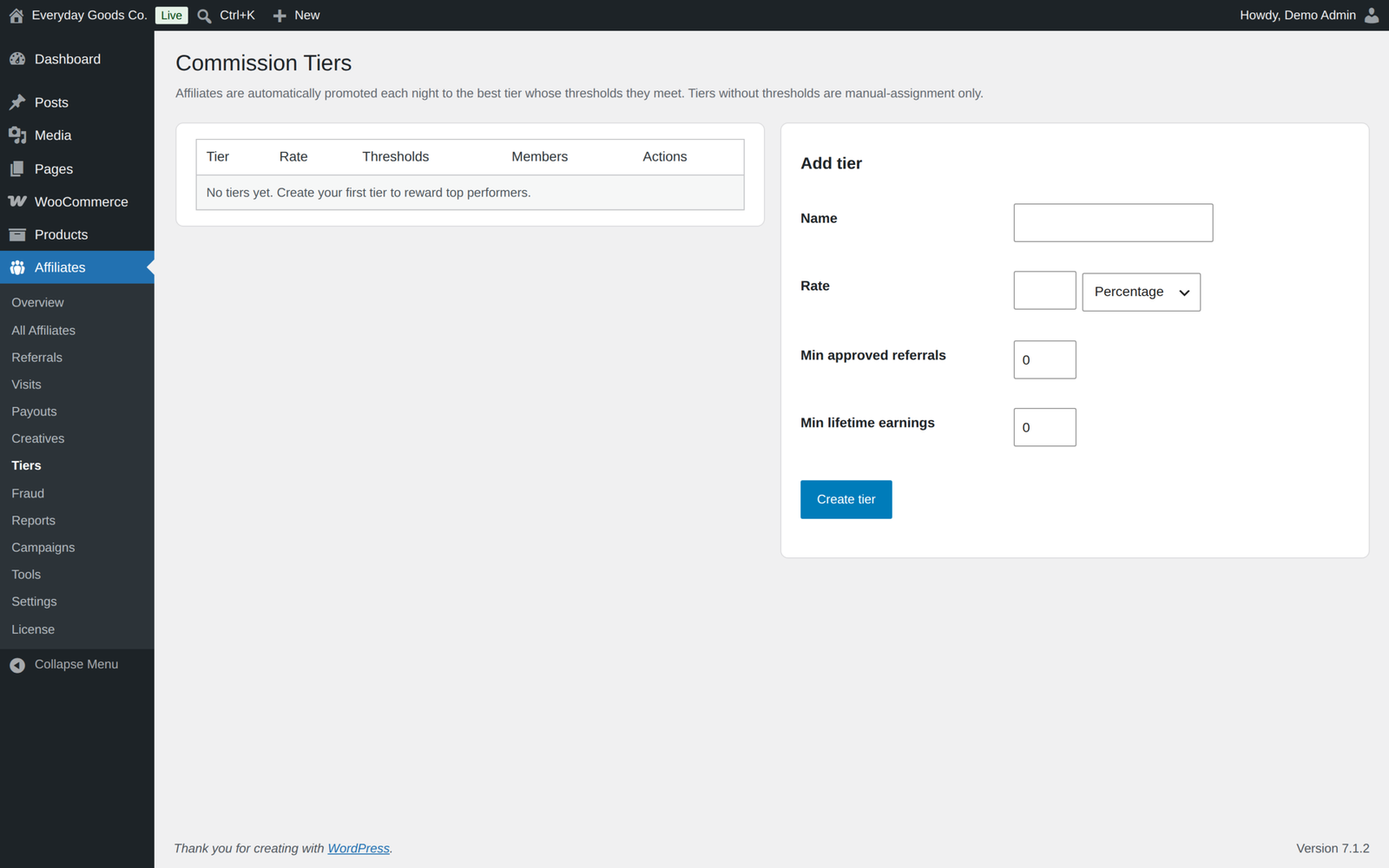
- Per tier rates that reward performance automatically.
- Per product, per variation and per category rates, set on the product and category screens, as a percentage or a fixed amount.
- Lifetime commissions bind a customer to the affiliate who referred them, so future orders keep paying, with an optional expiry.
- Recurring commissions on WooCommerce Subscriptions renewals, forever or for 12, 6 or 3 months, at a rate you choose or at your normal rates, with the same rules and fraud checks as a first order.
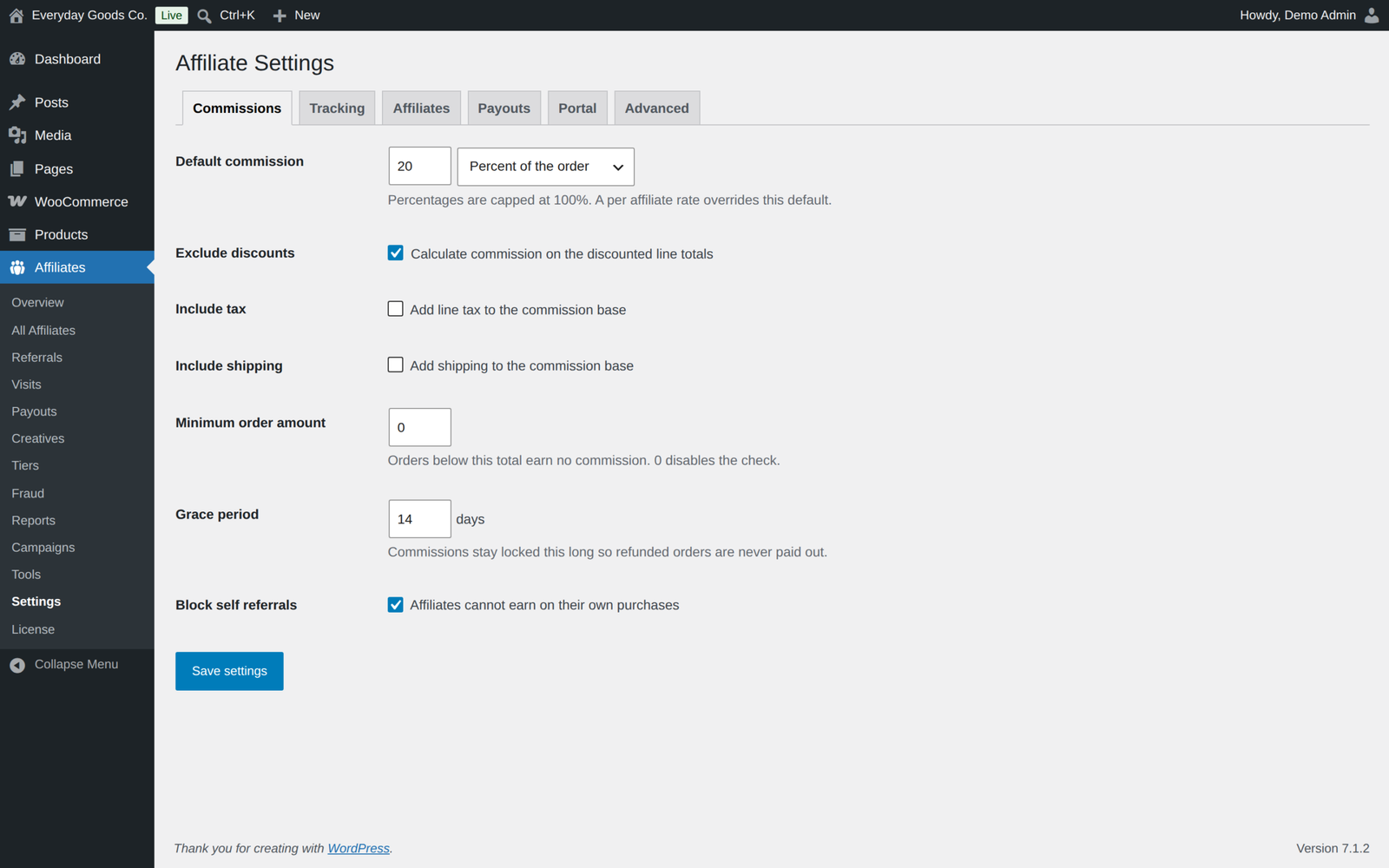
Choose what commission is calculated on (item subtotal, taxes, shipping, discounts), set a minimum order amount, and exclude products, categories or user roles. Self referrals can be blocked, and New customers only pays on a customer's first purchase alone.
A grace period, 14 days by default, holds every commission until your refund window passes. A full refund reverses the commission, and a partial refund reduces the commission of the refunded items (or in proportion for an amount refund), always from the original amount. Refunds after payout are deducted from the affiliate's next payout.
Commissions are recorded in the order currency; amounts are not converted between currencies.
Tiers and a multi level network
- Performance tiers. Give each tier its own rate and the referral and earnings thresholds to reach it. Affiliates are promoted automatically every night and never demoted, an optional email tells them when they move up, and you can also place anyone in a tier by hand.
- Multi level network. Let affiliates recruit other affiliates and earn on their sales, up to 10 levels deep, with a rate per level calculated on the commission or on the order. The Network screen shows the recruitment tree and lets you set a recruiter by hand, and affiliates see their recruit link, recruits and network earnings on a Network tab.
Payouts your way
- Five payout methods. PayPal, Stripe Connect, bank transfer, store credit and manual. You choose which to offer, and each affiliate enters their own details. Payouts are made per currency, and only active affiliates are paid.
- Paid means paid. Manual, bank transfer and PayPal payouts wait as awaiting payment until you mark them as sent. With the PayPal Payouts API switched on, PayPal sends the money and the payout completes when PayPal confirms it.
- Stripe Connect transfers are sent straight to the affiliate's Stripe account through the Stripe API. No Stripe plugin is needed, and your secret key is stored encrypted and never shown again.
- Store credit is paid as a WooCommerce coupon locked to the affiliate's email address.
- Bank exports. Export unpaid balances, payouts awaiting payment with each person's payout destination, and completed payouts as CSV, or create a SEPA pain.001 XML file of your euro bank transfers for your bank.
- Scheduled runs. Run payouts automatically every week, every two weeks (14 days) or month, or keep payouts manual. Store credit and Stripe payouts are sent automatically; PayPal (with the API) is sent and confirmed by PayPal; bank transfer, manual and PayPal without the API are prepared and wait for you to mark them as sent.
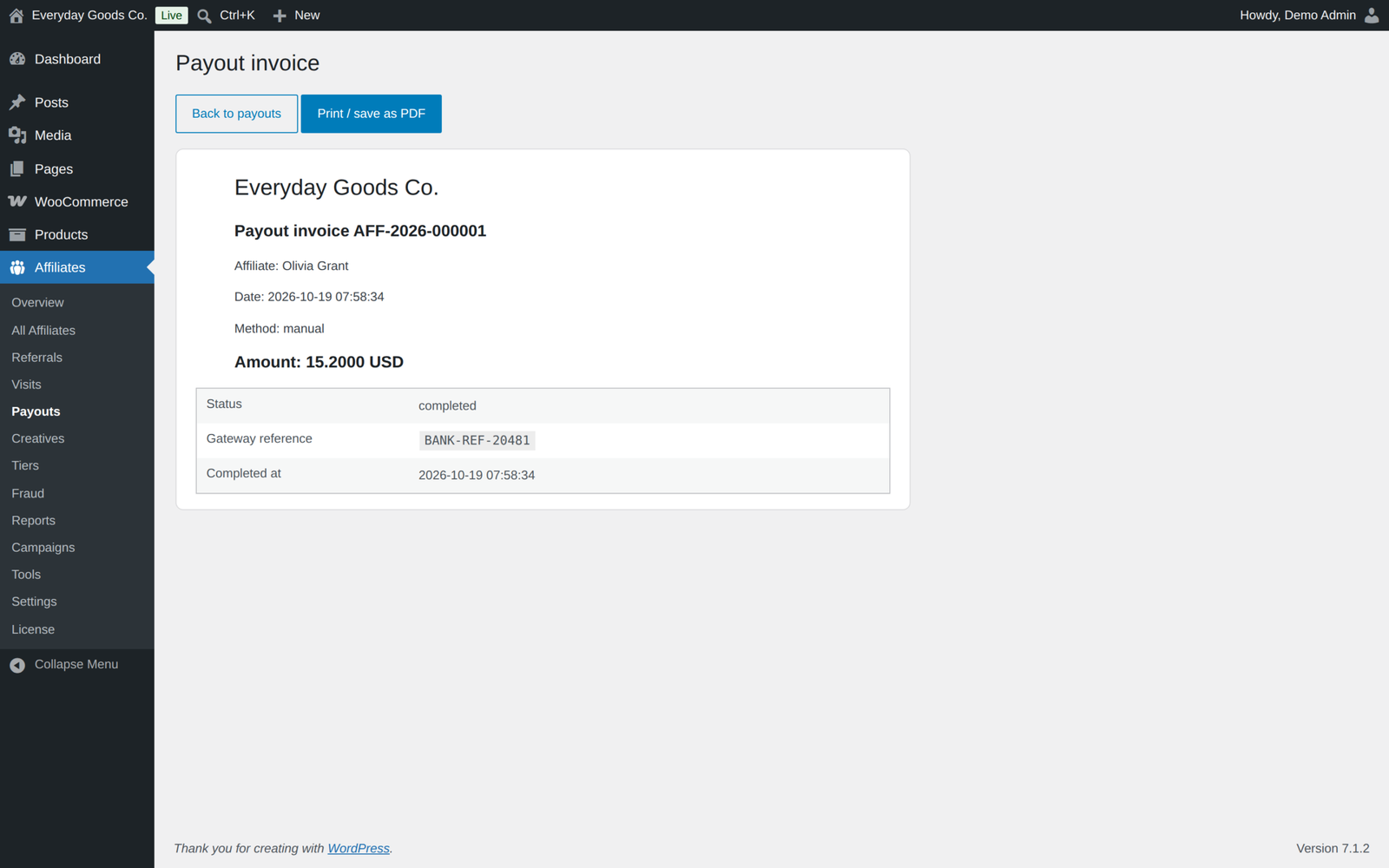
- The paperwork. Sequential invoice numbers with a printable invoice per payout, which affiliates can also open from their dashboard, minimum payout thresholds and retry for a failed payout.
- Safe details. Payout details are encrypted at rest and only ever shown masked.
Built in fraud protection
Every referral is scored for self purchases, IP overlap between the affiliate and the buyer, and click flooding. Commissions above your hold threshold are held for review, and affiliates above your suspension threshold are suspended automatically. A full fraud log lets you release a hold with one click, which also releases the network commissions it held.
Tools that grow your program
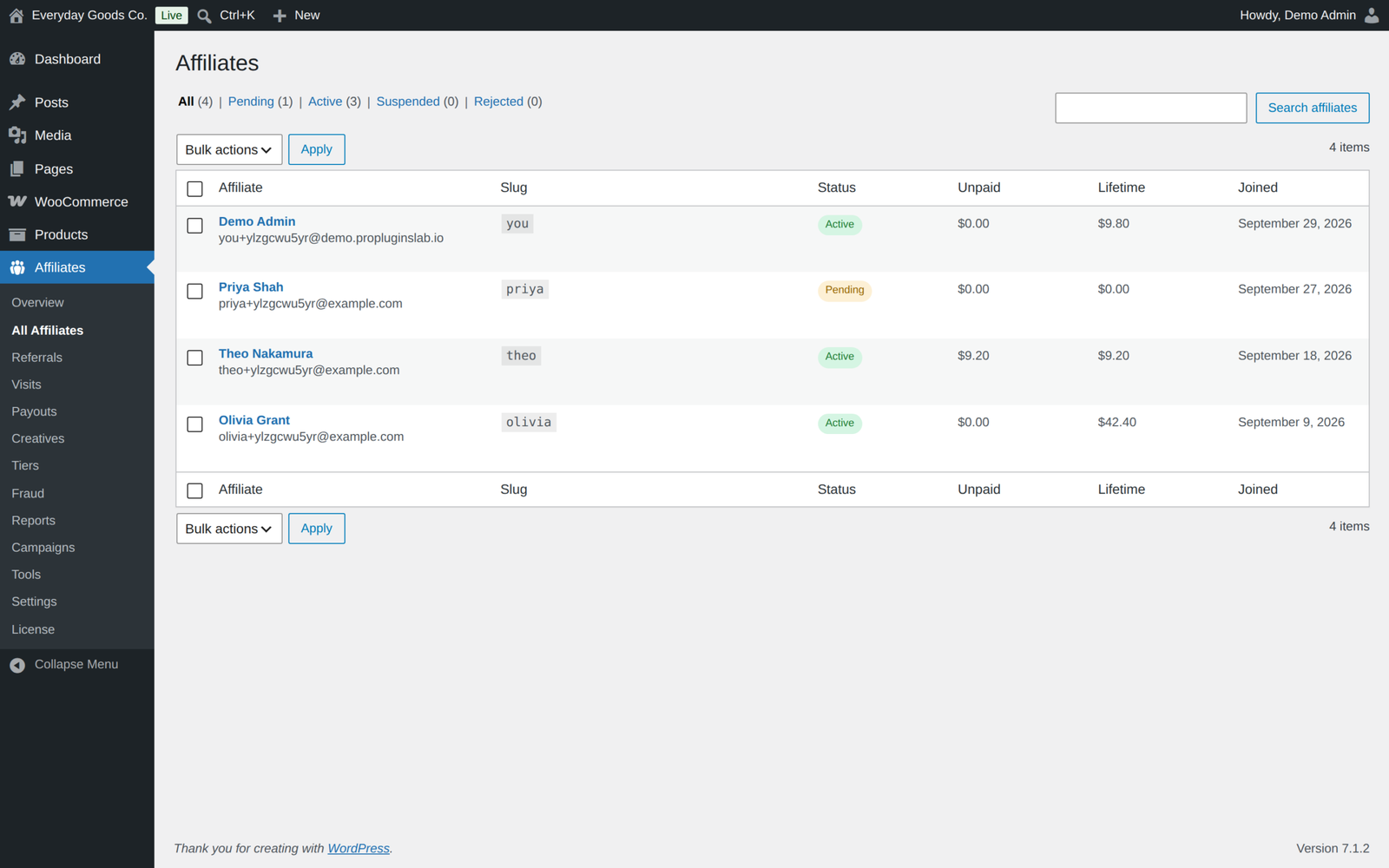
- Unlimited affiliates, with an application queue where you approve, reject or suspend, or approve everyone automatically.
- Registration form builder. Drag and drop the fields you want, so you collect exactly the information you need.
- Creatives library. Keep your banners, text links and HTML creatives in one place, edited with the WordPress media picker. Affiliates copy ready made embed code from their dashboard; impressions and clicks are counted.
- Affiliate coupons. Create a coupon for an affiliate in one click from their screen, or automatically when you approve them, and they see their coupons in the dashboard.
- Leaderboard. An opt in leaderboard over a period you choose, showing affiliates by their initials only.
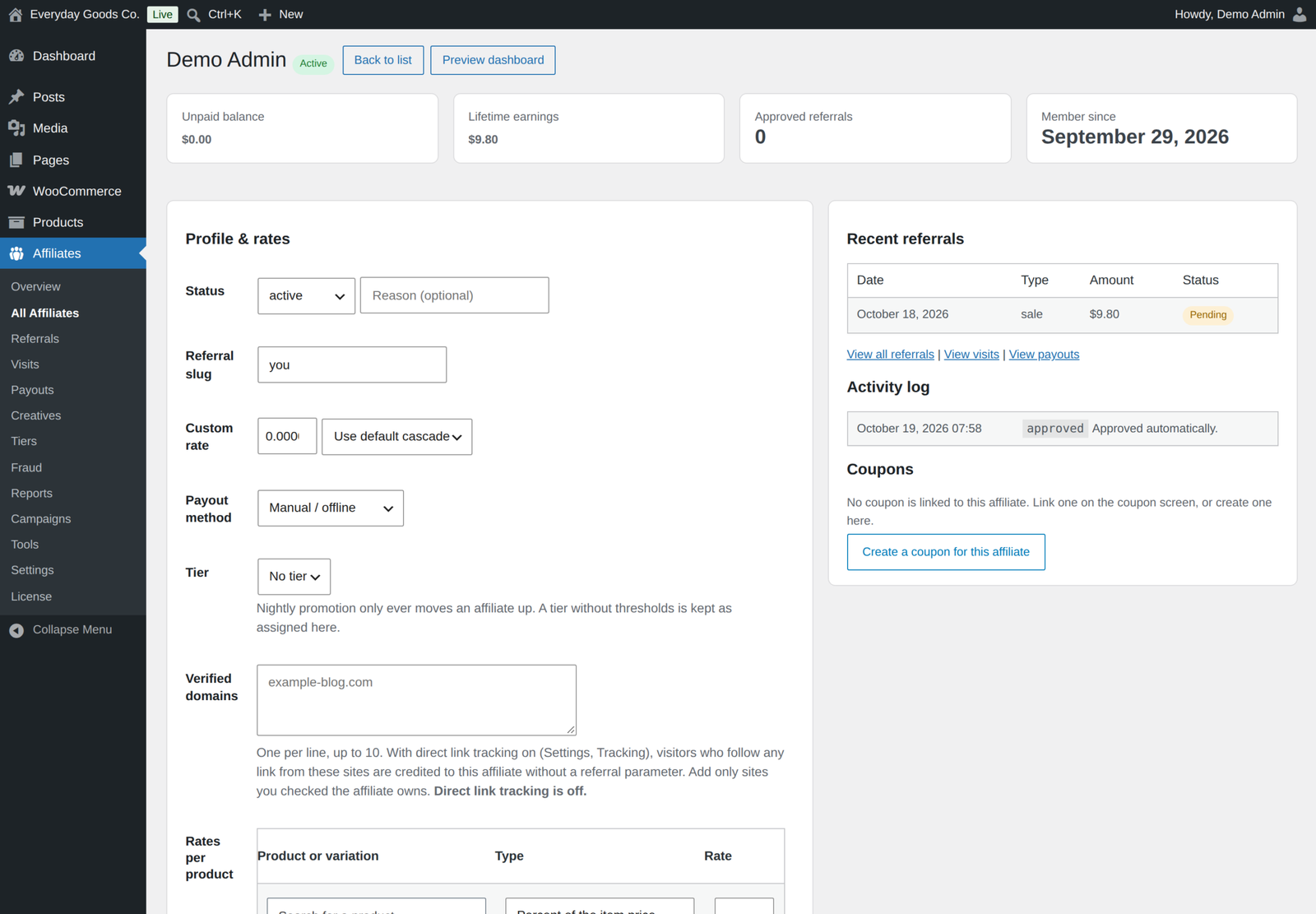
- Dashboard preview. See an affiliate's dashboard exactly as they do, read only, from their screen.
- Order tools. An Affiliate column in the orders list, and Change affiliate on the order screen, which is refused once the commission was paid out.
- Affiliate Manager role, so you can hand the program to someone without giving them full admin access.
- Announcements. Send a message to every active affiliate, shown in their dashboard notifications and optionally by email.
- Activity log of every status change, rate change and payout.
Reports and exports
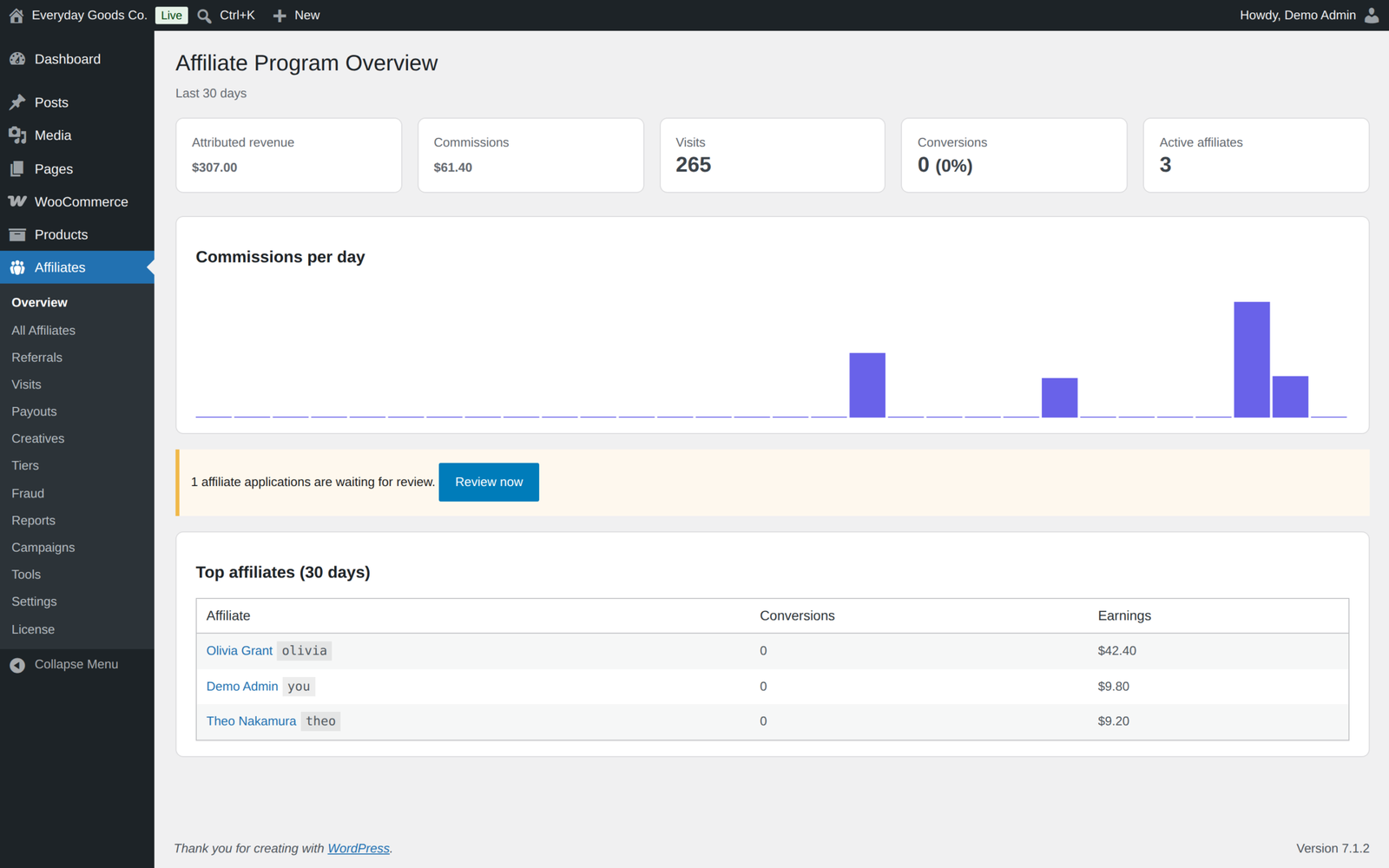
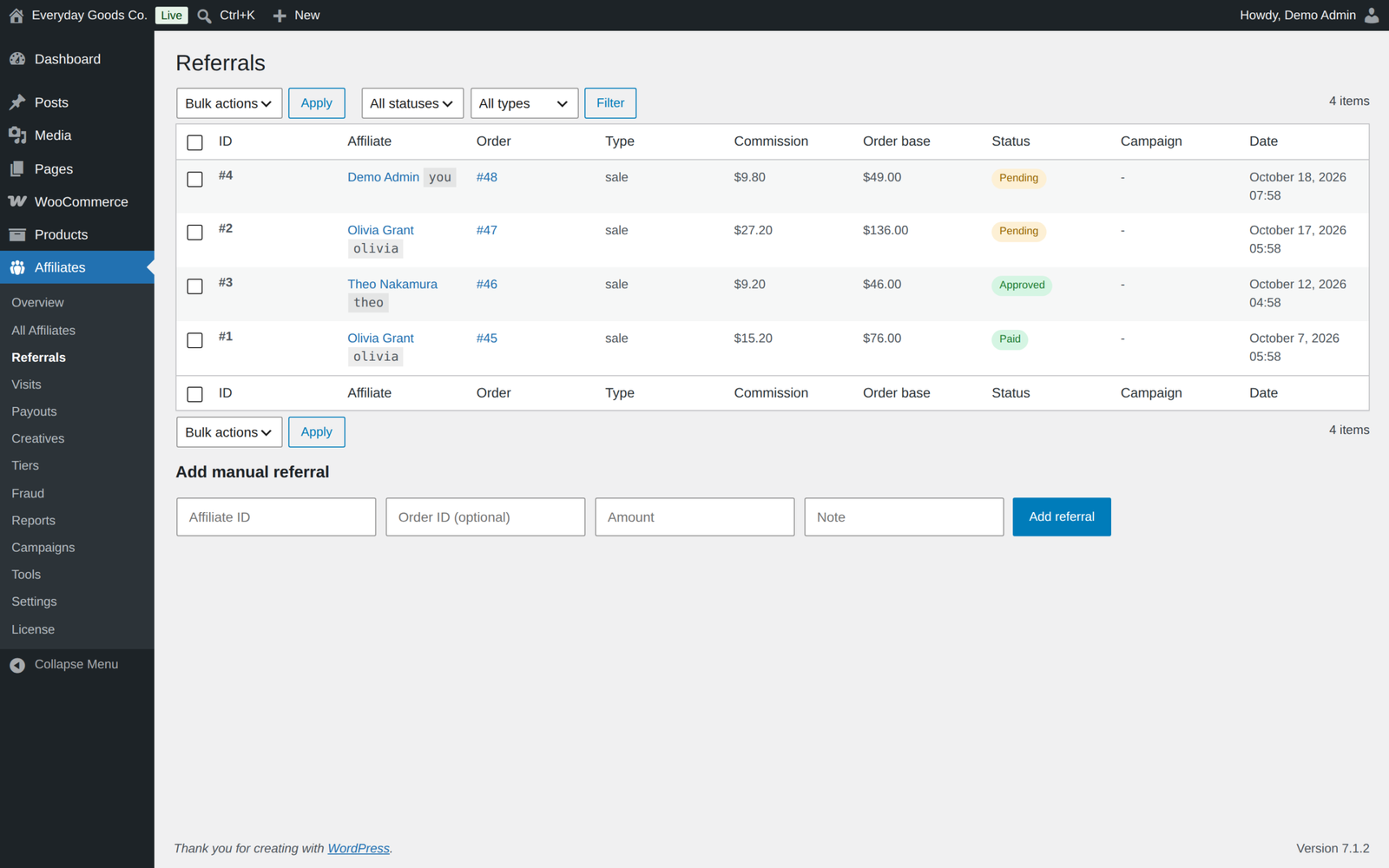
- An overview of attributed revenue, commissions, visits, conversion rate and your top affiliates
- Reports over any date range, with your top performers
- A Campaigns screen and a Top campaigns panel on Reports, for any date range
- Referral CSV export for any date range and status, straight from the Reports screen
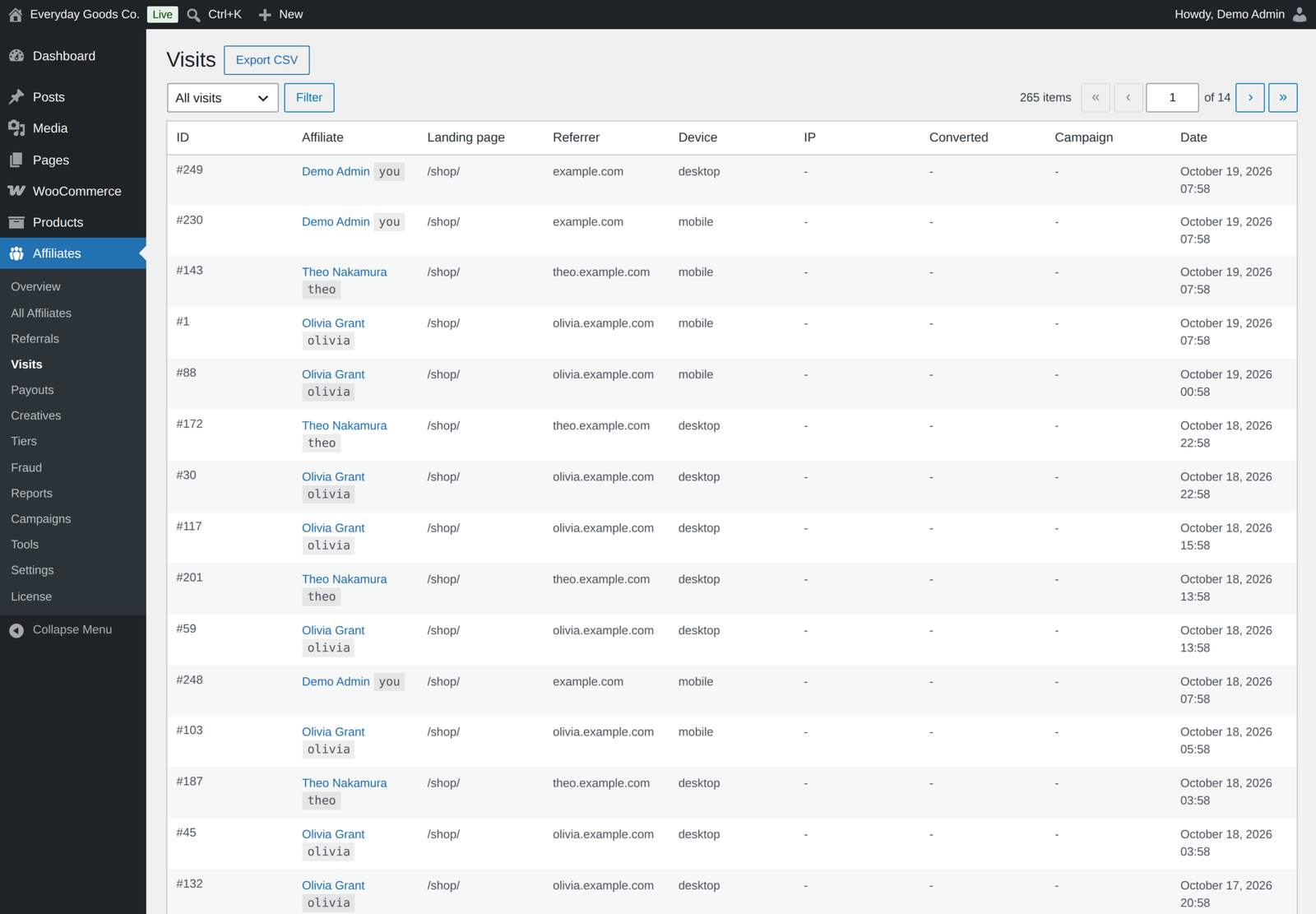
- Visit log with the referral link behind each visit and whether it converted, exportable as CSV with your filters applied
- Referral, affiliate, visit and completed payout CSV exports from the Tools screen
Emails that match your store
Every email is a standard WooCommerce email, so it carries your store branding and you manage it under WooCommerce, Settings, Emails.
- Affiliate approved, for the affiliate
- Affiliate rejected, for the applicant
- New commission, for the affiliate
- Payout sent, for the affiliate, only once the money has been sent
- Affiliate tier promotion, for the affiliate
- New affiliate application, for you
- New referral, for you, off by default and switched on when you want it
Affiliates can switch off the commission, payout and tier promotion emails in their dashboard.
Made for store owners
- A guided setup wizard and a clean admin that looks and works like the rest of WordPress
- Simple and advanced settings modes, so the screen is never overwhelming
- Your data is kept on uninstall unless you choose to delete it in the settings
Works with what you already run
- High Performance Order Storage and legacy order storage, declared and built on the WooCommerce CRUD APIs
- Cart and Checkout Blocks
- WooCommerce Subscriptions, for recurring commissions on renewals
- WP Consent API, so no tracking cookie is set without marketing consent
- Translation ready
Privacy and data
GDPR personal data export and erasure are built in, covering signup answers, payout details, commissions, payouts and lifetime links. IP addresses are hashed and payout details are encrypted. There is no tracking, analytics or telemetry. Pro only contacts our update server once you enter a licence key, Stripe only when you pay an affiliate by Stripe Connect, and PayPal only when the PayPal Payouts API is switched on.
For developers
Over forty actions and filters, such as ppl_afw_resolved_rate to change the rate cascade, ppl_afw_commission_amount to adjust a commission and ppl_afw_payout_gateways to add your own payout method. There is a REST API under ppl-afw/v1, the dashboard and signup templates can be overridden from your theme, and wp ppl-license commands manage the licence from WP-CLI. A developer guide and a user guide ship in the plugin's docs folder.
See it working on the live demo, or read the documentation.
Requirements
- WordPress 6.2 or newer, tested up to 7.1
- WooCommerce 8.0 or newer, tested up to 11.2.1
- PHP 7.4 or newer
- For recurring commissions: WooCommerce Subscriptions
- For Stripe Connect payouts: a Stripe account and a secret key with transfer permission
Licence
A one-time payment with lifetime updates. Enter your licence key under License in the Affiliates menu and new versions appear on the Plugins screen like any other update. The licence controls updates, not features: everything keeps working with or without it.
Moving from the free edition
Install and activate Pro. Both editions store their data in exactly the same place, so your affiliates, commissions, payouts and settings are all still there, with nothing to import and nothing to reconfigure. While Pro is active the free edition stays idle and shows a notice, so you can deactivate and delete it whenever you like without touching your data.
Frequently asked questions
Do I need the free plugin installed as well?
No. Pro is a complete standalone plugin. Only one edition runs at a time, and while Pro is active the free plugin stays idle.
Can I go back to the free version?
Yes. Deactivate Pro and activate the free plugin. Your data stays intact, and the Pro features simply stop applying.
Does the Stripe payout method need the Stripe plugin?
No. It talks to the Stripe API directly. Add a restricted secret key with transfer permission under Affiliates, Settings, Payouts.
Does the plugin send PayPal payments by itself?
Only if you switch on the PayPal Payouts API under Affiliates, Settings, Payouts and enter a client ID and secret from a PayPal app with Payouts enabled. With the API off, PayPal payouts wait as awaiting payment until you pay them yourself and click Mark as sent. The integration has not been tested against live PayPal yet, so start in Sandbox mode.
Will uninstalling delete my data?
No. Data is kept unless you first enable "delete data on uninstall" in the settings.
Changelog
Every release, newest first, with the date it came out.
Version 1.6.1 (October 18, 2026)
- Fix: "New customers only" (Commissions tab, advanced mode) now finds returning customers by their earlier orders with the same billing email or the same customer account, guest checkouts included. An earlier order counts when it is paid or on hold awaiting payment; cancelled, failed, unpaid and fully refunded orders do not.
- Fix: with "New customers only" on, an abandoned or failed checkout no longer blocks the commission on the customer's real first purchase, and a customer who signs in with a different billing email is no longer treated as new.
- Dev: new filters ppl_afw_is_returning_customer and ppl_afw_returning_customer_statuses, and Commissions_Service::is_returning_customer().
Version 1.6.0 (October 17, 2026)
- New: optional PayPal Payouts API under Settings, Payouts (Off, Sandbox or Live, client ID, secret stored encrypted). PayPal payouts are sent from your PayPal account and complete when PayPal confirms them, checked every hour; failed or returned payouts fail and the balance is restored.
- New: payouts through bank transfer, manual, and PayPal without the API are recorded as awaiting payment. Send the money, then click Mark as sent (per payout, or Mark all awaiting payment as sent); the affiliate is emailed only then. Cancel returns the commissions to the balance.
- New: Payouts screen exports: Export unpaid balances (CSV), Export awaiting payment (CSV) with PayPal emails or bank details, and Export completed (CSV).
- New: SEPA bank file. Enter the store's account holder, IBAN and optional BIC under Settings, Payouts, then use Export SEPA XML on the Payouts screen for a pain.001.001.03 file of the euro bank transfers awaiting payment with a valid IBAN. The export does not mark anything as paid.
- New: IBANs that affiliates enter are checked for typing errors. Account numbers that are not IBANs are still accepted.
- New: Creatives tab in the affiliate dashboard with ready to paste embed code and link, filtered by category. Banner code includes the impression pixel, clicks are counted from the creative link (once a minute per visitor), and inactive creatives never count.
- New: Campaigns tab in the affiliate dashboard (clicks, sales, conversion rate, copy link, create a named campaign), a campaign field in the link builder, an Affiliates > Campaigns screen, a Top campaigns panel on Reports, and a Campaign column on Visits and Referrals.
- New: Network tab in the affiliate dashboard when the multi level network is on: recruit link, recruits by first name and last initial, levels and network earnings.
- New: opt in Leaderboard tab, switched on under Settings, Portal, with a period of 7 to 365 days and 3 to 50 places. Affiliates are shown by their initials only.
- New: Coupons tab in the affiliate dashboard for affiliates with linked coupons, and the "Coupon for each affiliate" setting that creates a coupon named after the slug on approval, with the "Affiliate coupon discount" you choose.
- New: direct link tracking (Settings, Tracking, off by default). Enter up to 10 verified domains on an affiliate's screen; visitors arriving from those sites without a referral parameter are tracked as that affiliate's click. A domain belongs to one affiliate.
- New: "When sources disagree" setting on the Tracking tab: coupon first, then lifetime link, then referral link (default), or referral link first. Coupons and lifetime links of inactive affiliates no longer credit.
- New: "Signup creates the account" (on by default): visitors without an account fill in one form, their customer account is created, they are logged in and the application is submitted.
- New: "My Account tab" (on by default): an Affiliate program tab in WooCommerce My Account with the dashboard or the signup form.
- New: affiliate screen fields for Tier, Recruiter (when the network is on, set once), Verified domains and Rates per product, plus a Coupons panel with "Create a coupon for this affiliate".
- New: commission rates per variation, and rates per product for a single affiliate, which beat every other rate.
- New: Affiliate column in the WooCommerce orders list, and "Change affiliate" in the order's Affiliate attribution box. It rejects the old commission and records a new one at the new affiliate's rates; None removes it; it is refused once the commission was paid out.
- New: "Affiliate tier promotion" email under WooCommerce > Settings > Emails, which affiliates can switch off with their "Tier promotions" preference.
- New: Claw back refunds after payout (Commissions tab, advanced mode, on by default): a refund on a commission that was already paid is deducted from the next payout. A negative balance is never paid out.
- New: Preview dashboard on an affiliate's screen gives administrators a read only view of that affiliate's dashboard.
- New: affiliates open and print their own payout invoices from Payout history.
- New: REST routes me/creatives, me/campaigns, me/downline, me/coupons, leaderboard and me/leaderboard.
- Improved: commissions are calculated per line item. Percentages apply to each line, flat product and category rates pay per unit sold, and the store default, affiliate, tier and sequence flat rates pay once per order. Excluded products neither earn nor lend their rate.
- Improved: recurring commissions go through the normal pipeline: commission base settings, fraud scoring, network overrides and emails. A renewal earns only while the first commission is not rejected or refunded and the affiliate is active, and the same renewal is never credited twice.
- Improved: a recurring rate of 0 now applies the normal commission rates to each renewal instead of repeating the first commission.
- Improved: the purchase sequence number counts all of the customer's paid orders, referred or not.
- Improved: tiers are ranked by their thresholds. Nightly promotion never moves anyone down and keeps manually assigned tiers without thresholds.
- Improved: affiliate pickers on the Tiers, Network, coupon and order screens are search boxes.
- Improved: dashboard and report stats update right away, and Reports "Top affiliates" follows the selected date range.
- Improved: the affiliate dashboard works without JavaScript: tabs are links and forms post normally.
- Improved: the privacy exporter includes signup answers, the masked payout method, commissions, payouts and the orders an affiliate was credited for. The eraser also removes the customer's email hash from referrals and an affiliate's login IP hashes and preferences.
- Improved: new invoice numbers look like AFF-2026-000001 (older invoices keep PPL-) and store credit codes start with aff-credit-.
- Improved: uninstall with data deletion on also removes product, variation and category rates, coupon affiliate links (orders keep theirs), the PayPal secret and the new options.
- Fix: only active affiliates are paid, by "Run payouts now" and by schedules, through a method the store still offers. Each currency is paid as its own payout.
- Fix: the payout schedule is restored after Pro is deactivated and reactivated.
- Fix: "Every two weeks" runs on the chosen weekday at least 14 days after the last run. Schedules use the site timezone, and a run missed by WP-Cron is caught up the next day.
- Fix: a payout through a method that no longer exists fails and is rolled back.
- Fix: invoice numbers stay sequential when payout runs overlap.
- Fix: repeated partial refunds no longer compound. Refunding a line removes only that line's commission, and a shipping only refund leaves a commission that excludes shipping untouched.
- Fix: rejecting a referral also rejects its network overrides, and releasing a fraud hold also releases the overrides it held.
- Fix: with a grace period of 0, pending commissions on processing or completed orders are approved by the daily maintenance.
- Fix: the WooCommerce emails "New commission" and "Payout sent" follow the affiliate's email preferences.
- Fix: with the WP Consent API plugin installed, the referral cookie is set only with marketing consent and is registered with the Consent API. Visits without consent are still counted, without IP or browser data.
- Fix: saving a settings tab in simple mode keeps the advanced only options, and the Affiliates tab shows the signup form field builder again, so saving it no longer clears the signup fields.
- Fix: "Separate signup page ID" works: visitors who are not affiliates are pointed from the dashboard page to that page, and an approved affiliate on the signup page gets a link to the dashboard.
- Fix: ppl_afw_portal_after fires once per dashboard; the new ppl_afw_portal_after_wrapper fires outside the wrapper.
Version 1.5.0 (October 15, 2026)
- Restored: the premium settings that had no field since the plugin was renamed. Tracking: attribution model, cookieless fallback and coupon tracking. Affiliates: lifetime commissions, and in advanced mode the lifetime link expiry and recurring commissions (on or off, duration, rate). Commissions (advanced mode): purchase sequence rules. Payouts: automatic payout schedule and day.
- Restored: the Affiliate ID field on the coupon editor, the affiliate rate fields on the product editor, and the affiliate rate on the product category add and edit screens. Category rates can now be a percentage or a fixed amount.
- Fix: the recurring duration setting now limits renewal commissions to the chosen window.
- Invalid values in these fields are refused with a message instead of being saved.
Show earlier versions (1.0.0 to 1.4.0)
Version 1.4.0 (October 15, 2026)
- Restored: the Creatives, Tiers, Network and Fraud screens under Affiliates, which were missing since the plugin was renamed. Creatives has its list and editor with the media picker, Tiers adds and edits tiers, Network shows the recruitment tree, and Fraud lists scored events with Release hold.
- Restored: the Multi-level and Fraud settings tabs (shown in advanced settings mode).
- New: Stripe secret key field under Settings, Payouts for the Stripe Connect payout method. The key is stored encrypted, is never shown again after saving, and can be replaced or removed.
- New: assign an affiliate to a tier by hand on the Tiers screen, and set an affiliate's recruiter on the Network screen. Their own recruits move with them.
- Invalid values on these screens and tabs are refused with a message instead of being reset.
Version 1.3.0 (October 15, 2026)
- New: export the visit log as CSV. The Visits screen has an Export CSV button that follows the converted and affiliate filters, and Tools has a Visits (CSV) export.
- Security hardening: REST permission checks are named methods, changes through the REST API are accepted only from a logged in browser session, CSV cells that a spreadsheet could read as formulas are exported as plain text, and form input is sanitized as it is read.
- Change: Pro no longer deactivates the free plugin. While Pro is active the free plugin stays idle and shows a notice so you can deactivate it yourself.
- Fix: saving an affiliate no longer clears the tier assigned to them.
- Fix: saving notification preferences in the affiliate dashboard keeps the types that form does not show.
- Fix: uninstall now also removes the plugin's user meta, transients, capabilities and role when data deletion is switched on.
- Fix: remaining notices now use the Affireo name.
- Readme: External services section for the licence and update check and for Stripe payouts.
- Tested with WordPress 7.1.3 and WooCommerce 11.2.1.
Version 1.2.1 (September 2026)
- Fix: the changelog now says where to enter the license key: License in this plugin's menu.
- Tested with WordPress 7.1.1 and WooCommerce 11.1.1.
Version 1.2.0 (September 2026)
- New: automatic updates. Enter your license key under License in this plugin's menu, and new versions appear on the Plugins screen like any other update.
- New: with more than one ProPluginsLab plugin installed, WooCommerce, Licenses also lists them all in one place. The Plugins screen shows a reminder until a key is activated.
- New:
wp ppl-licensecommands (list, activate, deactivate, check) for managing keys from WP-CLI. - Pro features keep working with or without an active license; the license only controls automatic updates.
Version 1.1.0 (September 2026)
- New: optional "New referral (admin)" email that tells the store admin when an order is credited to an affiliate. It is off by default; enable it under WooCommerce > Settings > Emails.
- New: the Reports screen exports referrals for the selected date range and status.
- Links moved to propluginslab.io.
- Tested with WordPress 7.1.1 and WooCommerce 11.1.1.
Version 1.0.1 (August 2026)
- New: toolbar shortcut that gives an active affiliate the tracked referral link for whatever page they are viewing, with one click copying.
- The toolbar is restored for active affiliates on the front end, since WooCommerce hides it from customer and subscriber roles by default. Return false from the ppl_afw_toolbar_restore_admin_bar filter to keep it hidden.
- Minimum PHP requirement lowered to 7.4.
- Tested against WordPress 7.1 and WooCommerce 11.0.1.
Version 1.0.0 (August 2026)
- Initial release.
Details
At a glance
- Latest version
- 1.6.1
- Last updated
- October 19, 2026
- Type
- Pro plugin
Requirements
- PHP version
- 7.4
- WordPress (min)
- 6.2
- WordPress (tested)
- 7.1
- WooCommerce (min)
- 8.0
- WooCommerce (tested)
- 11.2.1
Share
You might also like
 Pro
Pro
Presentero Gift Cards for WooCommerce
Sell and redeem WooCommerce gift cards online or in your shop, with PDF cards, QR codes and scheduled delivery. Includes refunds, automations and reports.
From $49.00 One-time
Live demo Add-on
MailerLite Add-on Back In Stock Notifier for WooCommerce
From $19.00 One-time
Live demo-
Pro
Inputo Name Your Price for WooCommerce
Let customers name their price on WooCommerce products, guided by your minimum and suggestion. Includes quick amounts, rules, Subscriptions, currency switchers and reports.
From $39.00 One-time
Live demo