Your cart is empty.
Browse plugins
Overview
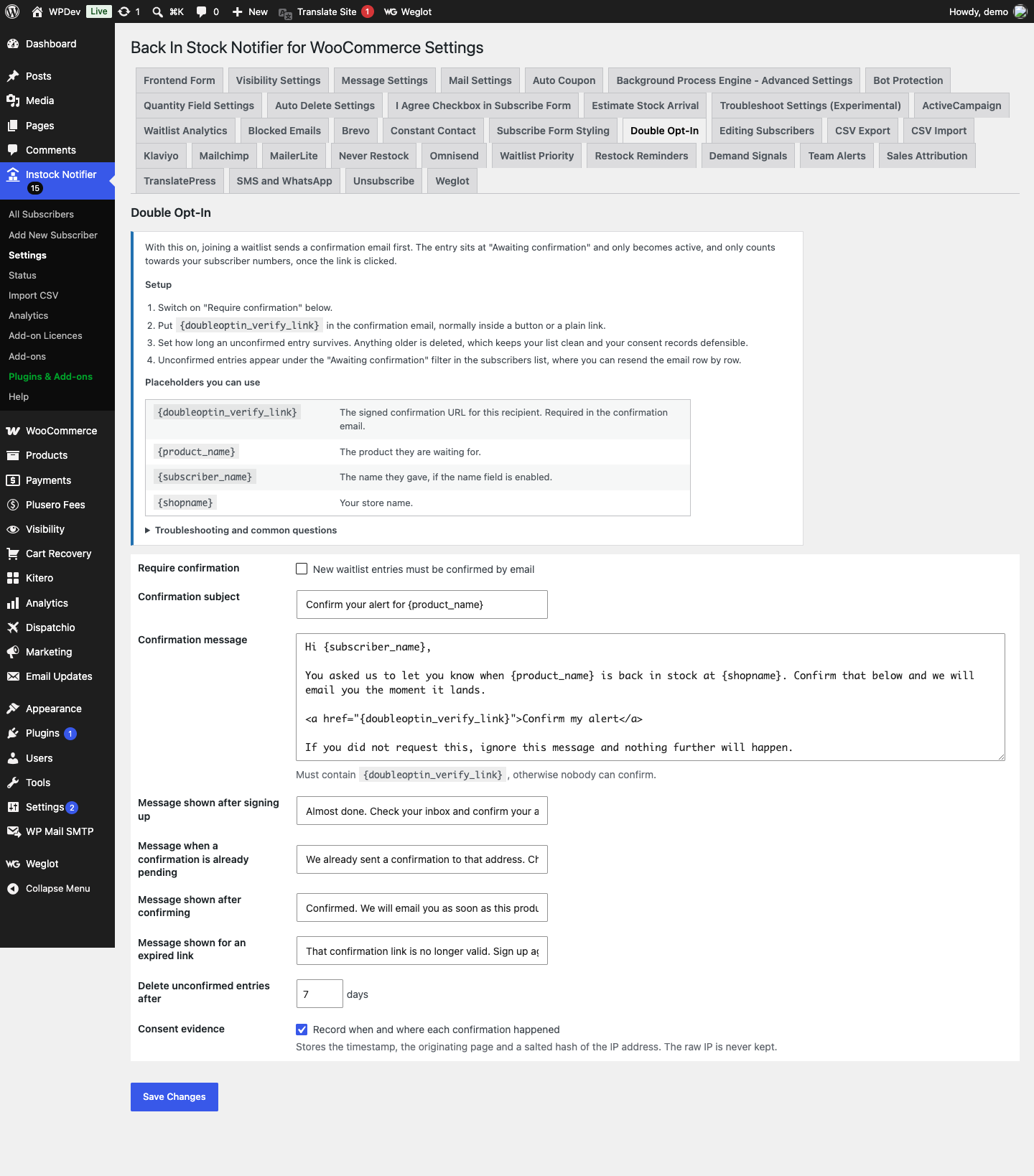
Require email confirmation before a waitlist entry becomes active, with signed confirmation links, a resend control, consent evidence for GDPR, and automatic cleanup of entries nobody confirms. With this on, joining a waitlist sends a confirmation email first. The entry sits at “Awaiting confirmation” and only becomes active, and only counts towards your subscriber numbers, once the link is clicked.
How it works
- A new signup is intercepted before the parent plugin stores it. The row is created at Awaiting confirmation instead, and a confirmation email goes out. Only when the link is clicked does the row become active and count toward your subscriber numbers.
- The confirmation link is signed with an HMAC keyed on your site salts. Clicking it twice is harmless: the second click reports that the alert is already confirmed rather than showing an error.
- Alongside the flow, the evidence is recorded: when the confirmation happened, which page the form was on, and a salted hash of the IP address. The raw IP is never stored, because keeping one indefinitely to prove consent is difficult to justify while the hash still lets you show two records came from the same visitor.
- Anything unconfirmed past your expiry window is deleted by a job running twice a day. That keeps the list clean and the consent records defensible.
Setting it up
- Switch on “Require confirmation” in the add-on settings.
- Put {doubleoptin_verify_link} in the confirmation email, normally inside a button or a plain link.
- Set how long an unconfirmed entry survives. Anything older is deleted, which keeps your list clean and your consent records defensible.
- Unconfirmed entries appear under the “Awaiting confirmation” filter in the subscribers list, where you can resend the email row by row.
Shortcodes
{doubleoptin_verify_link}The signed confirmation URL for this recipient. Required in the confirmation email.{product_name}The product they are waiting for.{subscriber_name}The name they gave, if the name field is enabled.{shopname}Your store name.
Common questions
Do I need this? If you sell into the EU or the UK, or you use a marketing platform that audits list quality, yes. It is also the simplest defence against somebody signing up an address that is not theirs.
What happens to existing subscribers? Nothing. Confirmation applies to new signups from the moment you switch it on. Anyone already on a waitlist stays active.
Somebody says the confirmation email never arrived. Find their row under “Awaiting confirmation” and use the Resend action. If confirmations never arrive for anyone, the problem is email delivery in general: check the parent plugin’s test mail tool and consider an SMTP plugin.
What consent evidence is kept? The confirmation timestamp, the page the form was on, and a salted hash of the IP address. The hash lets you show two records came from the same visitor without keeping the address itself.
Data and privacy
- Stored per subscriber: the confirmation timestamp, the referring page, a salted hash of the IP address, and a truncated user agent string.
- The IP hash is keyed on your site salts. It cannot be reversed into an address, but a known address can be hashed and matched against it if you ever need to.
- Nothing is sent to any third party.
Details
At a glance
- Latest version
- 10.0.3
- Last updated
- November 5, 2026
- Type
- Add-on
Requirements
- PHP version
- 7.2
- WordPress (min)
- 5.8
- WordPress (tested)
- 6.8
Share
You might also like
 Bundle
Bundle Add-ons Back In Stock Notifier for WooCommerce
All 26 Back In Stock Notifier add-ons in one plugin, switched on and off individually, for one price and one licence key that covers…
From $49.00 One-time
Live demo-
Add-on
Custom CSS Add-on for Back In Stock Notifier for WooCommerce
Restyle the front-end subscribe form, button and popup without touching a theme file: colours, sizes, spacing, widths per breakpoint, plus a sanitised custom CSS…
From $19.00 One-time
Live demo -
Add-on
Analytics Add-on Back In Stock Notifier for WooCommerce
From $19.00 One-time
Live demo